B
Click the Printer Settings button. The Printer Settings screen appears.
C
Select the paper size for each paper source as the Paper Size Loaded.
D
Press the Apply button.
Cleaning the Printer
Cleaning the exterior of the printer
To keep your printer operating at its best, clean it thoroughly several times a year by using the following instructions.
c
Caution:
Never use alcohol or thinner to clean the printer. These chemicals can damage the printer.
❏ Use a soft, dry, clean cloth to clean the LCD screen/touch panel. Do not use liquid or chemical cleaners.
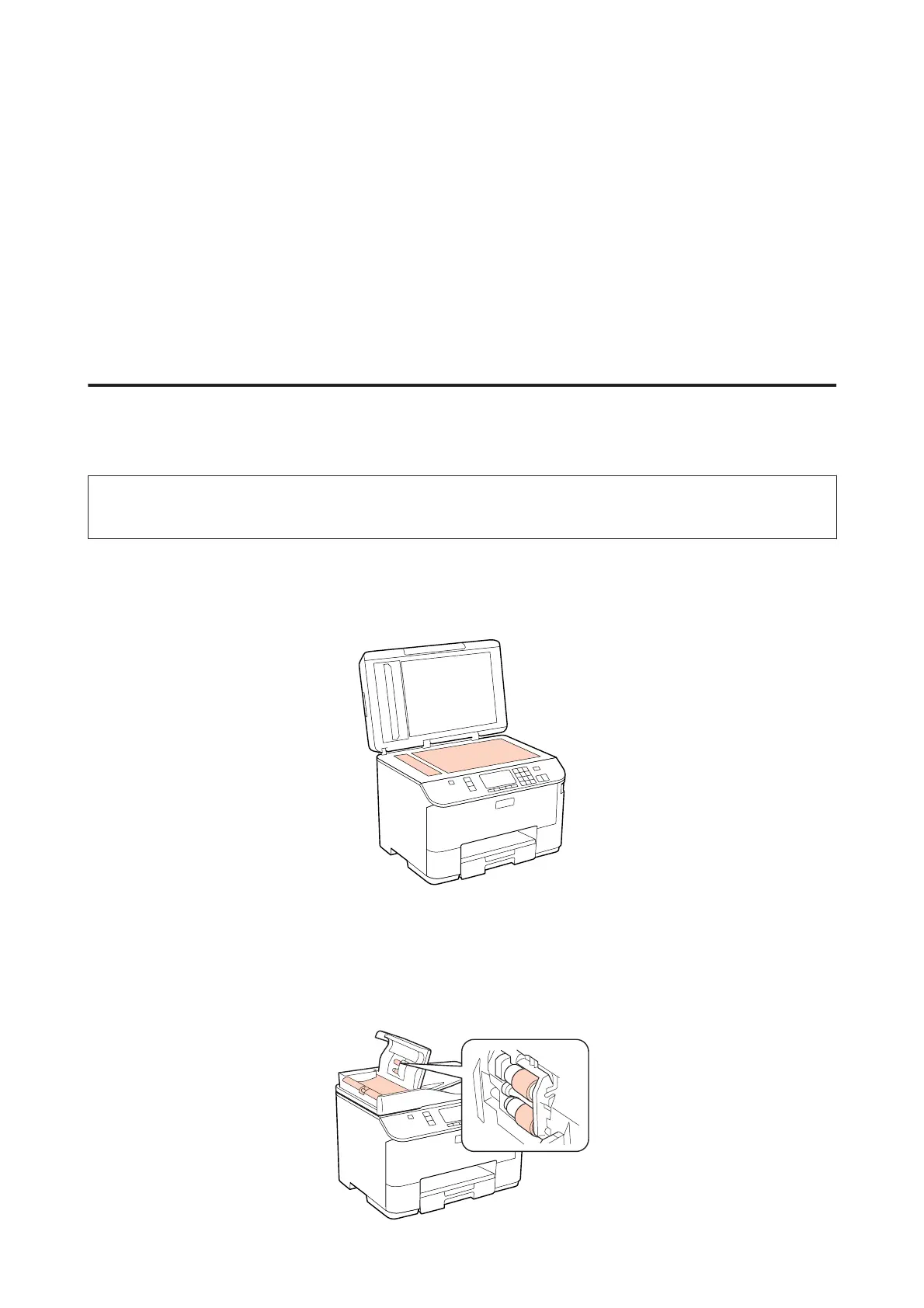
❏ Use a soft, dry, clean cloth to clean the surface of the document glass.
❏ If the glass surface is stained with grease or some other hard-to-remove material, use a small amount of glass
cleaner and a soft cloth to remove it. Wipe off all remaining liquid.
❏ Open the ADF cover and use a soft, dry, clean cloth to clean the roller and the interior of the ADF (only for printers
with ADF function).
WP-4511/4515/4521/4525/4530/4531/4535/4540/4545/4590/4595 User’s Guide
Maintaining Your Printer and Software
146











 To Next Page