Chapter 4. API Guides
Dynamic vs. Static Buffer
The default type of buffer in Wi-Fi drivers is“dynamic”. Most of the time the dynamic buffer can significantly save
memory. However, it makes the application programming a little more difficult, because in this case the application
needs to consider memory usage in Wi-Fi.
lwIP also allocates buffers at the TCP/IP layer, and this buffer allocation is also dynamic. See lwIP documentation
section about memory use and performance.
Peak Wi-Fi Dynamic Buffer
The Wi-Fi driver supports several types of buffer (refer to Wi-Fi Buffer Configure). However, this section is about the
usage of the dynamic Wi-Fi buffer only. The peak heap memory that Wi-Fi consumes is the theoretically-maximum
memory that the Wi-Fi driver consumes. Generally, the peak memory depends on:
• the number of dynamic rx buffers that are configured: wifi_rx_dynamic_buf_num
• the number of dynamic tx buffers that are configured: wifi_tx_dynamic_buf_num
• the maximum packet size that the Wi-Fi driver can receive: wifi_rx_pkt_size_max
• the maximum packet size that the Wi-Fi driver can send: wifi_tx_pkt_size_max
So, the peak memory that the Wi-Fi driver consumes can be calculated with the following formula:
wifi_dynamic_peek_memory = (wifi_rx_dynamic_buf_num * wifi_rx_pkt_size_max) +
(wifi_tx_dynamic_buf_num * wifi_tx_pkt_size_max)
Generally, we do not need to care about the dynamic tx long buffers and dynamic tx long long buffers, because they
are management frames which only have a small impact on the system.
4.33.32 How to improve Wi-Fi performance
The performance of ESP32-S2 Wi-Fi is affected by many parameters, and there are mutual constraints between
each parameter. A proper configuration can not only improve performance but also increase available memory for
applications and improve stability.
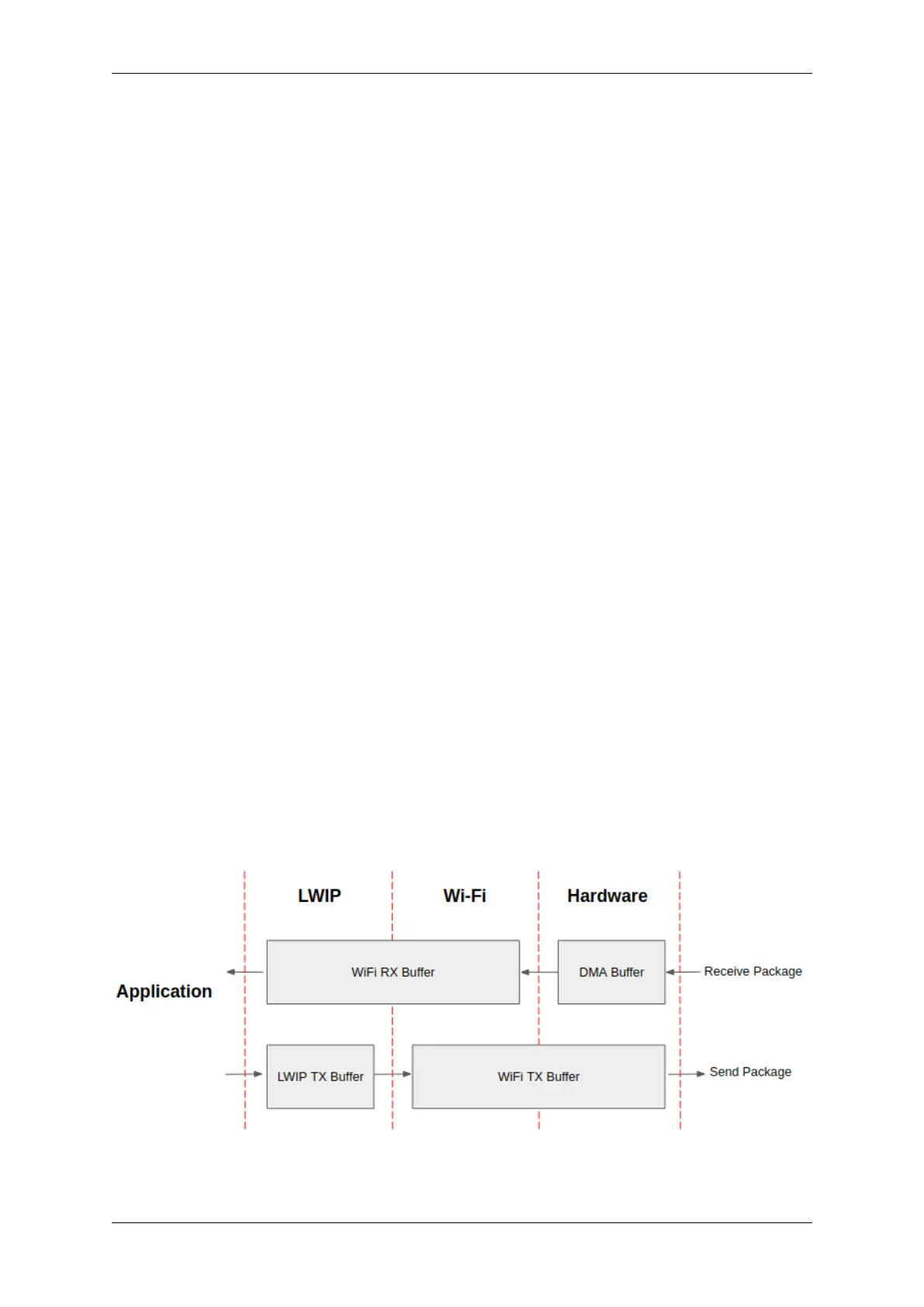
In this section, we will briefly explain the operating mode of the Wi-Fi/LWIP protocol stack and explain the role
of each parameter. We will give several recommended configuration ranks, user can choose the appropriate rank
according to the usage scenario.
Protocol stack operation mode
Fig. 46: ESP32-S2 datapath
Espressif Systems 1548
Submit Document Feedback
Release v4.4



 To Next Page