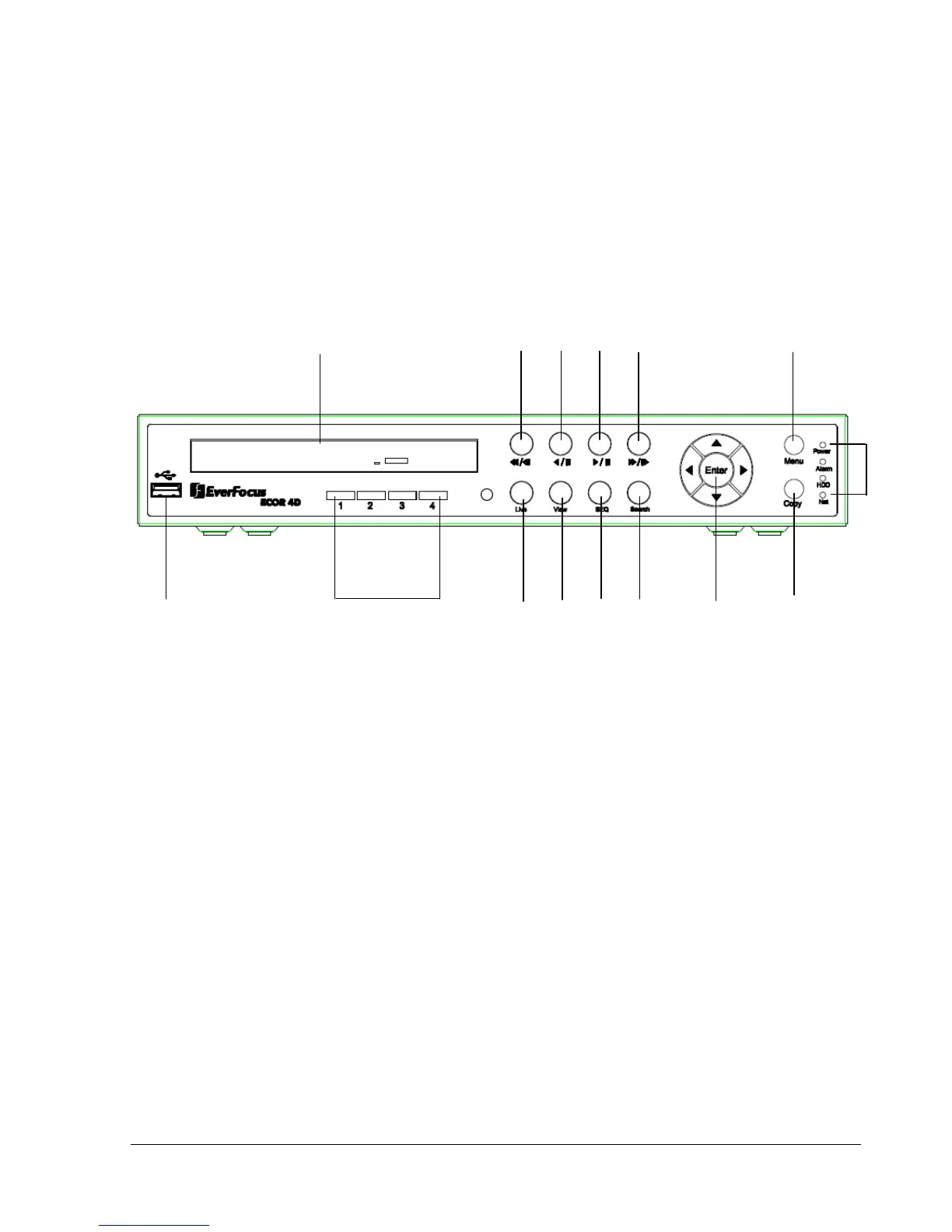
1.4 Front Panel
Your primary interaction with your new DVR will be through the Front Panel buttons and their
corresponding buttons on the included Remote Control. Take a moment to learn where the keys are as the
remainder of the manual will refer to them often.
1. USB 2.0 (front)
For connecting USB mouse or USB flash memory.
2. DVD+RW Burner
DVD+RW burner (D models only)
3. Channel Key (1~4)/(1~8)
Press channel key (CH1~CH4) / (CH1~CH8) to display that channel in full screen view.
4. Live
Press this key to show live view. Press to exit from playback mode.
5. View
Press this key to switch between 4-screen, 9-screen, Picture In Picture, and Full-screen displays in
live and playback mode.
Note1: PIP display is not available in playback mode.
Note2: 9-screen display available in 8 Channel model only















 To Next Page