Home
EverFocus
DVR
ECOR Series
Page 69
EverFocus ECOR Series - Page 69
107 pages
Manual
Save Page as PDF
To Next Page
To Next Page
To Previous Page
To Previous Page
Loading...
62
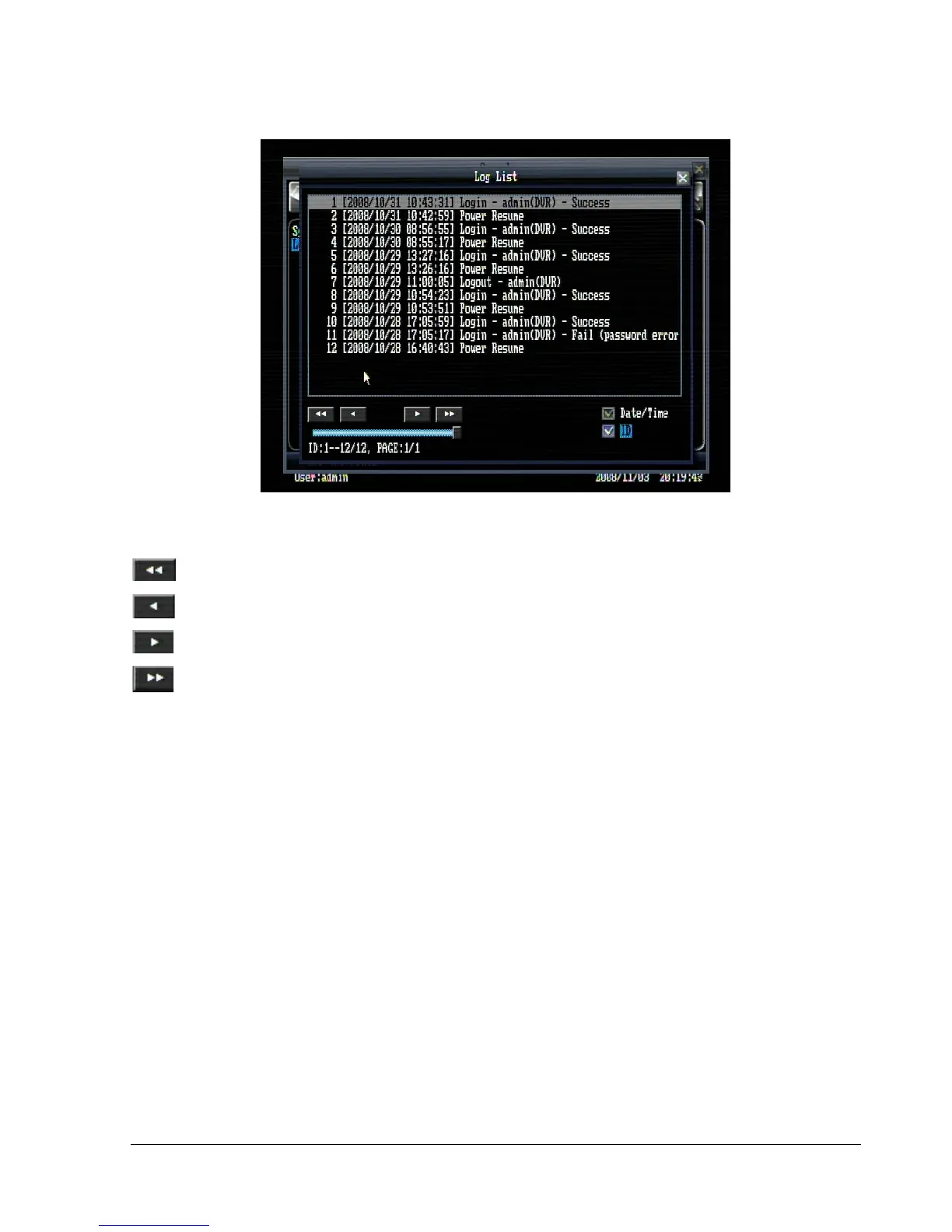
Figure
5.31 (Log List)
: Go to the first page o
f log.
: Go to the previous pag
e of log.
: Go to the next page o
f log.
: Go to the last page of lo
g.
Date/Time:
Check the b
ox to show
log
date/time.
ID:
Check the box to show
de
tailed log informati
on.
68
70
Table of Contents
Main Page
Default Chapter
5
Table of Contents
5
1 Product Overview
8
Features
8
Package Contents
9
Specifications
10
Front Panel
12
Back Panel
14
2 Installation
16
Video Connections
16
Audio Connection Installation
16
Alarm Input / Output Installation
17
Network Connection
18
Direct PC Connection through Crossover Network Cable
18
Network Connection through Patch Cable
18
Network System Requirements
19
Speed Dome Installation
19
Final Install Process
20
3 Mouse and Front Panel Operation
21
General Usb Mouse Operation
21
OSD Root Menu
21
Operation in Configuration Menu
22
Component Options
22
General Front Panel Operation
24
Front Panel Key Review
24
Operation in Configuration Menu
24
Component Options
25
4 General Dvr Operations
26
Record
26
Login
26
Playback Operation
28
Playback
28
Reverse Playback
28
Pause
28
Fast Forward
28
Fast Backward
29
Step Forward
29
Step Backward
29
Stop Playback
29
Start Sequence
29
Layout Change
30
Bring to Full Screen Mode
30
Quick Menu
31
Triplex Operation
31
Change Camera Order
31
Copy
32
Standard Copy
32
Quick Copy
33
Search
33
Time Search
34
Event Search
34
Smart Motion Search
35
Search Result
36
Logout
38
5 Dvr Configuration
39
Osd Setting Menu
39
Record & Play Setting
39
Record
39
Play
40
Camera Setting
41
Basic Setting
41
Video Adjust
43
Motion
44
Video Loss
46
Schedule Setting
47
Alarm & Event Setting
49
Alarm
49
Event
50
Network Setting
55
Lan
55
Email
56
Ddns
57
Disk Setting
58
Display Setting
59
Monitor OSD
59
Main M/T SEQ
60
System Setting
61
Date/Time
61
Daylight Saving
62
User
63
Security
64
I/O Control
65
Firmware & Misc
66
Information Setting
67
System
67
Log
68
6 Networking Overview
70
Introduction to Tcp/Ip
70
Subnet Masks
70
Gateway Address
70
Virtual Ports
71
Pre-Installation
71
What Is Your Network Setup
72
Simple One to One Connection
73
Direct High Speed Modem Connection
78
Router or Lan Connection
80
7 Remote Operation from Browser
83
Connecting to Ecor
83
Ie Browser Setting &Active XC Ontrol Installation
84
Installing Activex Controls
84
Enabling Activex Controls
86
Remote Live View
89
Remote Ptz Control
90
Remote Playback
91
8 Everfocus Ddns Setup
92
9 Linksys & D-Link Port Forwarding
93
Linksys Port Forwarding
93
D-Link Port Forwarding
95
10 Troubleshooting
98
Appendix A: Timing of Alarm Modes
99
Appendix B: Control Protocol
103
Related product manuals
EverFocus eZ.HD ECOR HD 4F
158 pages
EverFocus eZ.HD ECOR HD 16X1
156 pages
EverFocus ECOR2
147 pages
EverFocus ECOR264
2 pages
EverFocus ECOR264-4D2
140 pages
EverFocus ECOR960 4F2
149 pages
EverFocus ECOR960 8F2
149 pages
EverFocus ECOR264-4X1
147 pages
EverFocus ECOR264-4D1
128 pages
EverFocus ECOR264-16X1
147 pages
EverFocus ECOR264 Series
4 pages
EverFocus EDR410H
134 pages




 To Next Page