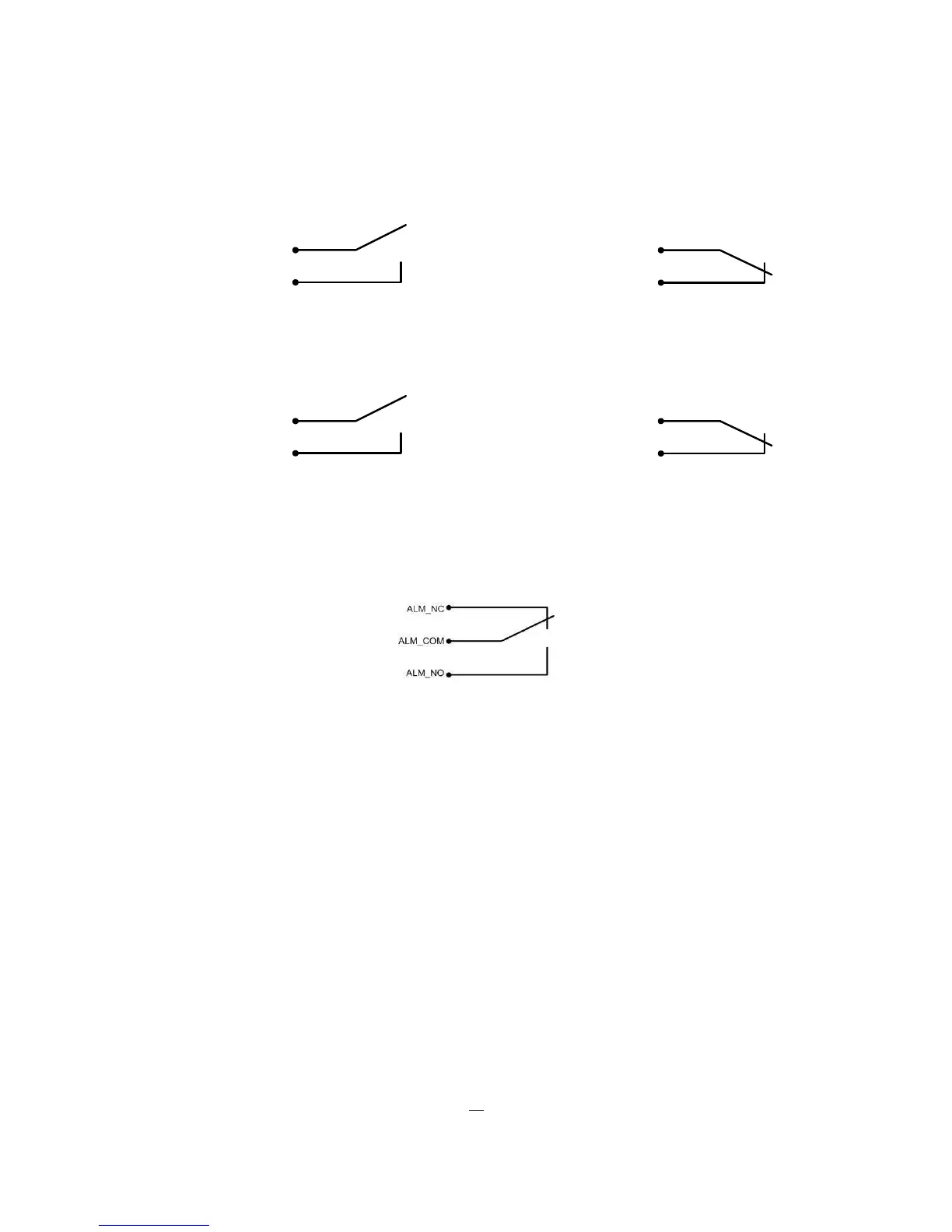
2. Record: The input switches to Record (or Record Standby) as long the contact is closed.
CTRL IN
GND
CTRL IN
GND
Idle state Record / Record Standby
3. Armed / Disarmed: If the contact is closed, the DVR will switch off alarm (alarm contact and motion
alarm) operation. System alarm events are always active.
CTRL IN
GND
CTRL IN
GND
DVR armed DVR disarmed
2.4.3 Alarm Output Relay
The relay outputs provide either Normally Open or Normally Closed dry contacts.
Output relay in idle state
2.5 RS-485 keyboard / PTZ Installation
All ELR functions can be remote-controlled by the EKB-500 universal keyboard. Using the EEPbus protocol,
digital video recorders, keyboards and speed domes can be installed on one single RS-485 bus. One
system can comprise up to 8 keyboards.
2.5.1 General RS-485 bus installation
The EKB-500 keyboard uses a RS-485 simplex wiring; the signal is transferred via a single twisted pair line.
CAT5 network cable is recommended, UPT version (unshielded) is sufficient for normal application. A
shielded cable should be used if the installed cables are expected to be highly susceptible to interferences.
The number of devices installed in one bus is limited to 32, and the maximum cable length is 1200m. Both
of these can be expanded using a signal distributor (see below).











 To Next Page