4.9 DISPLAY
1. Press Display button on menu by using mouse or press “Display” button on the front panel.
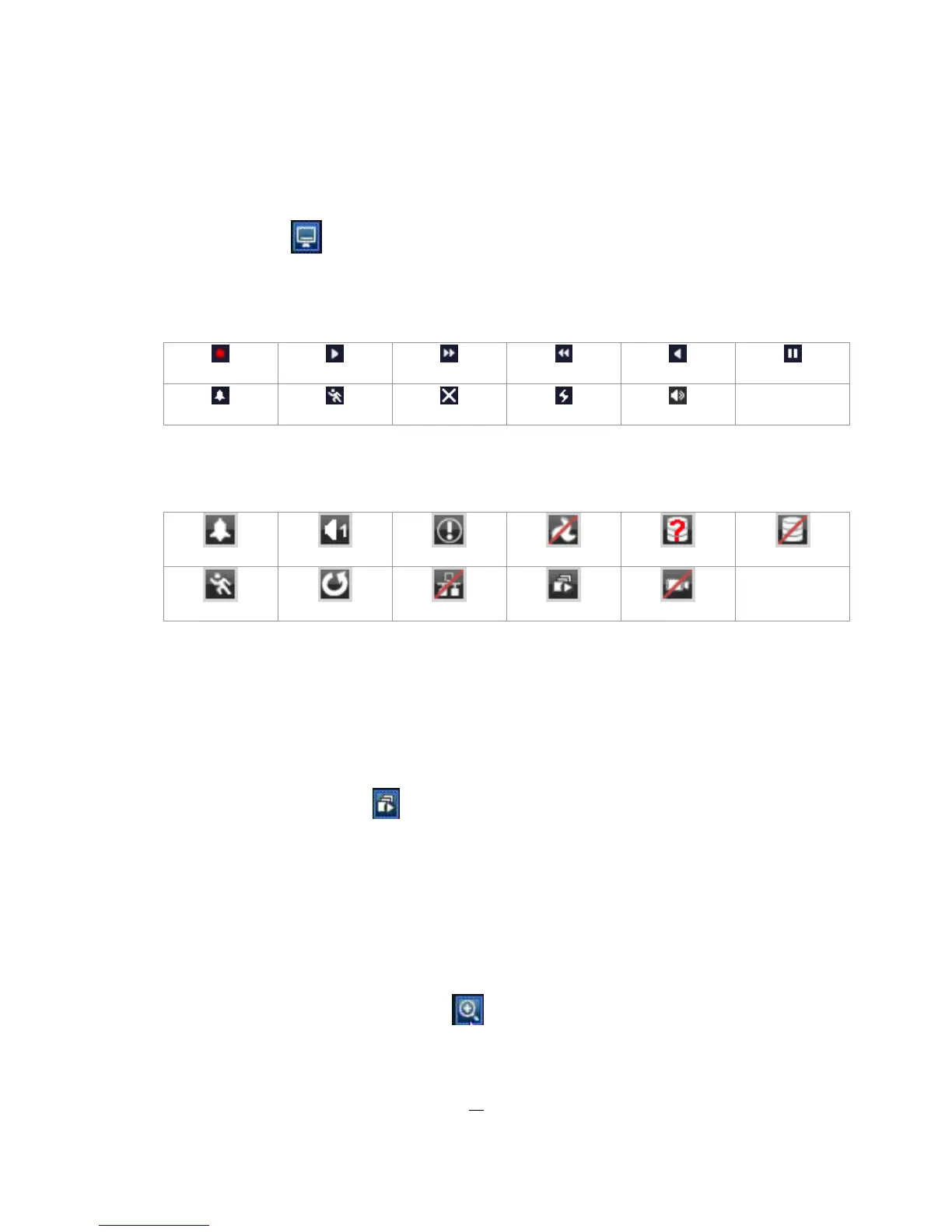
2. Press once to show camera information. Please see the following table for status representation.
Recording Playback Fast forward Fast backward
Back pause
Alarm Motion Video loss Express copy Audio out
3. Press again to show status information. Please see the following table for status representation.
Alarm Audio 1 Event
Fan failure HDD failure
HD temp. too high
Motion
New firmware
No network Seq. Video loss
4. Press again to show both status information and camera information.
5. Press again to hide all information.
4.10 SEQUENCE
1. By mouse: Click Sequence button to enter the auto sequential switching mode.
2. By front panel: Click Sequence button on front panel to enter the auto sequential switching mode.
4.11 ZOOM
1. Make sure no camera is in playback mode
2. Select one camera
3. Right-click to bring up the menu bar and click button, or press ”Zoom” key on front panel.











 To Next Page