6 04-2017 5325 00
VARIABLE COMBINATION LOCKS
Some models are supplied with variable
combination locks.
The lock is supplied with a silver-coloured
key that has a standard combination, which
is used for opening and closing the lock.
It is possible to customise the locks using a
kit, available as an accessory, which allows
the lock combination to be changed.
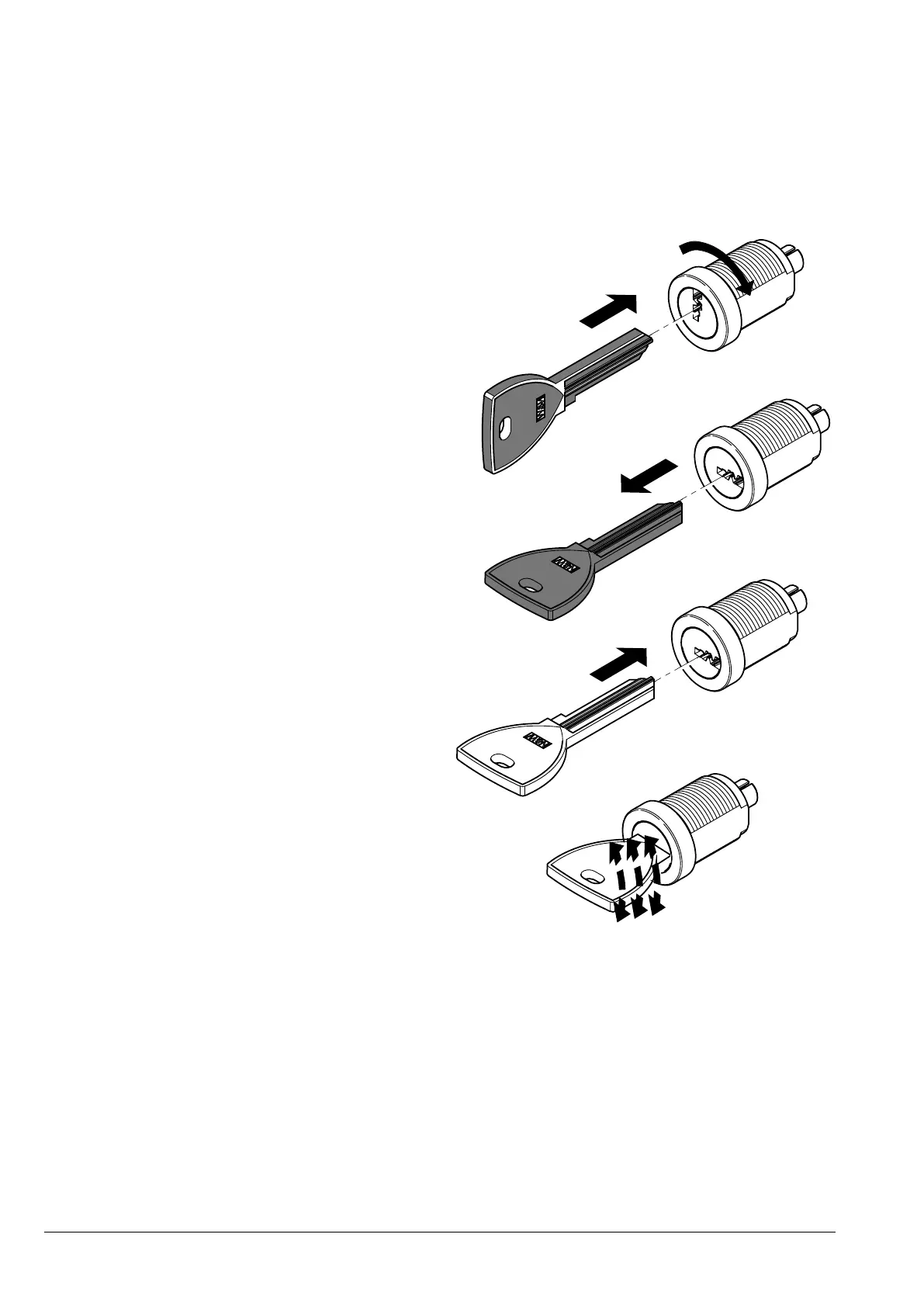
The kit is composed of a change key
(black) for changing the standard combi-
nation, change keys (gold) and use keys
(silver) for changing and using the new
combinations.
Change and use key packs with other com-
binations can be supplied on request.
Furthermore, other use key (silver) packs
can be requested specifying the combina-
tion printed on the keys.
To change the combination:
1. Open the door of the appliance to avoid
having to force the rotation;
2. Lightly lubricate the inside of the lock
with a lock spray.
3. Insert the current (black) change key and
rotate it to the change position;
4. Extract the current change key and insert
the change key (gold) with the new com-
bination;
5. Slightly turn the change key several
times without fully rotating the key;
6. Rotate the key to the closing position and
remove the change key.
The lock has now assumed the new combi-
nation.
-
er be used.
-
-
ing properly over time.
Other types of lubricants can trap dirt
Fig. 3



 To Next Page