Test Results
NetBlazer 427
Summary (RFC 6349)
Summary (RFC 6349)
From the Test menu, tap Results, and the Summary tab.
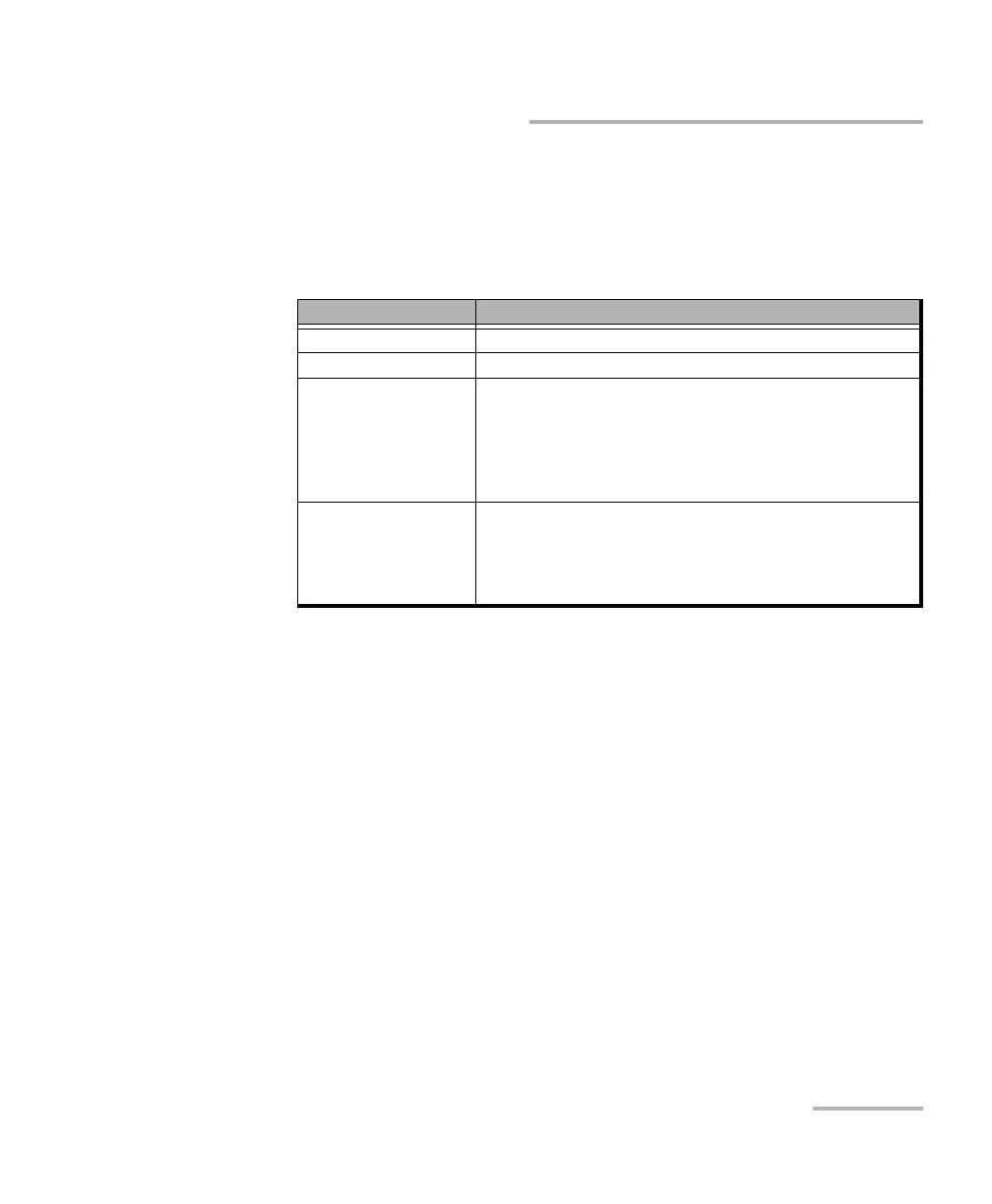
Status indicates the actual test status as follows.
Start Time indicates the date and time the test has been started. The
date and time is reset every time the test is restarted or reset. This is
the only information available on the remote module.
Test/Power Recovery when displayed, indicates that the test has
automatically recovered from a power failure. The number of
occurrences is also displayed next to the Test/Power Recover y field.
Refer to Power Failure Recovery on page 559.
Test Status Description
“--” Test has not started.
In Progress The test is running.
Completed, <Verdict> Test has completed and the test pass/fail verdict is displayed
when enabled. A fail verdict is declared if any of the following
conditions occurs: Link Down, LOS, TCP Throughput verdict
failed, or an abort condition (Timeout, DTS connection lost,
unresolved address, user stopped, configuration
synchronization error, invalid MTU).
Aborted, <reason> Test has been aborted either manually (Stop) or automatically
from an alarm and the reason is displayed as follows:
Link down alarm, LOS alarm, Timeout during execution,
DTS connection failed, Invalid Configuration,
Unresolved addresses, Invalid MTU, User Stopped












 To Next Page