Test Functions
526 FTB-700G/800 Series
Traffic Scan
Traffic Scan
The traffic scan tool provides the capability to discover and monitor VLAN
traffic flows on the network.
Not available with Framed Layer 1.From the Test menu, tap Functions,
and the Traffic Scan tab.
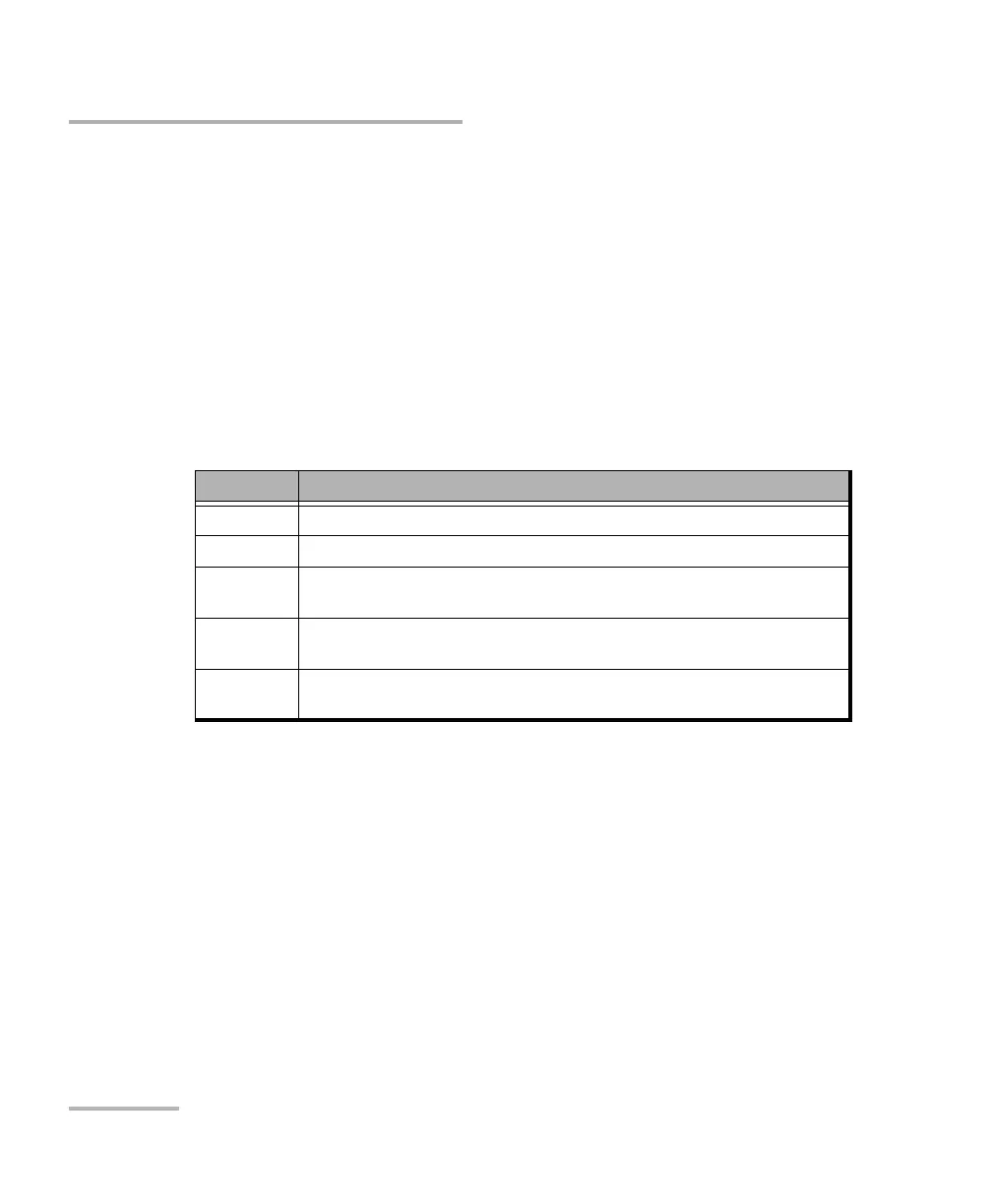
Level
Allows the selection of the criteria that will be used to filter the incoming
VLAN traffic flows. The default setting is All. Choices are:
Level Description
All Monitors untagged frames and up to 3 levels of stacked VLAN frames
Untagged Monitors untagged frames only (no VLAN)
C-VLAN Discovers/monitors only frames where the outer VLAN is a C-VLAN
(TPID of 0x8100)
S-VLAN Discovers/monitors only frames where the outer VLAN is a S-VLAN
(TPID of 0x8100, 0x88A8, 0x9100, 0x9200, or 0x9300)
E-VLAN Discovers/monitors only frames where the outer VLAN is a E-VLAN
(TPID of 0x8100, 0x88A8, 0x9100, 0x9200, or 0x9300)












 To Next Page