Room Scheduling System • Room Agent Installation and Configuration 13
4. Click Download for Room Agent to download (see figure 7,
2
on the previous page).
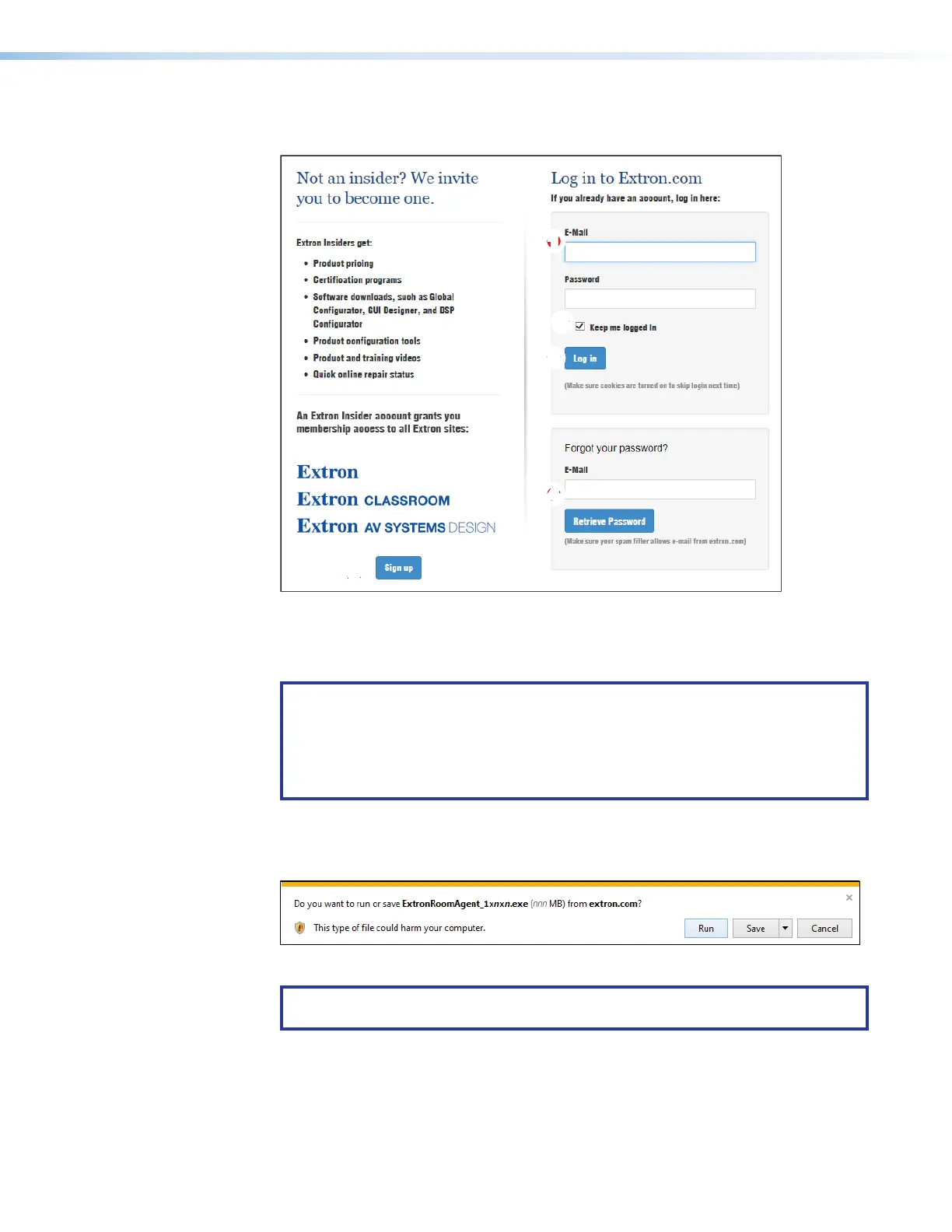
The Log in dialog box appears (see figure 8).
1111111111
55
55555555
33
33333333
44
44444444
22
22222222
Figure 8. Log in Dialog Box
5. Enter the E-Mail address and Password associated with your Extron website account
(
1
).
TIPS:
• Click Sign up (
2
) to obtain website credentials.
• Click Keep me logged in (
3
) to eliminate steps 5 and 6 in future downloads.
• Enter your registered email address and click Retrieve Password (
4
) if you
have forgetten your credentials.
6. Click Log in to copy the software to the computer (
5
).
7. If your browser asks you to confirm that you want to continue, click Run or make a
similar confirmation (see figure 9,
1
).
1111111111
1111
Figure 9. Download Warning and Confirmation
NOTE: Figure 9 may appear different or may not appear at all, depending on your
Web browser choice and its security settings.



 To Next Page