Room Scheduling System • Google Setup 56
Downloading a JSON File
NOTES:
• As of June 2016 this information is correct. However, this site is not controlled by
Extron and may change.
• These instructions assume that you have a Google account and the necessary
permissions.
To authenticate a Room Agent touchpanel to Google, a Google account and a credential
JSON file are required. To obtain a JSON file, follow these instructions:
1. Go to the Google Developers console for a Google Calendar API: https://console.
developers.google.com/flows/enableapi?apiid=calendar and log in.
2. From the drop-down menu, select Create a Project.
3. Click Continue.
4. Click Go to Credentials.
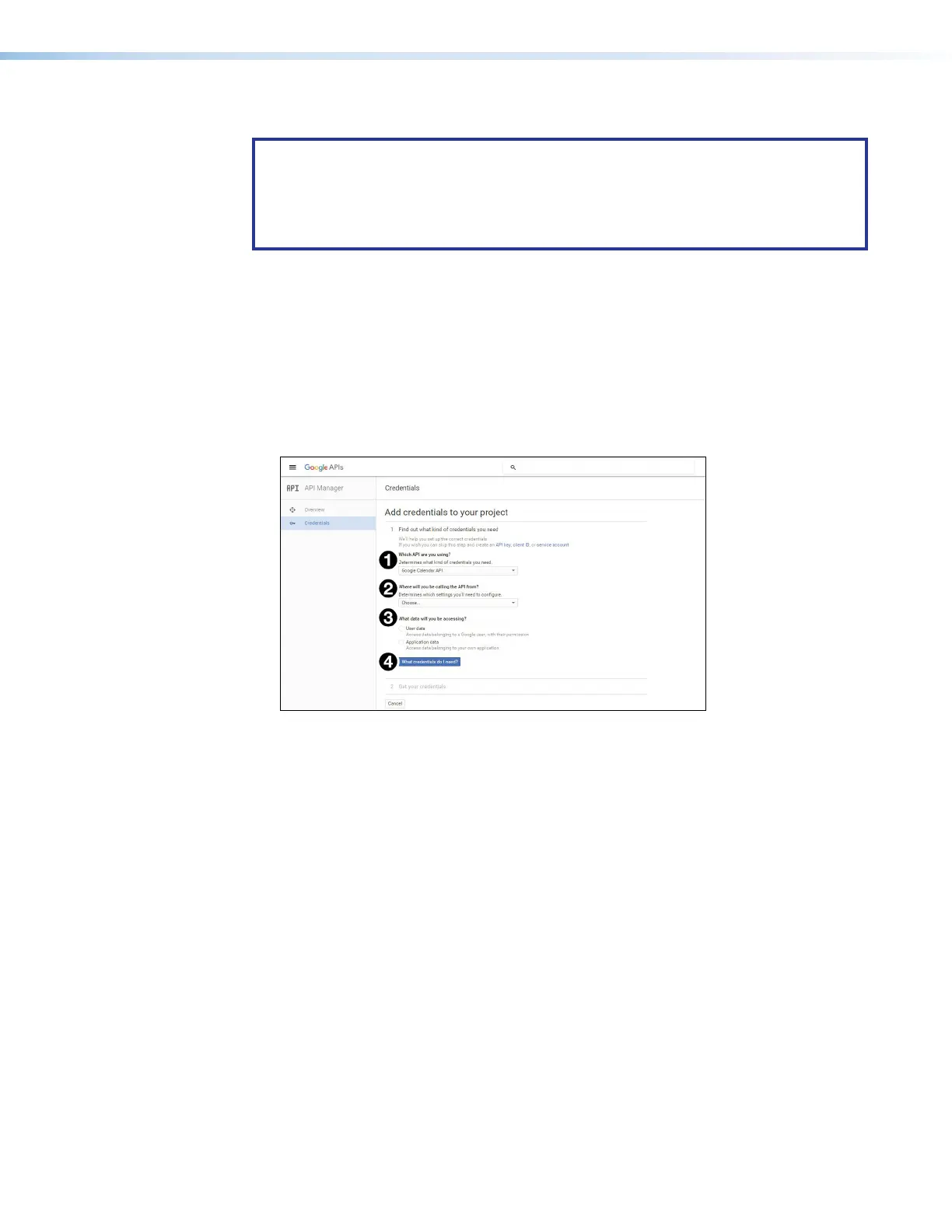
The Find Out What Credentials You Need page opens:
Figure 60. Find Out What Credentials You Need
5. From Which API are you using? (see figure 60,
1
), select Calendar API.
6. From Where will you be calling the API from? (
2
), select Other UI (e.g.
Windows, CLI tool).
7. From What data will you be accessing? (
3
), select User data.
8. Click What Credentials do I need? (
4
).



 To Next Page