EasyManua.ls Logo

FATEK P5070S - YASKAWA PLC Connections; YASKAWA Extended MEMOBUS

FATEK P5070S
224 pages
Print Icon
To Next Page IconTo Next Page
To Previous Page IconTo Previous Page
Loading...
190
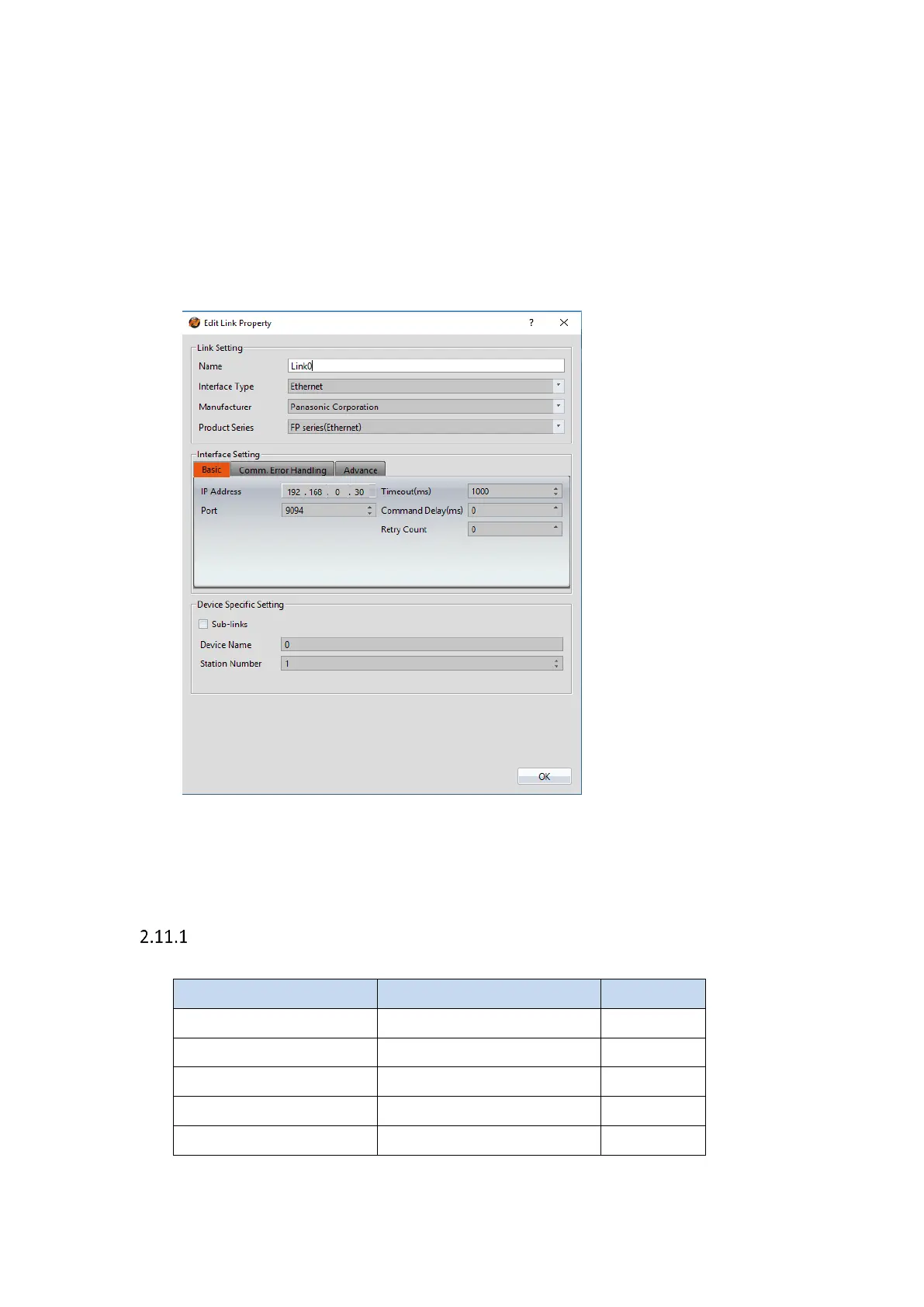
Within the Link configuration window in FvDesigner:
Under Interface Type select Ethernet
Under Manufacturer select Panasonic Corporation
Under Product Series select FP Series(Ethernet)
Enter the IP Address that was written into the PLC.
Enter the Port number that was set on the PLC.
2.11 YASKAWA
Extended MEMOBUS
2.11.1.1 Communication Setting

Item
Default Setting
Remark
Signal Level
Ethernet
Internet Protocol
192.168.1.1
Port
502
PLC Station No.
1
Communication Method
Extended MEMOBUS

Related product manuals