4 | Start-up FISCHER Mess- und Regeltechnik GmbH
24 BA_EN_DE90
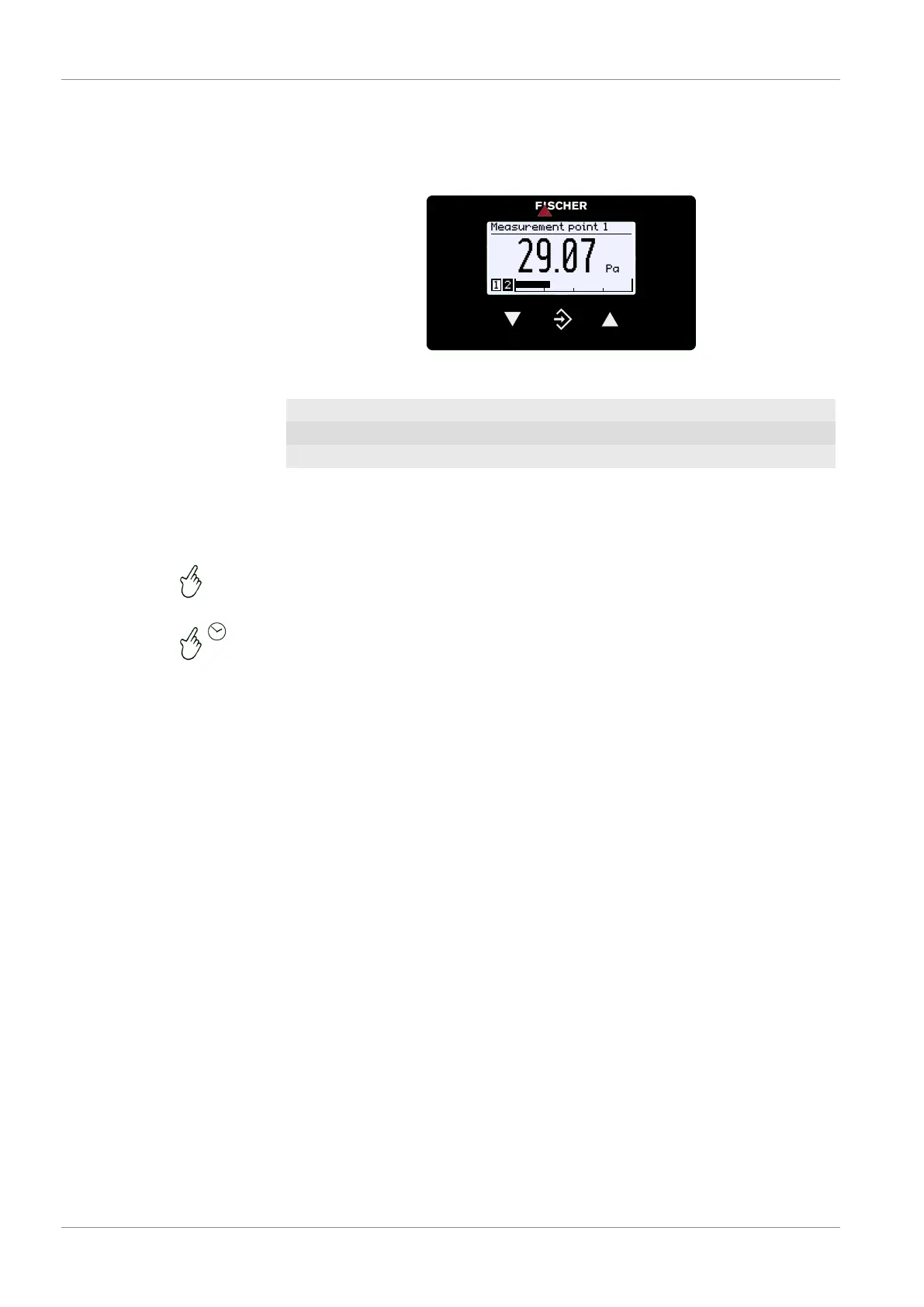
4.2.2 Keyboard
The basic functions of the keyboard are explained in this section. For more in-
formation about the operating concept, please see the section 'first steps'.
Measurement point 1
Pa
Pa29.07
1 2
Fig.29: Operating keys
ÿ
Page down menu Decrease value
û
Call up menu Save value Return jump
þ
Page up menu Increase value
The buttons are always pressed individually. Combinations, such as pressing
two buttons at the same time or similar, are not used.
The button can be actuated in two ways. IN the following, the adjacent symbols
indicate the actuation type.
1. Pressing briefly calls up an immediate reaction to the pushed button.
2. If the button is pressed for longer than 250 ms, the reaction is a repetition of
the pressed button, hereinafter called 'Repeat'. If the button is pressed per-
manently, the repeat is carried out in a continuous sequence. However,
there is no acceleration.
3. Automatic stop at the menu item Back : Permanent pushing of the button
ÿ or þ returns the user to the menu item Back very quickly. The stop is
automatic there.
4. Jump back to the operating display: Permanent pressing of the button û
takes the user from the menu item Back into the operating screen.


 To Next Page