Home
Flashforge
3D Printers
Creator3
Page 29 (X Axis Calibration)
Flashforge Creator3 - X Axis Calibration
77 pages
Manual
Save Page as PDF
To Next Page
To Next Page
To Previous Page
To Previous Page
Loading...
Creator3
User
Guide
|
www.f
lashforge.com
400-699-1063
29
X
axis
C
alibration
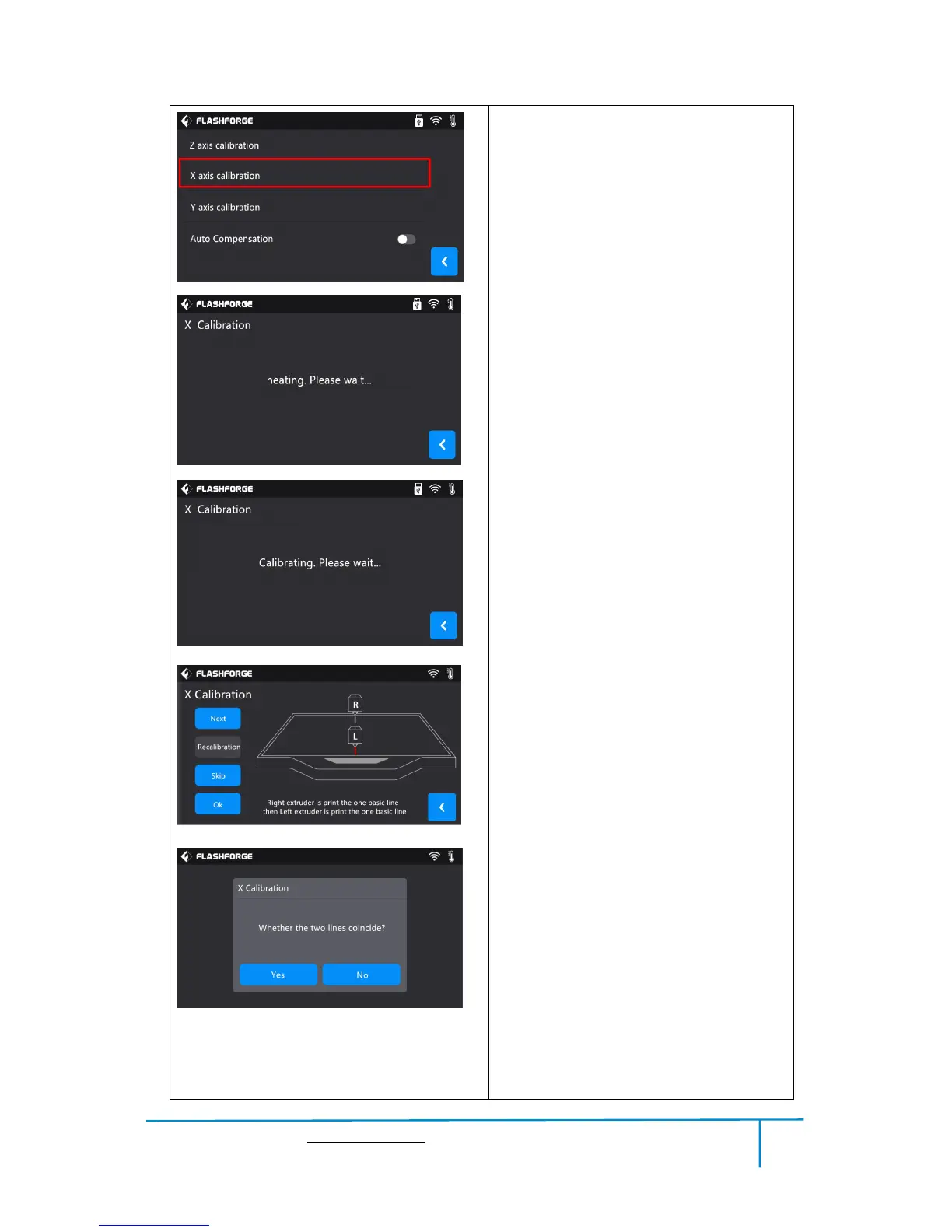
1.
X
axis
calibration:
T
ap
[
X
axis
calibration].
2.
Extruder
begins
to
heat
up.
3.
Extruder
begins
to
do
the
calibration
:
Right
extruder
prints
a
base
line
perpendicular
to
X
axis
in
the
middle
of
the
platform
at
coordinates(0,100),
then
left
extruder
prints
a
base
line
perpendicular
to
X
axis
in
the
middle
of
the
platform
at
coordinates(0,-100).
4.
Choose
whether
the
two
lines
coincide:
T
ap
[next]
to
choose
whether
the
two
lines
coincide:
Y
es/No.
1
2
3
4
3
28
30
Table of Contents
Main Page
Default Chapter
2
Table of Contents
2
Preface
3
Introduction
4
Electrical Safety
5
Notice
5
Personal Safety
5
Work Environment Safety
5
Filament Requirements
7
Filament Storage
7
Make a 3D Model
9
Process
9
Chapter 1: 3D Printing Technology
9
Slice and Export the 3D Model
10
Build the 3D Model
10
Basic 3D Printing Process
10
Views
11
Chapter 2: About Creator3
11
About Your Creator3
11
Terms
13
Reference
14
Interface Menus
15
Tools in Print Interface
16
Details Interface
16
Preheat
17
Tools
17
Filament
18
Filament Preheat
19
Level
20
Home
22
Manual
22
Setting
23
Wifi
25
Wlan Hotspot
26
Door Opened Pause
26
Door Opened Detector
27
Turn On/Off [Startup Sound]
27
Turn On[Left/Right Filament Check]
27
Z Calibration
28
X Axis Calibration
29
Adjust the Deviation Value
30
Y Axis Calibration
30
Light Bar Control
32
Factory Reset
32
Update
32
Status
33
About
33
Accessories
34
Chapter 3:Unpacking
35
Filament Installation
40
Chapter 4: Hardware Assembly
40
Printer Start-Up
41
Loading Filament
41
Unloading Filament
43
Chapter 5: Build Plate Leveling
45
Software Installation
47
Software Acquisition
47
Software Installation and Start-Up
47
Chapter 6: About Software
47
Exploring Flashprint
47
Software Introduction
48
Loading
49
Generating Rilievo
50
Set View
53
Reset View
53
Show Model Outline
53
Move
54
Show Steep Overhang
54
Rotate
54
Scale
55
Cut
55
Extruder
56
Supports
58
Support Options
59
Auto Supports
59
Add Supports
59
Clear Supports
60
Delete Supports
60
Print
60
Speed
62
Temperature
62
File Menus
63
Edit Menus
65
Undo
65
Redo
65
Duplicate
65
Generate a Gcode
70
Chapter 7: Basic Printing
70
Print Methods
73
Print from Computer ( Ethernet Cable Connection)
73
Print from Computer (Wifi Connection)
74
Print from USB Stick
76
Chapter 8: Supports and Service
77
Related product manuals
Flashforge Creator
22 pages
Flashforge Creator 3
100 pages
Flashforge Creator 4
36 pages
Flashforge Creator Pro
54 pages
Flashforge Creator Pro 2
28 pages
Flashforge Creator 3 Pro
60 pages
Flashforge Cura
4 pages
Flashforge CN/EN-A01
36 pages
Flashforge Adventurer3
20 pages
Flashforge ADVENTURER 3
32 pages
Flashforge Adventurer 5M
72 pages
Flashforge Adventurer 5M Pro
72 pages















 To Next Page