Page 29CWT Compact S4 Touch Installation & Maintenance Manual for CWT 1.0-0Issue 3
Product description
The printer module consisting of the printer and the paper supply roll are
positioned on a vertical main assembly plate that can easily be removed. The
printer module is held in position by means of hinges on the door frame and a
locking hatch. The location of the lock hatch depends on the version of the printer
shelf. See Printer mounting.
The printer is connected to the CPU board via a serial interface.
The printer firmware can be updated via WebOffice.
4.5.1
GeBe GTP4672 Thermal printer
Note:
The printer shelf comes in two variates.
The older version (version 1) has a long plate mounted in the cabinet with a lock
mechanism at the end of the plate. The newer version (Version 2) has lock
directly after the hinge.
Both types are displayed in the manual.
Reference:
This section describes the printer exterior and the function principles. See the
CWT Software Configuration Handbook section GEBE printer for information
regarding all other aspects of printer control and printer settings.
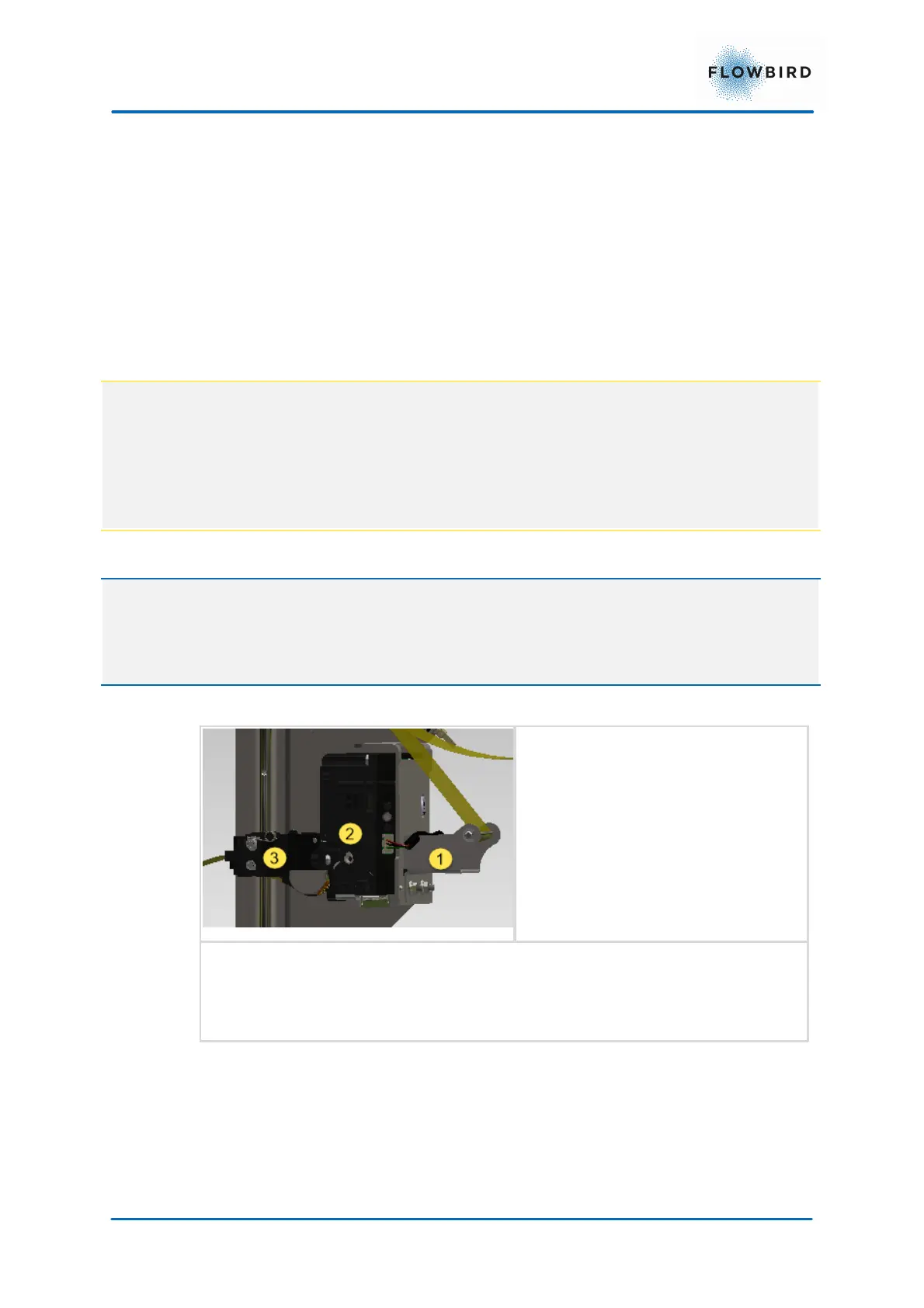
1. Paper guide
2. Printer
3. Ticket presenter



 To Next Page