Page 79CWT Compact S4 Touch Installation & Maintenance Manual for CWT 1.0-0Issue 3
Corrective maintenance
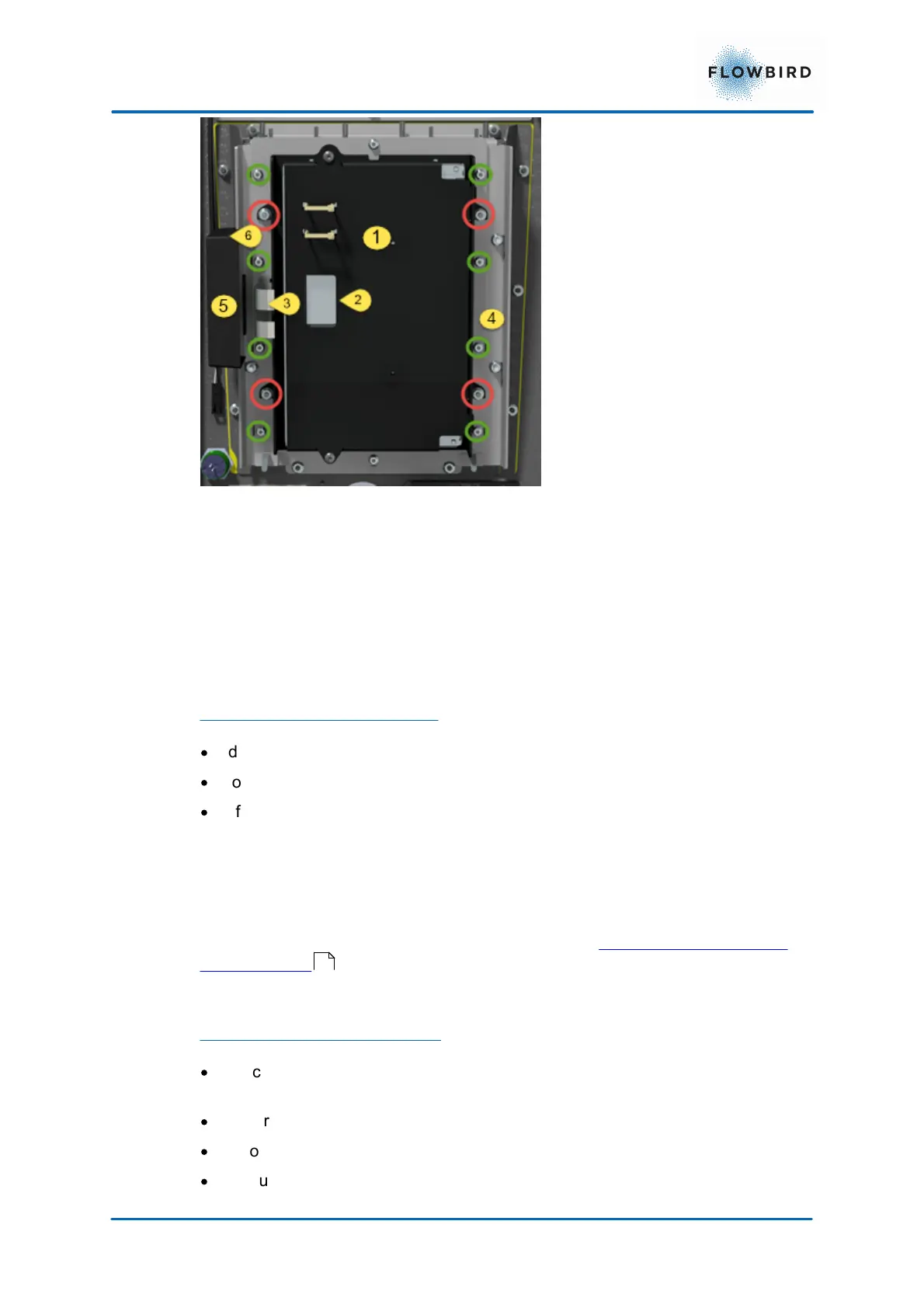
1. Display Unit
2. Connector for the Display cable.
3. Connectors for the touch panel.
4. Touch panel mounting
5. Controller unit
6. Controller connector to main board
To dismount the Display Unit
·
disconnect the Display Cable nr (1) from the main board.
·
loosen the nuts in the red circles.
·
lift of the display unit upwards.
We do not recommend to open the display unit as the internal construction is very
sensitive.
Mount the new display unit in reverse order.
Connect the display unit cable to the main board. see Connecting the display to
the CPU board .
To dismount the Touch panel:
·
Disconnect the 2 flat cables nr (2) from the controller unit. Be careful as these
cables are fragile.
·
unscrew the nuts in the green circles.
·
lift of the frame that holds the touch panel in place.
·
lift out the touch panel. You may need to apply some force as the gasket sits
very tight.
80



 To Next Page