Limitorque
®
Master Station IV EEP-SN4001 FCD LMENIM5010-00-AQ – 03/19
52
7.2.6 MOV Network Configuration
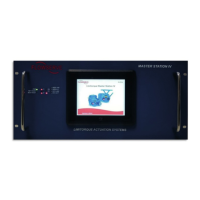
The MOV Network Config menu provides access to communication parameters used for connecting the MSIV to field
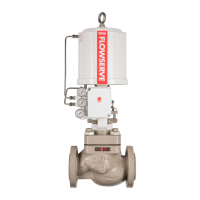
unit MOVs. Selecting the “Next” button will advance the display to the Active MOVs display which allows the user to add
additional field units to the network configuration. The Poll Priority button allows the user to set the poll cycle interval
for each activated MOV. After changing configurations, press “Accept” to save the settings.
Note: MOV Network Configuration is disabled when the unit is in Active mode. To turn off “Active” mode, go to the
System Configuration menu and select the “Redundant Config” button. Under Requested Mode, select the “Disabled”
button.
Note: The timeout and prop delay settings may need to be adjusted based on actuator series, size of network, baud rate,
and cable type/length.
Figure 7.27 – MOV Network Configuration
Figure 7.28 – Active MOVs



 To Next Page