19
EN
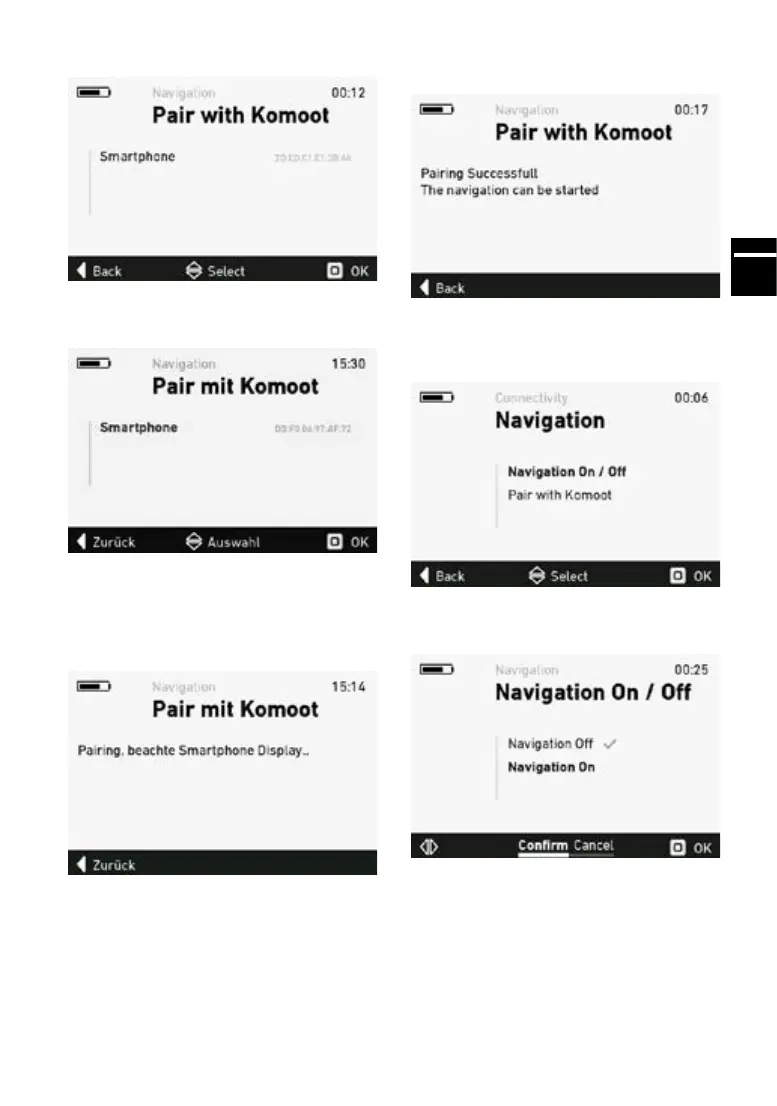
The detected devices are now displayed.
12. Select your chosen device.
The FLYER e-bike will now attempt to establish a
connection. Depending on the smartphone or the
security settings, you may need to grant permissi-
on for the connection to be established.
The connection has now been successfully esta-
blished.
From now on, the e-bike will always connect with
the selected smartphone automatically when na-
vigation is started and the navigation function is
activated in the komoot app.
Ifyouwanttoestablishaconnectionwithadie-
rent smartphone, select the desired smartphone
in step 12.
To activate the navigation in the settings menu,
selectthesub-menu“NavigationOn/O”.
Select“NavigationOn”andpress“OK”toconrm.
The e-bike will now attempt to connect to the
smartphone.



 To Next Page