45
EN
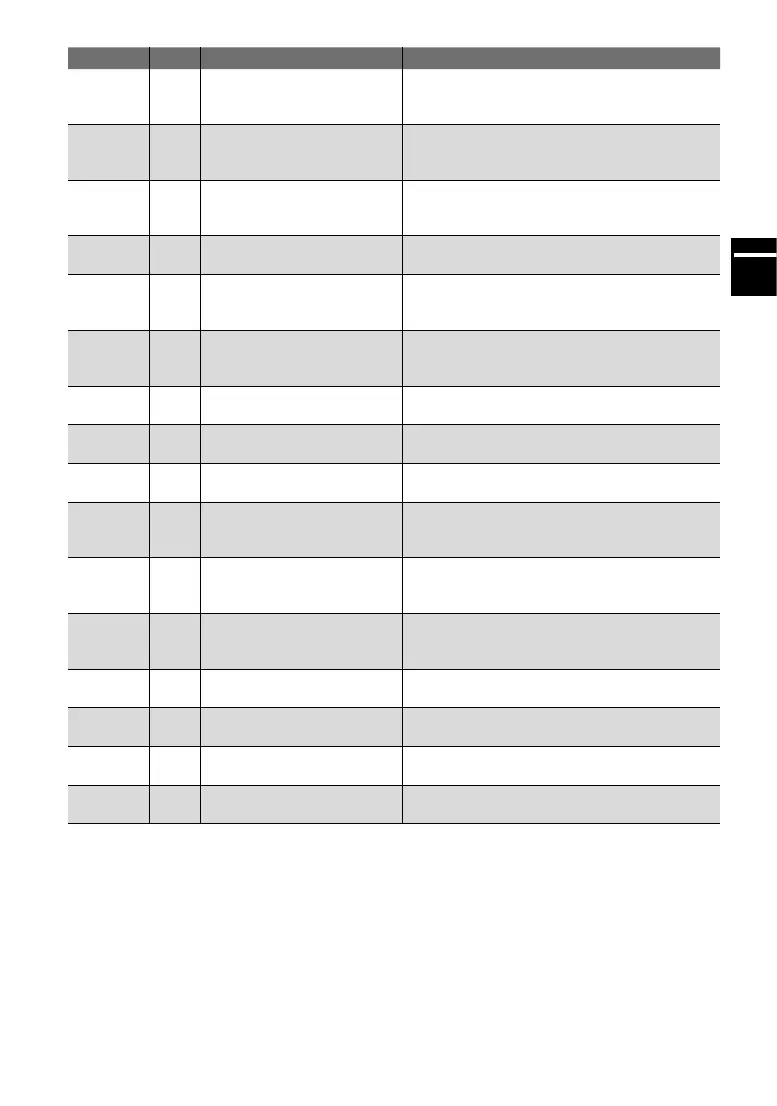
Category Code Displayedtext Remedy
65
31
15
16
Battery empty Recharge the battery.
66
34
35
Battery overheat
Protection mode has been activated as the
battery is overloaded. Let the battery cool and
restart the system.
67 32 Batteryidenticationerror
Ensure that an original FLYER battery is con-
nected and the battery connections are free of
dirt. Restart the system.
68 33 Battery communication error
Ensure that the battery connections are free of
dirt and restart the system.
69
36
40
41
Motor unit error
Restart the system. If the problem persists,
contact your FLYER specialist retailer.
6A
37
38
Motor unit overheat
Protection mode has been activated as the drive
unit is overloaded. Let the drive unit cool and
restart the system.
6B 39 Speedsensor Error
Restart the system. If the problem persists,
contact your FLYER specialist retailer.
6C 3A Error Torque Sensor
Restart the system. If the problem persists,
contact your FLYER specialist retailer.
6D 3C Motor Gear Error
Restart the system. If the problem persists,
contact your FLYER specialist retailer.
6E 3D Di2 Comm. Error
Check the cabling of the Di2 components and
restart the system. If the problem persists, con-
tact your FLYER specialist retailer.
6F 3E Di2 Connection Error
Check the cabling of the Di2 components and
restart the system. If the problem persists, con-
tact your FLYER specialist retailer.
70 3F Di2 general Error
Check the cabling of the Di2 components and
restart the system. If the problem persists, con-
tact your FLYER specialist retailer.
72 3B Motor comm. error
Restart the system. If the problem persists,
contact your FLYER specialist retailer.
73 3B CAN-TL communication error
Restart the system. If the problem persists,
contact your FLYER specialist retailer.
74 CANT-TL Maintenance Error
Restart the system. If the problem persists,
contact your FLYER specialist retailer.
37 42 Bluetooth error
Restart the system. If the problem persists,
contact your FLYER specialist retailer.



 To Next Page