36
4. Menu Display Operation
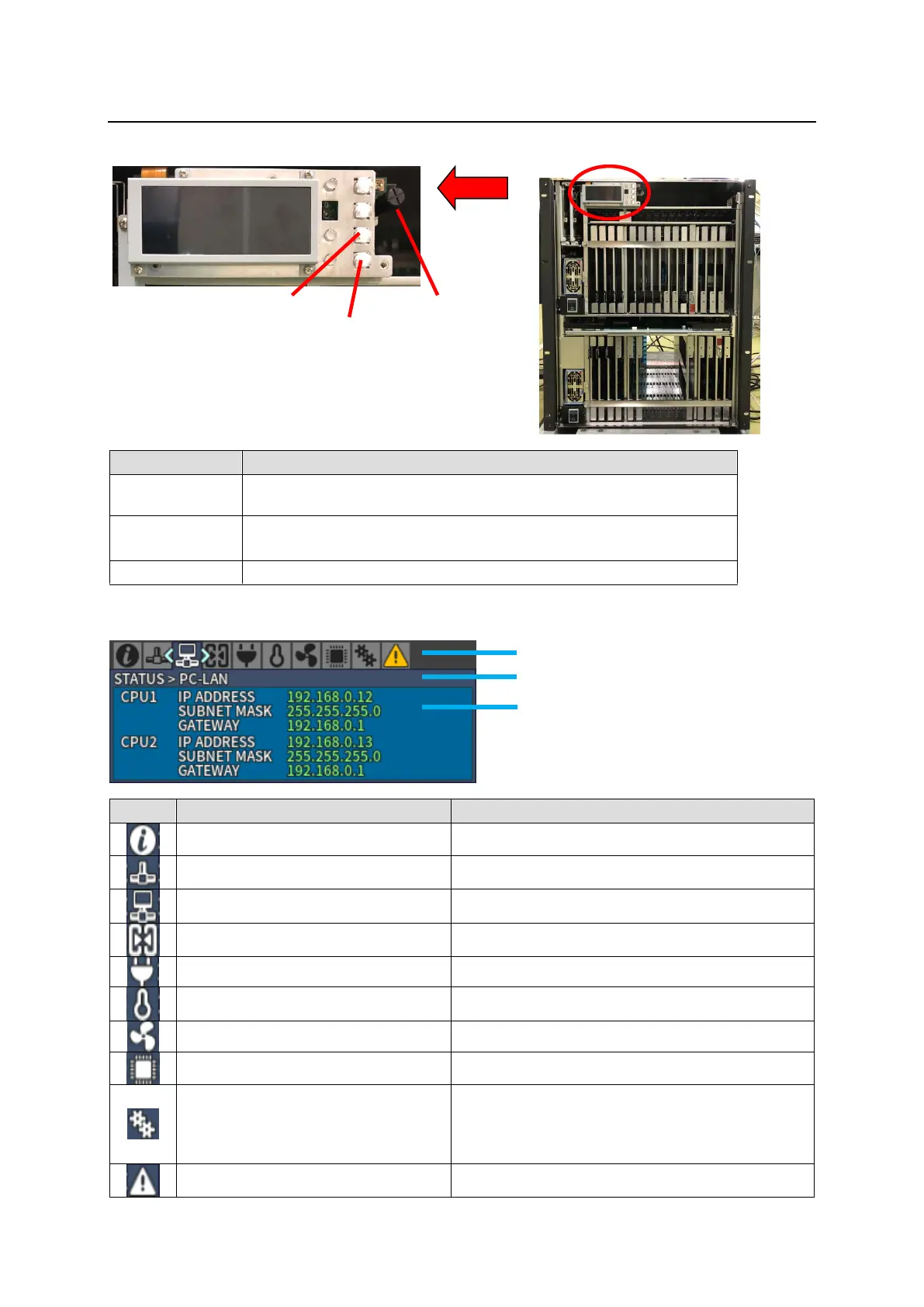
Removing the front panel reveals menu display operation buttons.
Opens STATUS menu. (STATUS menu is displayed when button is
lit.)
Lit: Displays the menu display.
Unlit: Returns to a menu selection using the icons on top.
Moves between menu icons.
Menu display is as shown below.
System Information (See Sec. 4-1-1.)
MFR-LAN settings (See Sec. 4-1-2.)
PC-LAN settings (See Sec. 4-1-3.)
Slot status (See Sec. 4-1-4.)
Power status (See Sec. 4-1-5.)
Temperature status (See Sec. 4-1-6.)
Fan status (See Sec. 4-1-7.)
Version information (See Sec. 4-1-8.)
Manual switches CPU cards 1 and 2, slot
shutdown and whether installed or not of the
redundant power supply unit.
(See Sec. 4-2.)
Alarm information (See Sec. 4-1-9.)



 To Next Page