41
4-2. SETTING
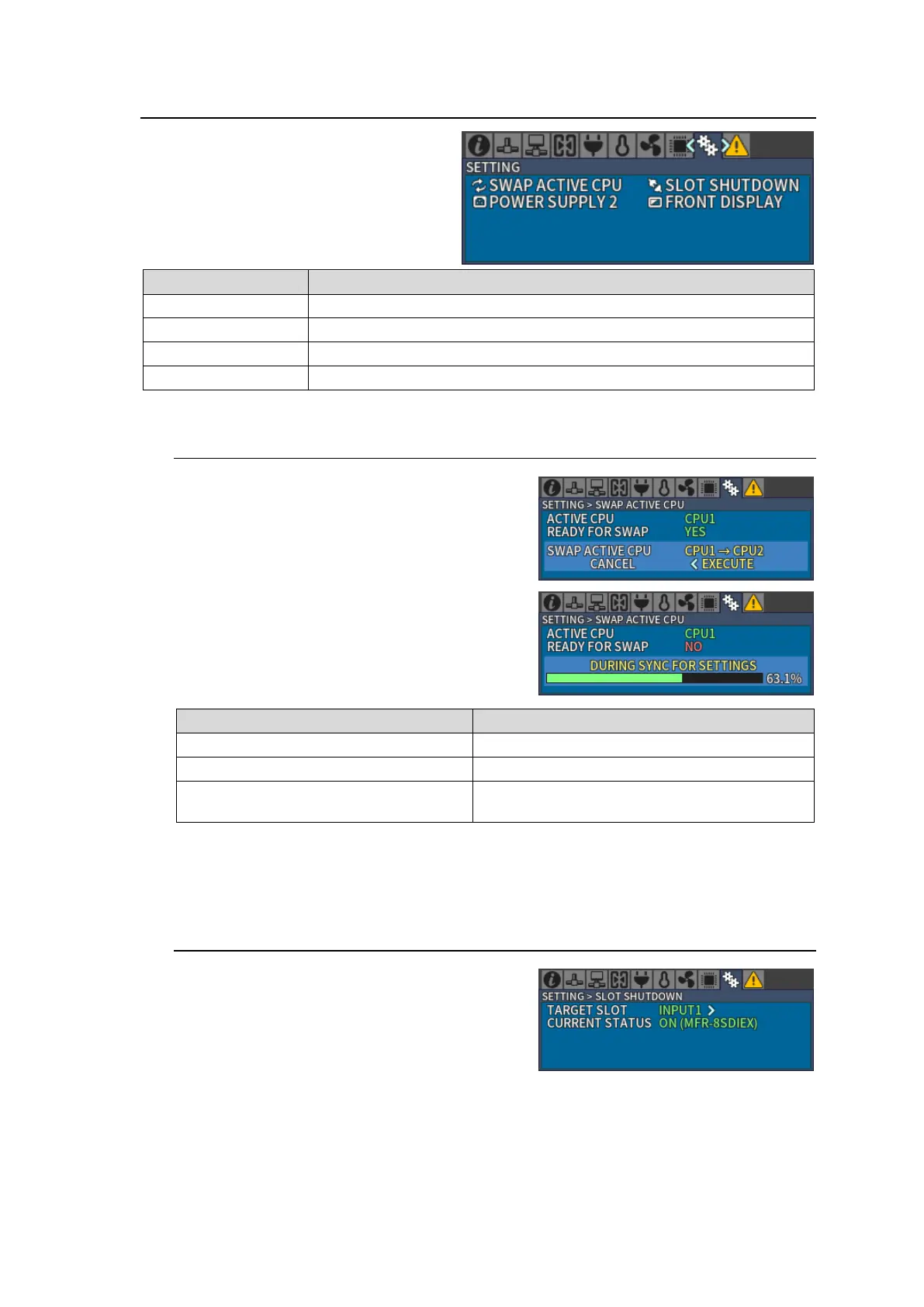
Turn CONTROL to select a menu to change
settings and press CONTROL to enter the
settings screen.
Allows you to verify CPU condition and manually swap the active CPU.
Allows you to turn on/off an in/out card.
Allows you to verify power supply 2 installation and change settings.
Allows you to change front menu display settings.
4-2-1. Swapping Active CPU
1. Open [SETTING > SWAP ACTIVE CPU]
menu. Confirm that READY FOR SWAP is set
to YES.
When READY FOR SWAP is set to NO, a
message appears as shown in the right figure.
THE OTHER CPU IS NOT INSTALLED
A redundant CPU is not installed.
The redundant CPU is not functioning.
Synchronizing settings with the redundant
CPU. Wait until status bar reaches 100%.
2. Turn and press CONTROL to select EXECUTE in SWAP ACTIVE CPU. A message Now
Executing… is displayed while a swap is executed.
4-2-2. Turning ON/OFF an Input/ Output Card
Example) Turning OFF the INPUT1 slot.
1. Open the [SETTING > SLOT SHUTDOWN]
menu.
2. Turn and press CONTROL to select INPUT1
in TARGET SLOT.



 To Next Page