Before using the terminal
43
: VPN connection
: Omakase Lock is set
: Dolby Digital Plus is ON
: Available memory on the terminal is low
: Check for application battery (Detect applications that
consumes battery power)
: Error/alert message
: Touch screen lock is set
: Error in docomo ID setting
■
Main status icons
: Signal strength
: Out of service area
: During international roaming
/ / : LTE/3G/GSM available
・
△
(Uploading) or
▽
(Downloading) appears in white during
communication
: Airplane mode is set
: Wi-Fi is connected
・
△
(Uploading) or
▽
(Downloading) appears in white during
communication
: Bluetooth function is ON
: Bluetooth device is connected
: Remaining battery is 0 - 4 % (Charge the battery)
: Remaining battery is 5 - 15 % (Almost empty)
: Remaining battery is 16 - 30 % (Low)
: Remaining battery is 31 - 79 %
・
Battery indicator (water blue range) gradually changes from
31 to 79 %.
: Remaining battery is 80 - 100 % (Ample)
: Charging
: Manner mode (Manner mode)
: Manner mode (Manner mode (Silent))
: Manner mode (Manner mode (Alarm))
: Manner mode (Original manner)
(white) : Keep lit when held is set (screen is lit detecting
motion)
(gray) : Keep lit when held is set
: Kana input mode
: Alphabet input mode
: Number input mode
: Handwritten input mode
: Pictogram/smiley/symbol entry
: Improved sound for IP calls
◆
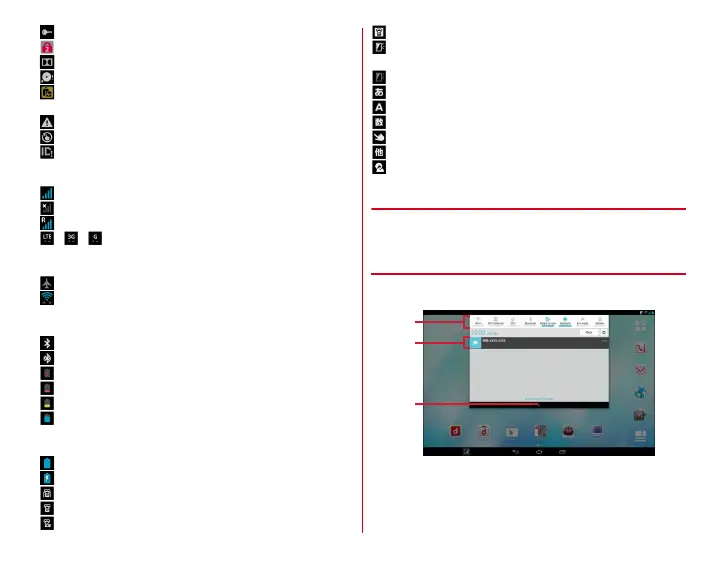
Notification panel
Open the Notification panel to check information of
notification icon or make settings.
❖
Open the Notification panel
1
Flick the status bar downward
a
Setting switch
Tap the setting switch to switch the settings. You can
change the setting switch allocations.
→
P44















 To Next Page