1. INITIAL SETTINGS AND ADJUSTMENTS
1-56
1.14.2 Advanced settings window
Note: Do not use the following components:
[Small] components (one block)
• [Alert (Current Only)]
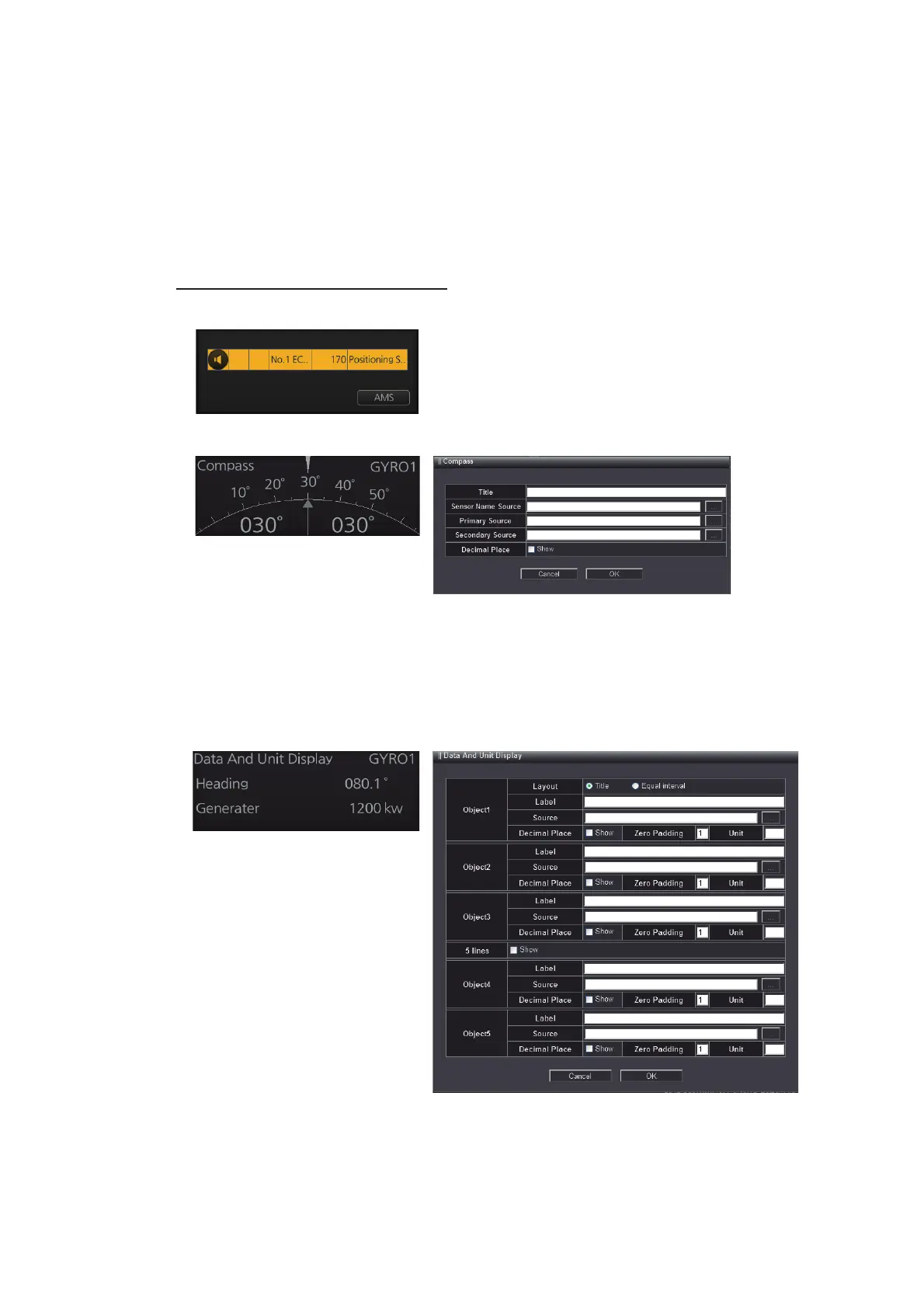
• Compass
[Title]: Enter the title of the component.
[Sensor Name Source]: Enter the sensor name.
[Primary Source]: Select the data source of the upper pointer.
[Secondary Source]: Select the data source of the lower pointer.
[Decimal Place]: Check the checkbox to show the value after decimal point.
• Data And Unit Display
[Layout]: Check the checkbox of [Title] to show the title of the component. Check
the checkbox of [Equal interval] to show only numeric data.
[Label]: Enter the data name of [Object 1] to [Object 4]. Example: "Heading",
"Speed", etc.
[Source]: Select the data source of [Object 1] to [Object 4].
• CommonMP
• Fore & AFT bridge (Wide) U10662/
10683/10782/1340
• Motion Sensor
• Steering Mode for GSI
• Fore & AFT bridge (Wide) Havyard122
• Fore & AFT bridge (Wide) NB802/818/
830/832/857
• Nav. Information For GSI



 To Next Page
 Loading...









