2. SETTINGS FOR SENSOR ADAPTER
2-3
2.3.2 How to confirm the firmware program version
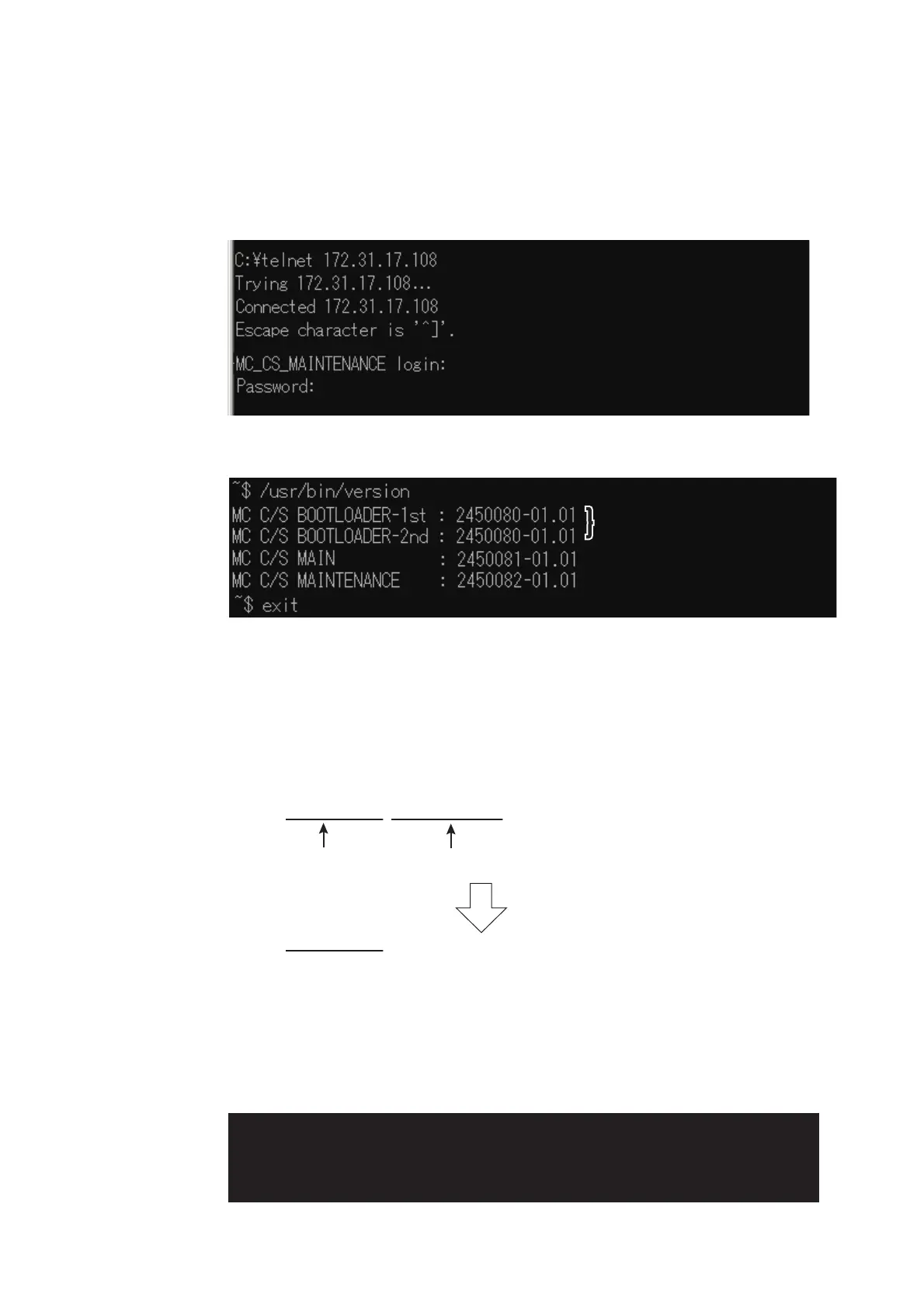
1. Activate the maintenance program of the sensor adapter MC-3000S.
2. Activate the command prompt of Windows
®
.
3. Enter “telnet 172.31.17.108” on the command prompt.
4. Enter the user name and password correctly.
5. Enter “/usr/sbin/version” on the command prompt to confirm the program version.
The program version is shown on the command prompt.
Note: The image shown above is an example. The program version number may
be different.
6. After confirming the program version, enter “exit” to finish the telnet command.
2.3.3 How to update the firmware program
1. Delete the version number from the firmware binary file name.
2. Activate the maintenance program of the Sensor Adapter MC-3000S.
3. Activate the command prompt of Windows
®
.
4. Change the current directory to the directory where the firmware binary program
is saved.
In the example shown below, binary file is saved at .
㸠㩷㩷
Enter the telnet command.
㸠㩷㩷
Enter the telnet command.
㸠㩷㩷
Enter the telnet command.
㸠㩷㩷
Enter the user name.
㸠㩷㩷
Enter the user name.
㸠㩷㩷
Enter the user name.
㸠㩷㩷
Enter the user password.
㸠㩷㩷
Enter the user password.
㸠㩷㩷
Enter the user password.
㸠㩷㩷
After the confirmation the program version, enter “exit” .
㸠㩷㩷
After the confirmation the program version, enter “exit” .
㸠㩷㩷
After the confirmation the program version, enter “exit” .
㸠㩷㩷
The command to confirm the program version.
㸠㩷㩷
The command to confirm the program version.
㸠㩷㩷
The command to confirm the program version.
Boot programBoot programBoot program
Main programMain programMain program
Maintenance programMaintenance programMaintenance program
Example
䋺
2450081-01010088_mc_cs_mainpg.bin
Program number Version number
Delete the version number from the file name.
Example
䋺
2450081_mc_cs_mainpg.bin
%
EF>WRFCVG
㸠㩷㩷
The command to change the current drive
㸠㩷㩷
The command to change the current drive
㸠㩷㩷
The command to change the current drive
㸠㩷㩷
The command to change the current directory
㸠㩷㩷
The command to change the current directory
㸠㩷㩷
The command to change the current directory



 To Next Page
 Loading...









