110
13 Troubleshooting
3D printing is a complex activity and there are a lot ways things can go wrong, or not quite work as
intended. This troubleshooting section covers the most common issues, but it’s not comprehensive. If
you don’t see anything that describes the problem you’re having, please contact Fusion3 Support (see
section 14).
13.1 Correct First Layer Height
First layer height refers to the height of the nozzle above the print bed when printing the first layer of
your part. This is important because an incorrect first layer height can result in a failed print later. Your
F410, thanks to its auto bed leveling system, takes most of the guesswork out of this, but it’s still
possible that adjustment will be needed.
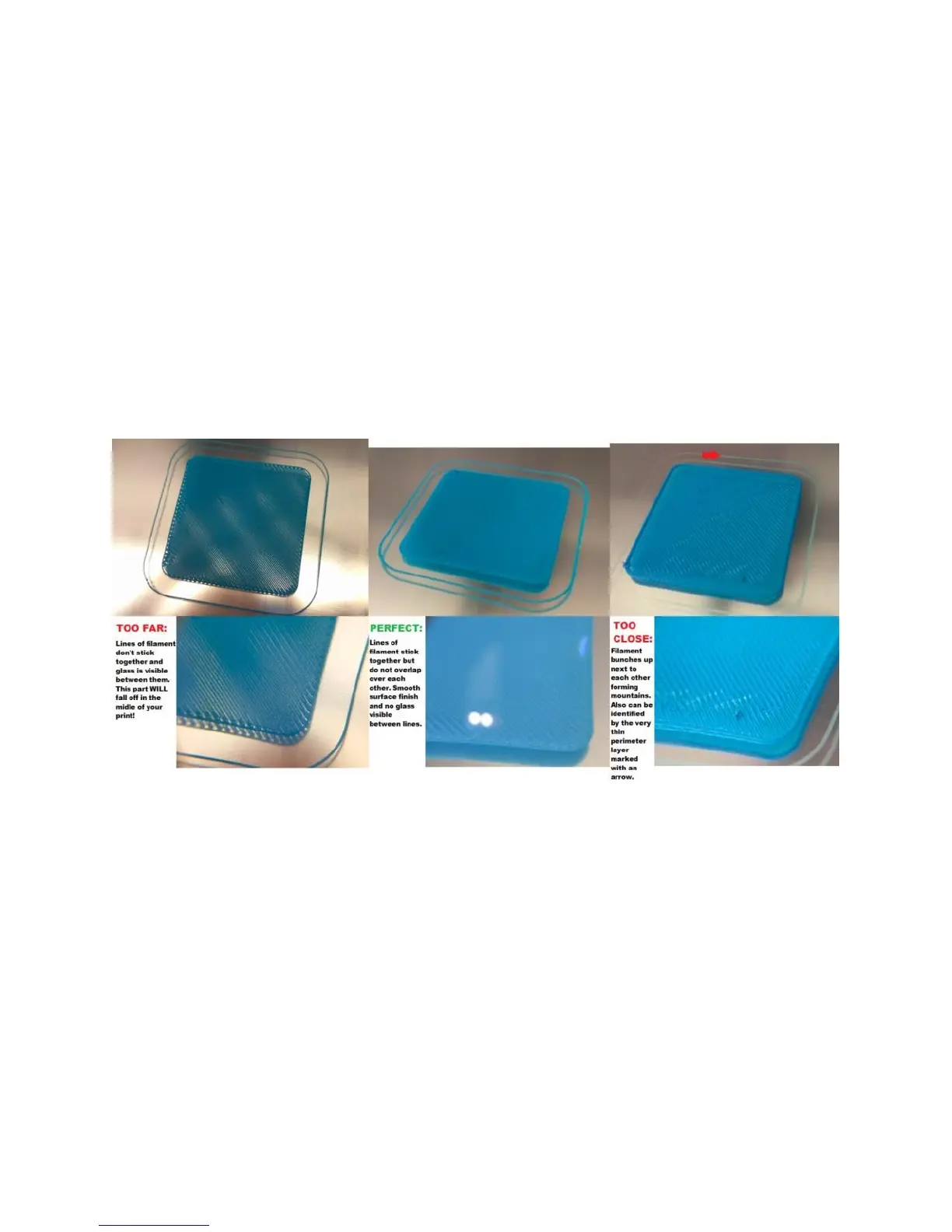
The first layer can be too far away, correct, or too close as shown in the graphic below.
NOTE: Before making any adjustments, make sure your bed is level by running the Manual Bed Leveling
steps in section 10.4.
Too Far Away
In extreme cases the filament squirting out of the nozzle won’t stick to the bed at all. It will get dragged
around under the nozzle and eventually form a ball of filament on the print head. If you see this, cancel
the print and manually check your bed level.
In less extreme cases of too far away, you will see gaps between the traces laid down by the print head
as shown on the left of the graphic.
Too Close
In extreme cases the nozzle will be pressed so firmly against the bed that no plastic will come out. This
usually only happens if the bed leveling probe has been knocked out of alignment or damaged.



 To Next Page