23
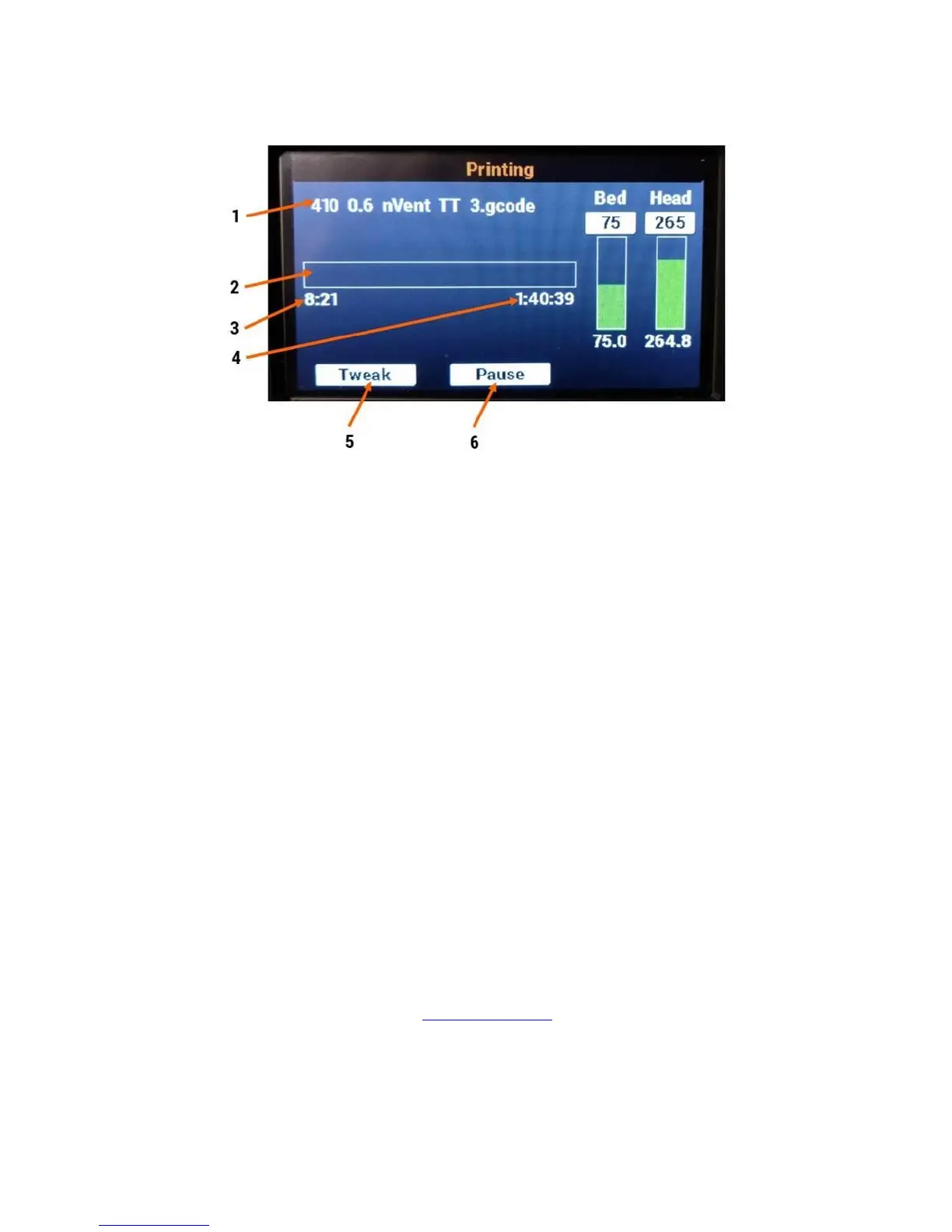
5.1.6 Print Status Screen (during a print)
1. Filename of the current print job
2. Progress bar; fills up as print progresses
3. Elapsed time so far, including heatup time
4. Estimated time remaining (note: this becomes more accurate as the print progresses past the
first layer)
5. Opens the Tweak menu
6. Pauses the print job
6 Web Interface Information
If connected to your local network, your F410 will set up a web page that allows you to remotely manage
the machine. For the most part it duplicates the controls found on the touchscreen, and provides some
additional information.
Key information:
This web page is only accessible from inside your local network; it is not accessible from the
internet
It is password protected to prevent unauthorized use. The default password is “fusion3”
If local DNS is available, your F410 will attempt to use the web address “http://fusion3f410”. If
DNS is not available, you will need to navigate to the printer’s IP address (see below).
6.1 Accessing the Web Page
1. Open your web browser and type in “http://fusion3f410” and press enter.
2. The page will load and will prompt you for a password.



 To Next Page