Home
Fusion3
3D Printers
F410
Page 12 (Getting Help)
Fusion3 F410 - Getting Help
115 pages
Manual
Save Page as PDF
To Next Page
To Next Page
To Previous Page
To Previous Page
Loading...
12
4.5
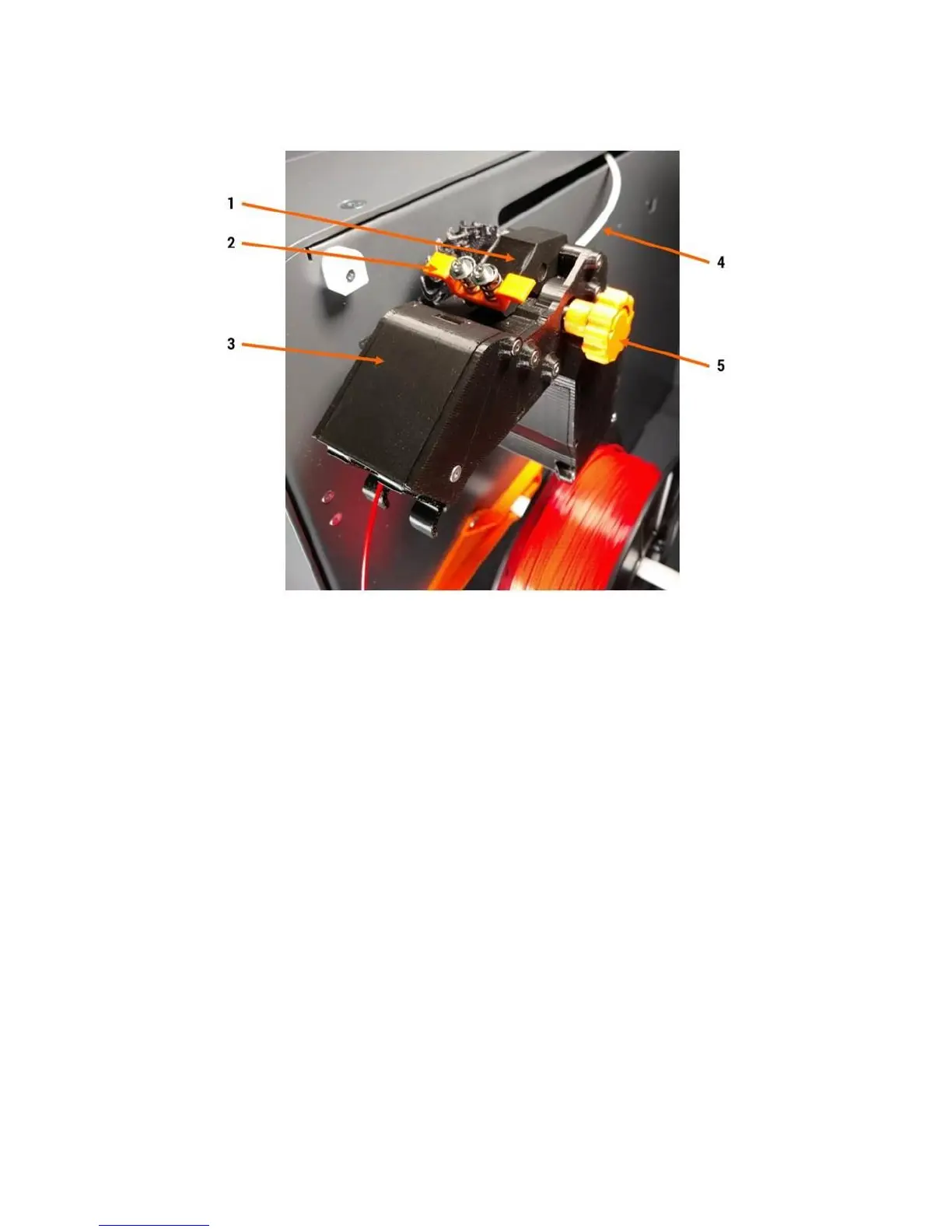
Extruder Cold End Detai
l
1.
Feed section & idle
r bar
2.
Spring grabber (use to rele
ase idler bar)
3.
Filament monitoring
section
4.
Filament exit tu
be (aka Bowden tube)
5.
Hand feed wheel
User touch points are o
range on the extru
der.
11
13
Table of Contents
Main Page
1 Introduction
2
Table of Contents
3
2 Warnings and Disclaimers
5
Do Not Operate Equipment Unattended
5
Hot Components Are Present During Operation
5
Electrical Shock Hazard
5
3 Setting up Your F410
6
Please Retain All Packaging
6
Lifting, Carrying, and Transporting
6
Finding a Suitable Surface
6
What Is a Suitable Ambient Environment
6
Power
7
Network
7
Setting up Simplify3D
7
4 Hardware Information
8
Front View
8
Right Side
9
Back
10
Filament Bay Detail
11
Extruder Cold End Detail
12
Print Volume Overview
15
Print Head Assembly Detail
16
5 Control Panel Information
18
Touchscreen Interface
18
6 Web Interface Information
23
Accessing the Web Page
23
Web Interface Description
24
Changing the Web Interface Configuration
28
Compatibility Information
29
7 Software Information (AKA Working with Simplify3D)
30
Additional Resources
30
Basic Interface & Operations
30
Processes & Profiles
32
Managing S3D Profiles
37
Simplify3D Build Estimates
39
Support Structures
40
Working with .Factory Files
44
Common Questions, Tips, & Tricks
44
8 SD Card Information
48
9 Information on Interchangeable Print Heads
49
Using Different-Sized Heads
49
10 Basic Tasks
50
Opening & Closing the Doors
50
Running a Print Job
50
Removing a Finished Print
59
Leveling the Print Bed
60
Loading Filament
64
Unloading Filament
69
Swapping Filament
69
Cleaning the Print Bed
69
Preparing the Print Bed
71
Moving Axes by Hand
73
Pausing, Resuming, & Canceling a Print Job
73
11 Filament
76
Storing Filament
76
12 Maintenance
78
Cleaning Your F410
78
Cleaning the Print Head
78
Check Heat Break
79
Tighten Print Head Hot Section
81
Inspecting & Cleaning the Extruder
81
Check & Adjust Bearing Preload
85
Check & Adjust Drive Cable Tension
86
Adjusting Configuration Values
90
Removing & Installing the Print Bed
92
Removing & Installing a Print Head
94
Replacing Damaged Foil Tape
100
Lubrication
101
Removing & Installing the Extruder
102
Accessing the Electronics Bay
106
13 Troubleshooting
110
Correct First Layer Height
110
Network & Connectivity Issues
112
Recovering from a Print Head Jam
113
14 Getting Help
115
Other manuals for Fusion3 F410
Quick Start Guide
26 pages
Related product manuals
Fusion3 EDGE
35 pages



 To Next Page