31
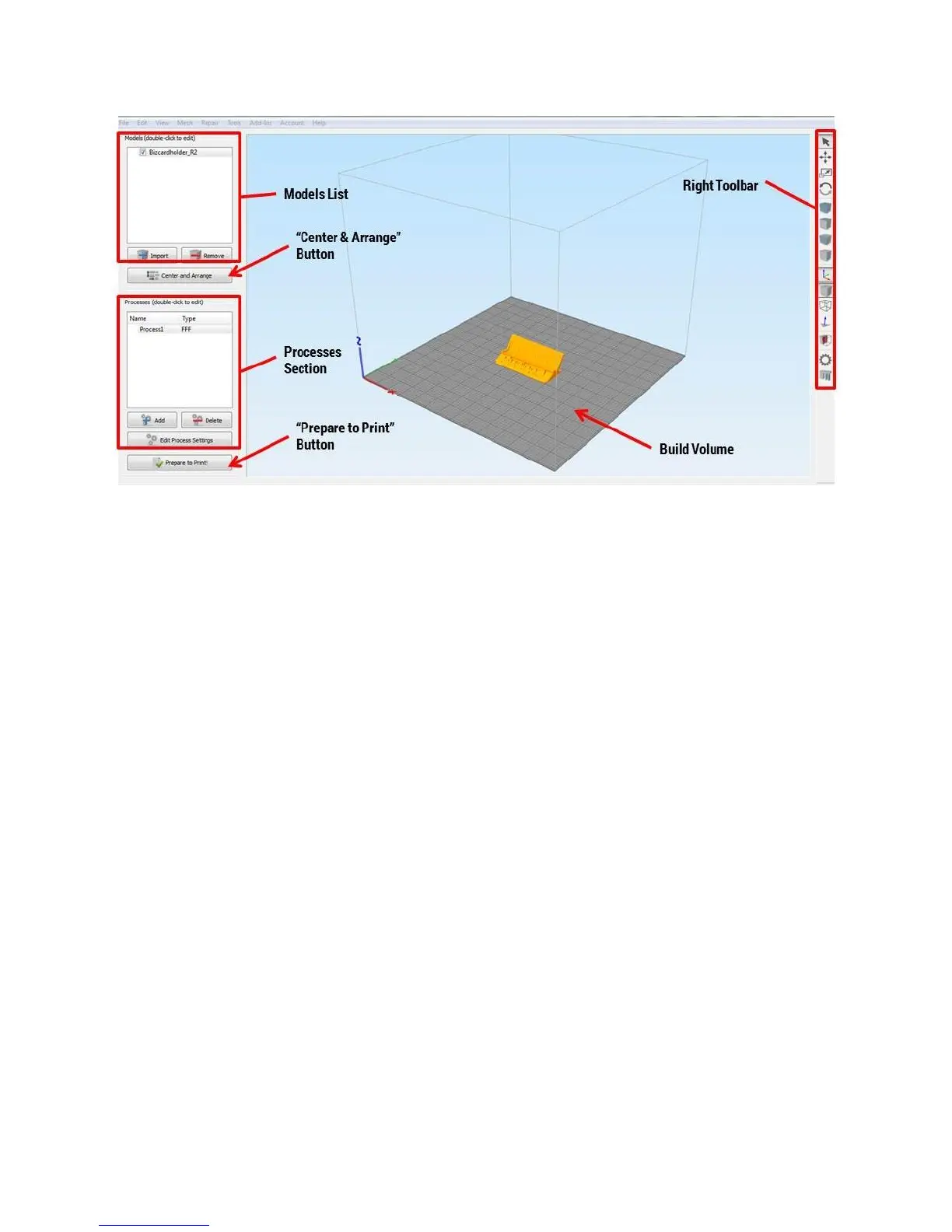
Models List: Shows a list of all models currently on the build plate. You can import more than 1 model
at once to print them all simultaneously.
“Center & Arrange” button: Click this to automatically arrange the parts on the build plate so that they
don’t overlap. Note that this does not rotate any models to the best printing orientation – that’s up to
you.
Processes Section: This is where you define how you want the part to be printed (material and other
settings). For most applications you should only have 1 process in this list at a time.
“Prepare to Print” button: Clicking this will “slice” your model with the settings defined in your process
and provide you with a 3D preview of the toolpath.
Build Volume: A 3D view of your printer’s build volume and the models you’ve imported.
Right Toolbar: This toolbar has many powerful tools including different visualization options, manually
defining support, etc.
Double clicking on a model will open another menu on the right with options to reposition, scale, and
rotate your model.



 To Next Page