GPSMAP 396 Owner’s Manual 1
gettIng stArted > unIt overvIeW
GettInG Started
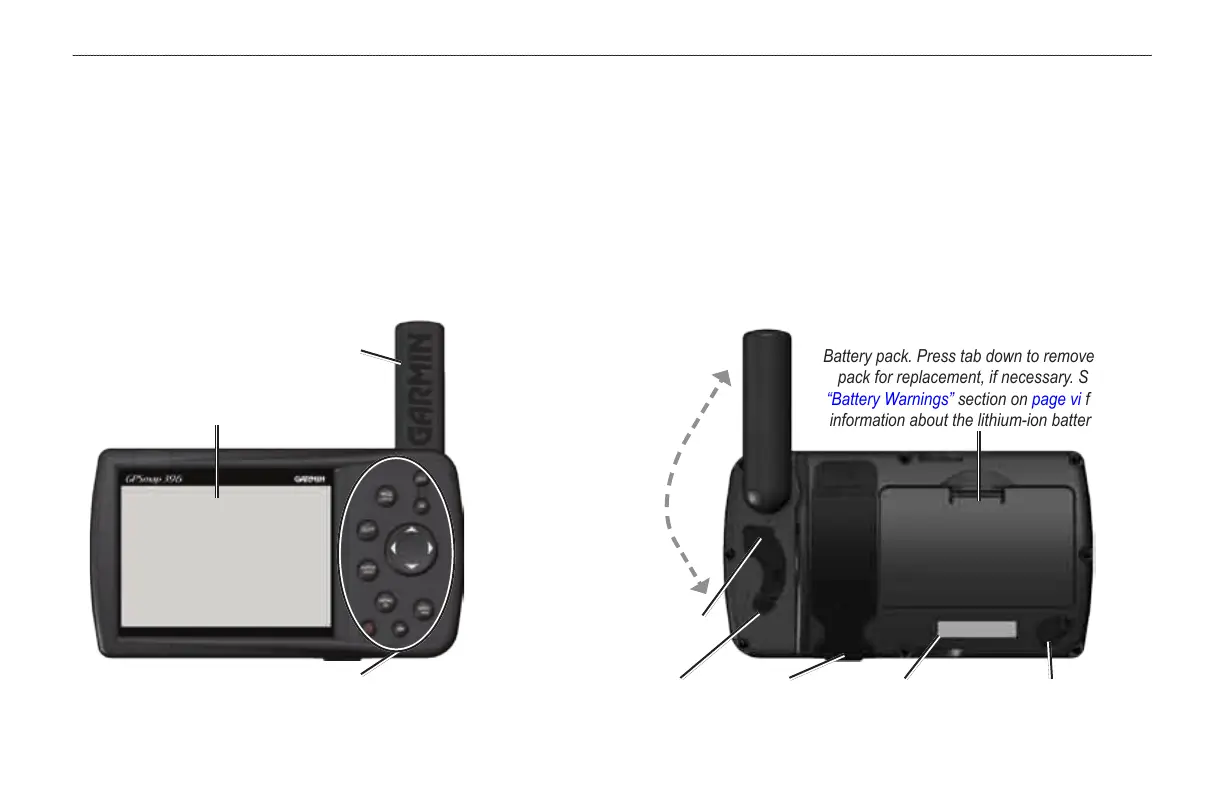
Unit Overview
The GPSMAP 396 is an all-in-one, versatile color aviation, automotive, and marine navigator-perfect for air, land, or water. This portable
GPS navigator features a 256-color TFT screen that is easy to read in bright sun, Jeppesen aviation database, and auto routing to provide
you with automatically generated turn-by-turn directions. With the included GXM 30/30A antenna and a subscription to XM WX Satellite
Weather, pilots have constant access to NEXRAD radar, lightning, METARs, TAFs, TFRs, and more. In addition, the GPSMAP 396 offers
XM Satellite Radio capabilities, featuring more than 150 digital channels of commercial free music; more than 30 channels of news, sports,
talk and entertainment; and more than 20 dedicated channels of XM Instant Trafc & Weather.
Detachable GPS
antenna collapses
for storage. Be sure
the antenna is up
(as shown here) to
receive satellite
signals. Refer to
the Appendix,
page 161, for
instructions on
removing the
antenna.
Battery pack. Press tab down to remove battery
pack for replacement, if necessary. See the
“Battery Warnings” section on page vi for more
information about the lithium-ion battery pack.
External power
connector under
weather cap
USB/GXM 30/30A connector
under weather capweather cap
Slot for optional
data card
Serial
number
Audio (Headphones/Line out)
connector under weather cap
Backlit keypad for easy nighttime operation
GPS antenna
256-Color TFT screen
with backlighting













 To Next Page