46 GPSMAP 396 Owner’s Manual
AvIAtIon Mode PAges > AIrcrAft InforMAtIon
Aircraft Information
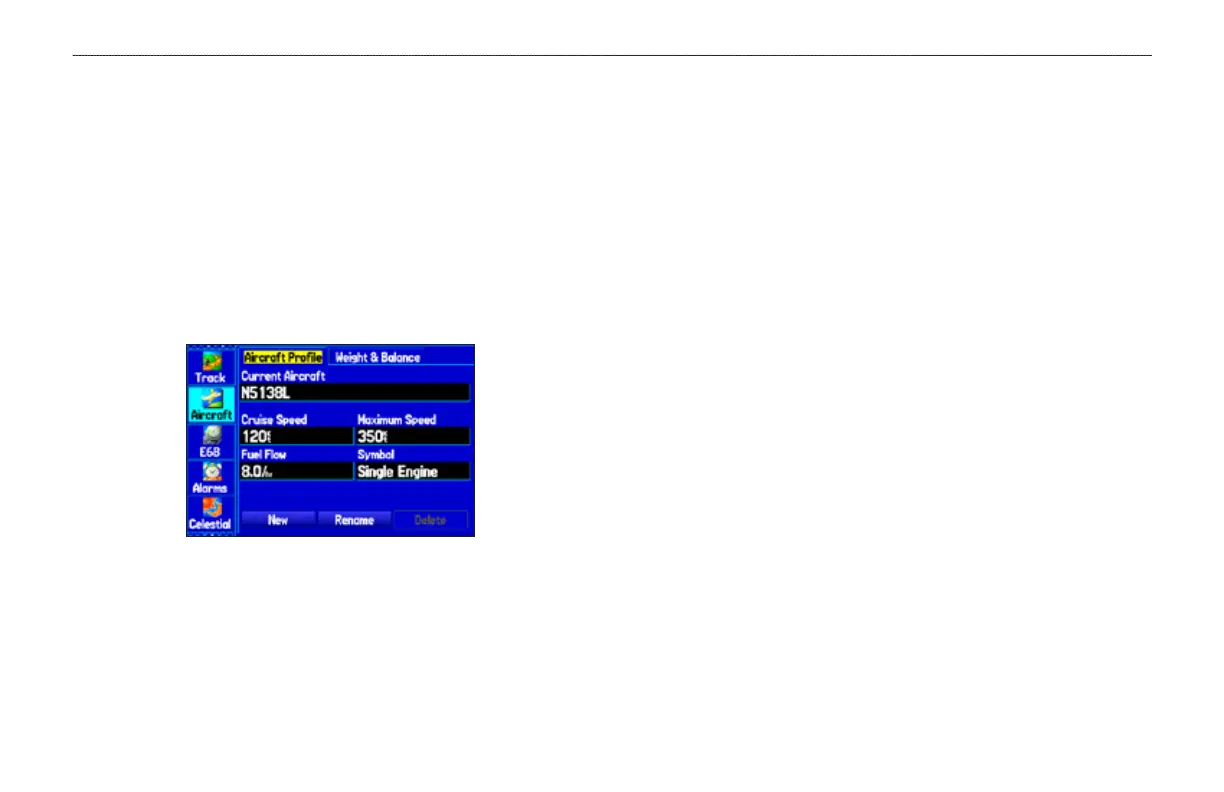
The Aircraft tab is divided into two sub tabs: Aircraft Prole and
Weight & Balance.
To open the Aircraft tab:
1. Press MENU twice to open the Main Menu.
2. Highlight Aircraft from the vertical list of tabs.
3. Press the ROCKER right or left to highlight either the Aircraft
Prole tab or the Weight & Balance tab from the top of the
screen.
Aircraft Prole Tab
Entering Your Aircraft Prole
The Aircraft Prole tab allows you to prole cruising speed,
maximum speed, fuel ow, and map symbol. The unit can save up to
10 aircraft proles.
Cruising speed and fuel ow are used as default settings when
viewing trip planning information on the Route Review Page. The
maximum speed is used to dene the range for airspeed on the Panel
Page and is automatically updated if you exceed this gure.
To enter an aircraft prole:
1. From the Aircraft Prole tab, use the ROCKER to highlight
New, and press ENTER.
2. Highlight the Current Aircraft eld, and press ENTER.
OR
Highlight the Rename button, and press ENTER.
3. Use the ROCKER to enter the aircraft tail number (or other
identifying information) in the Current Aircraft eld. Press
ENTER when nished.
4. Use the ROCKER to enter information for the cruising and
maximum speeds for your aircraft, your aircraft’s fuel ow, and
the symbol for your aircraft.
Select a symbol for your aircraft to change the data elds on
the Panel Page and the map symbol.
To select a saved aircraft prole:
1. From the Aircraft Prole tab, use the ROCKER to highlight the
Current Aircraft eld, and press ENTER.
2. Use the ROCKER to select the aircraft prole, and press
ENTER.













 To Next Page