EasyManua.ls Logo

GDC SX-3000 - IMB Network Tab

GDC SX-3000
160 pages
Print Icon
To Next Page IconTo Next Page
To Previous Page IconTo Previous Page
Loading...
2. SMS
- 26 -
April 20, 2015
SX-3000 Standalone Integrated Media Block™ with
Portable Storage/ Enterprise Storage User Manual
2.3.4.6 IMB Network Tab
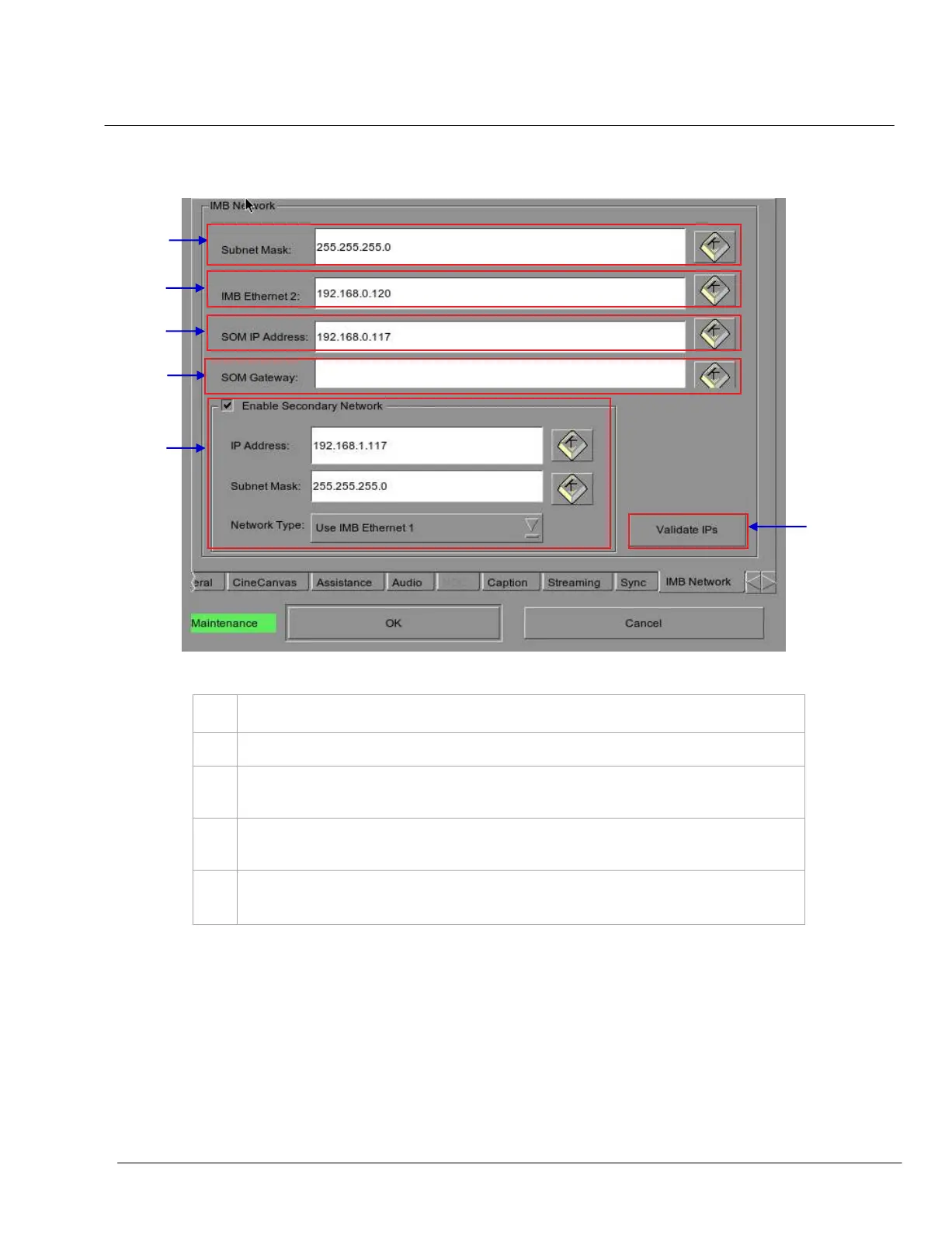
Figure 12 IMB Network Tab.
1
Specify the subnet for all IP addresses.
2
Specify the IP address of the IMB. This is the IP address of the Security Manager.
3
This is the main IP address of the SX-3000. The SMS user interface can be reached at this IP
address using VNC.
4
Specify the network gateway for the SX-3000.
5
Specify a secondary IP address and Subnet Mask for the SX-3000. This can be used to connect to
a content management network.
1
2
3
4
6
5

Table of Contents

Other manuals for GDC SX-3000