SX-3000 Standalone Integrated Media Block™ with
Portable Storage/ Enterprise Storage User Manual
2.3.5.3. Understanding the SNMP Configuration Interface
2.3.5.3.1. General
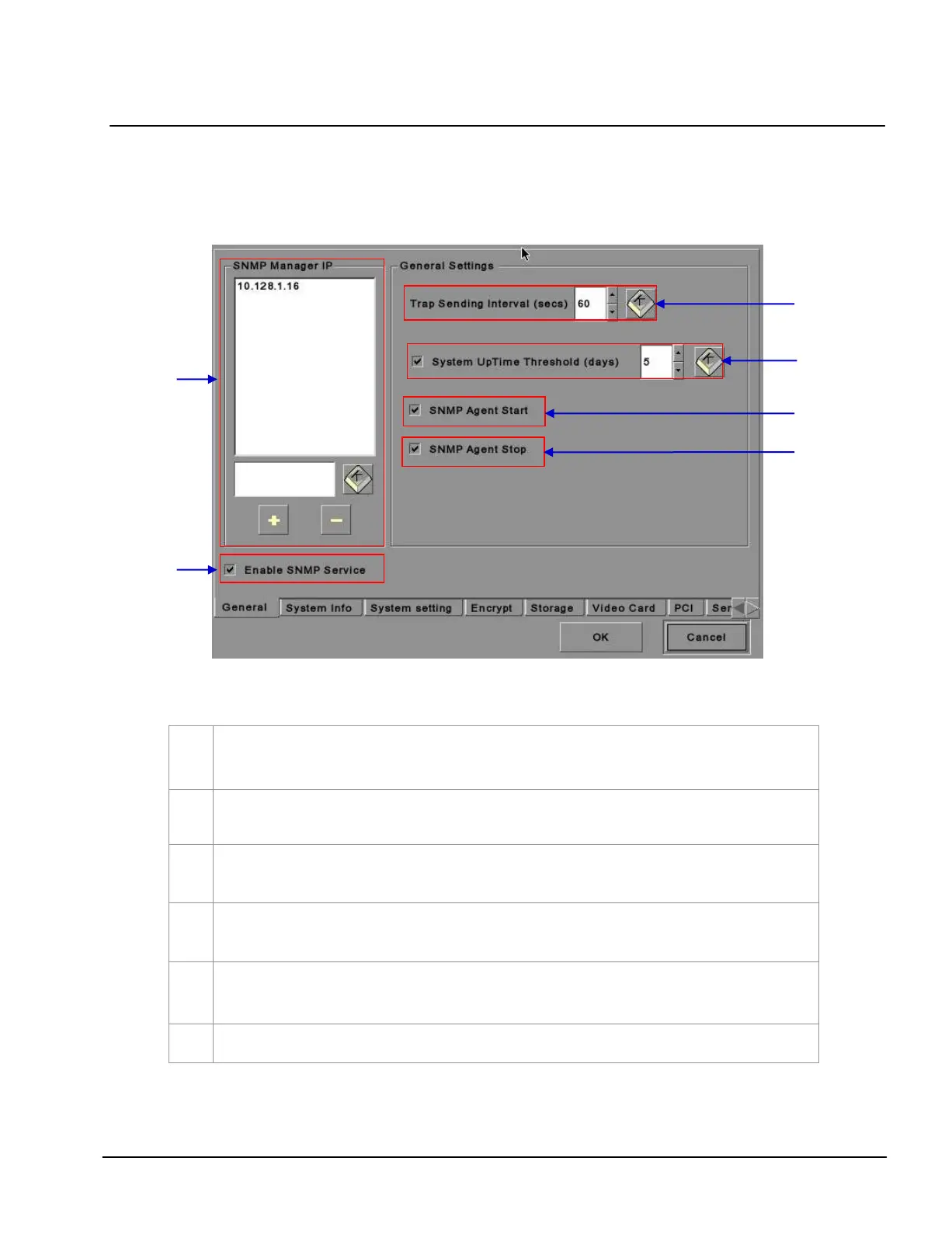
Figure 16 SNMP Configuration [General Settings].
For
SNMP Manager IP Address, indicate the IP address of the SNMP Manager where traps are to be
sent by typing in the IP Address , press the
+ or - button to insert multiple SNMP addresses.
For
Trap Sending Interval, indicate the time interval in seconds after which a trap should be resent to
the SNMP Manager. The trap will continue to be resent only as long as the error condition exists.
For System UpTime Threshold (days), indicate the threshold time in days.
NOTE: When Trap is On, a trap will be sent if the System UpTime exceeds the threshold value.
Activate the Trap by checking the small box opposite
SNMP Agent Start.
NOTE: When Trap is On, a trap is sent if the SNMP Agent is started.
Deactivate the Trap by un-checking the small box next to SNMP Agent Start.
Activate the Trap by checking the small box opposite
SNMP Agent Stop.
NOTE: When Trap is On, a trap is sent if the SNMP Agent is stopped.
Deactivate the Trap by un-checking the small box next to SNMP Agent Stop.
Check on the small box to enable SNMP Service.



 To Next Page