EasyManua.ls Logo

GeoVision GV-EBD4813 - PTZ Control Panel; Accessing the PTZ Control Panel

GeoVision GV-EBD4813
224 pages
Print Icon
To Next Page IconTo Next Page
To Previous Page IconTo Previous Page
Loading...
Accessing the Camera
102
2
2.3 PTZ Control Panel
In this section, you will be guided through the various functions of PTZ Control Panel. The
PTZ Control Panel is accessed from the live view interface of the camera.
Note this is only applicable to GV-PTZ5810-IR.
2.3.1 Accessing the PTZ Control Panel
1
1
2
3
4
5
6
7
8
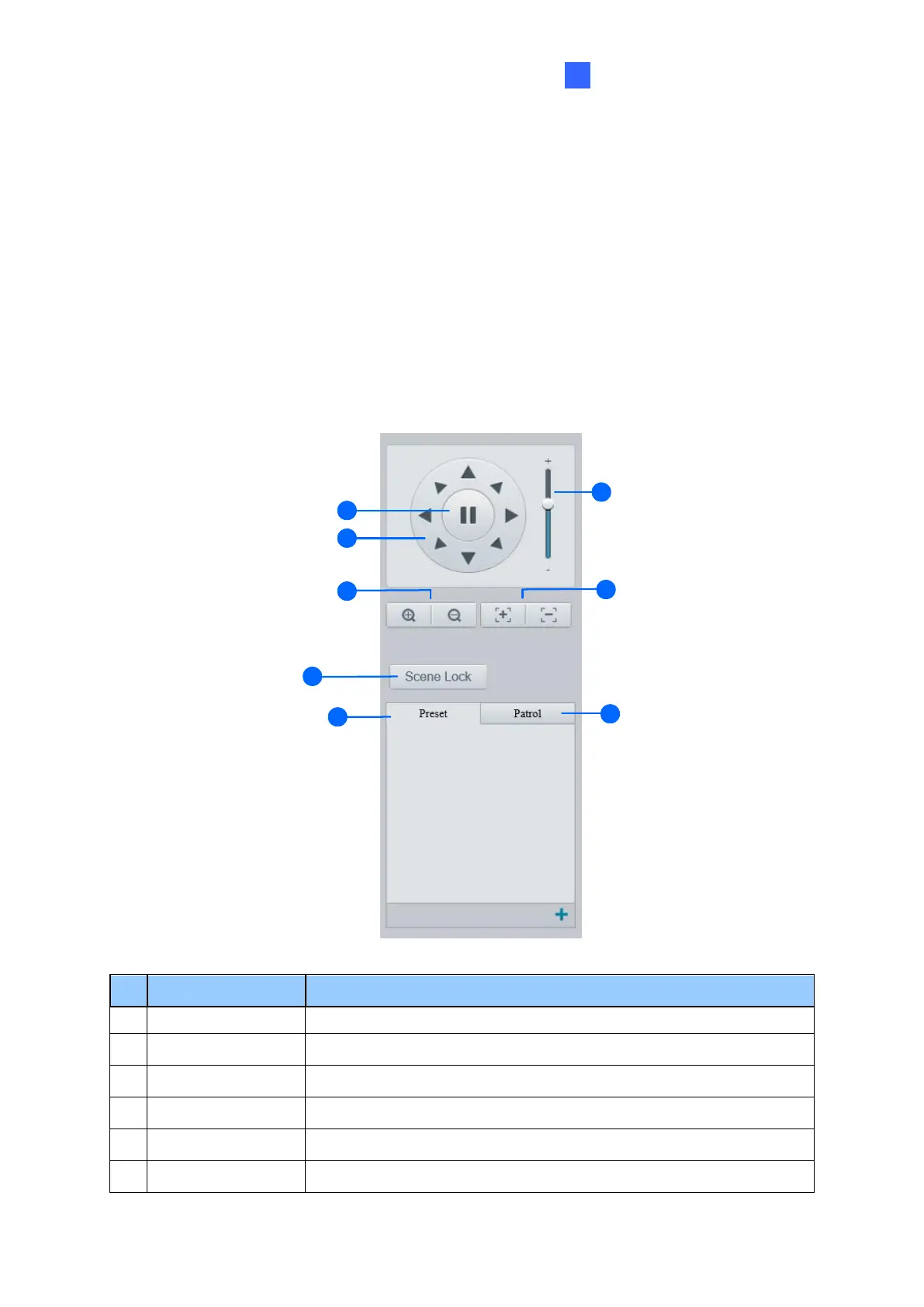
Figure 2-5
No.
Item
Function
1
Auto Pan
Start or stop auto panning of the camera.
2
PTZ Control Panel
Control the direction of the camera and release the control.
3
PTZ Speed
Adjust the moving speed of the PTZ camera.
4
Zoom
Adjust the camera’s zoom (optical).
5
Focus
Adjust the camera’s focus.
6
Screen Lock
Lock or unlock the camera direction.

Table of Contents