24
Connectingtraclight
▪ Install the product according to the manufacturer‘s instructions.
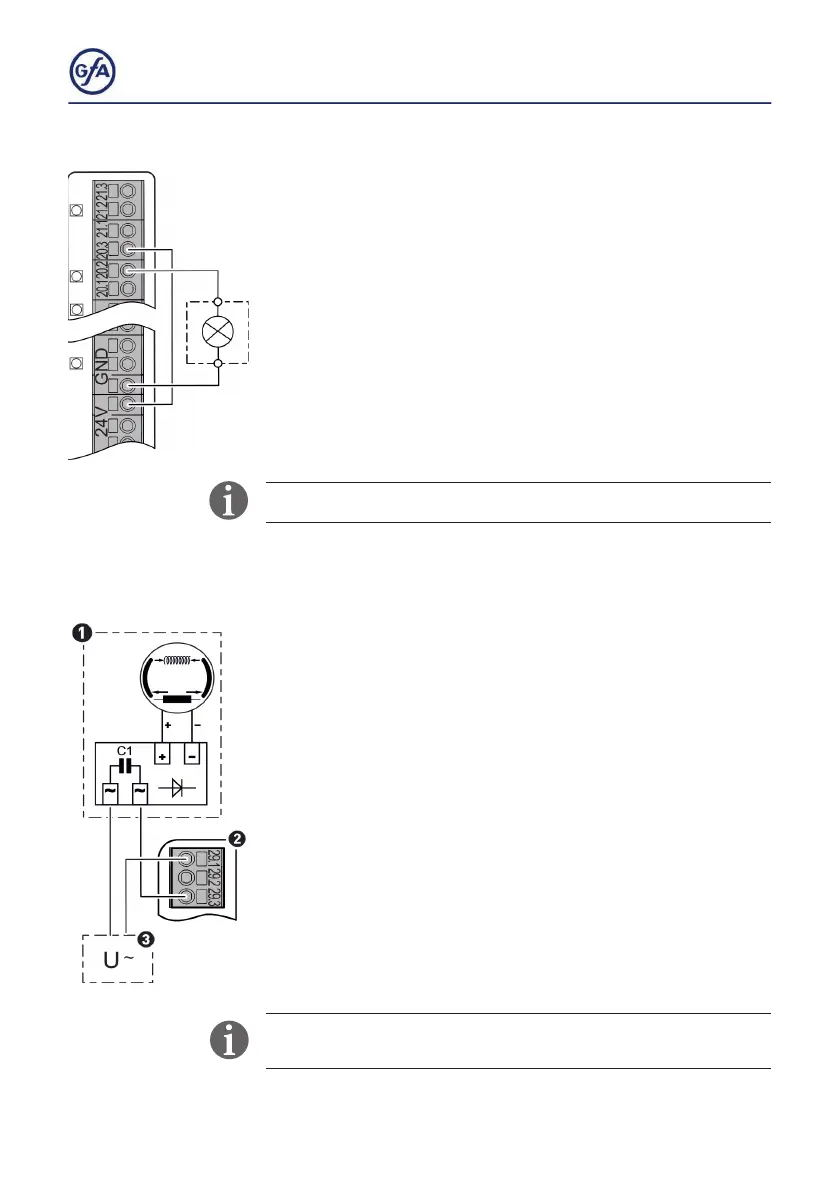
▪ Connecttheproductasshown.Youcanconnecttraclights
to terminals X20.1/ X20.2 or X21.1/X21.2.
▪ Activate the product after completion of the electrical
▪ installation with menu items
2.7 / P 2.8.
WerecommendtheuseofLEDtraclights.
X29: Separate control for magnetic brakes
If the door drive unit has a magnetic brake you have to connect
the brake to terminals X29.1-X29.3 to control the brake
independently.
Energized magnetic brakes produce the braking force.
Magnetic brakes are used when the door needs to open during
a power failure. The door then opens automatically thanks to
springs or weights.
▪ Connecttherectierofthebrake(1)toterminalsX29.1(2)
and the external power supply (3).
▪ Connect the external power supply (3) to terminals X29 (2).
The maximum electrical current at 230V is AC 1A. The voltage
must be provided separately.



 To Next Page