45
9.3 Readout of the cycle counter since last programming change
This menu item shows the number of cycles the door has run
since the last programming change. The counter increases by
1everytimethedoorreachesthenallimitpositionOPEN.
9.3
Cycle counter since last program change
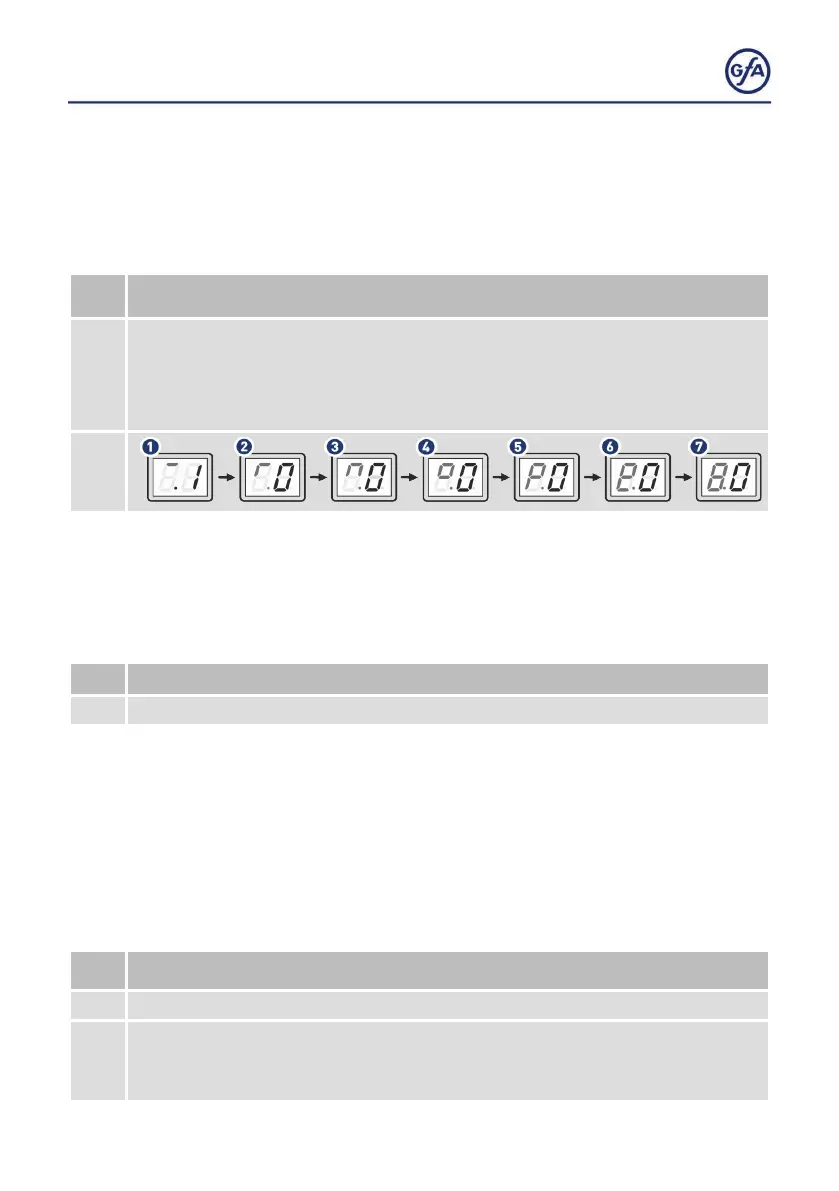
After selecting the menu item, the display changes 7 times to show a 7-digit
number.
The left side of the two-digit display shows a symbol for the current
position of cycle counter.The right side shows the number of the current position.
The example below shows 1,000,000 cycles.
9.4 Readout of software version
This menu item displays the software version of the door
control. For drive units with GfA frequency inverter, the
software version of the motor is shown as well.
9.4
Readout of software version
The display changes and shows the number of the software version.
9.5 Reset to factory settings / use of GfA-Stick
Activate the GfA-Stick with option .0 The GfA-Stick (part
no. 20003696) allows readout of faults, operations, and
programming by using the GfA App.
With option
. 1, you delete all set menu items and reset the door
control to factory setting.
9.5
Reset to factory settings / Use of GfA-Stick
. 0
Activate GfA-Stick.
. 1
Reset to factory settings.
▪ Press the OPEN Button once to select menu item
. 1.
▪ ConrmyourselectionbypressingtheSTOP Button for 3 seconds.



 To Next Page