Omnia Configurator - Creating a New Configuration Configuring Omnia PCB
MDE-5369G FlexPay™ IV (with Omnia V04.07) Programming and Service Manual · March 2021 Page 5-25
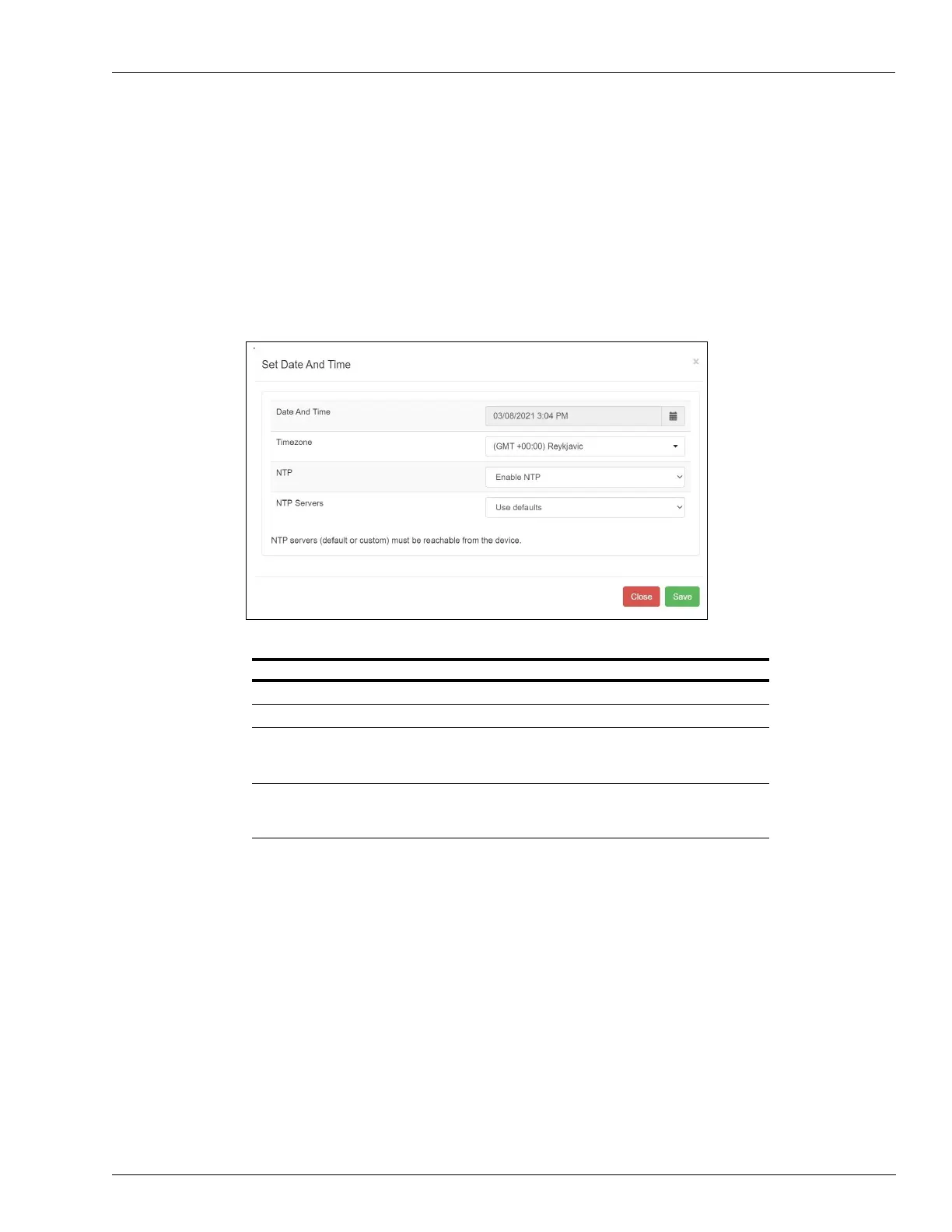
Set Date And Time
The Set Date and Time page allows to set the date, time and time zone of the Omnia system.
From release 02.xx onwards, it is possible to configure the NTP server settings and disable, if
not required.
Notes: 1) If the device is connected to Internet, the date and time are automatically
synchronized.
2) When NTP is enabled or disabled and a reboot timeout is pending, the timer will be
restarted.
Figure 5-31: Setting Date And Time
From the Software Update page, you can update the Omnia software: Core-Firmware, TW
Proxy, CloudApp, MultimediaApp, RTP Proxy, OpenApp Framework, and OpenApps.
Field Configuration Settings
Date And Time Current time (not available if NTP is enabled)
Timezone Region of the globe that observes a uniform standard time
NTP • ENABLE NTP – (Omnia automatically syncs date and
time with configured NTP server/s)
• DISABLE NTP (Omnia uses system clock configured)
NTP Servers Configure this parameter following customer IT requirement:
use default server list or configure customer specific NTP
servers IP address.
Note: Do not TURN ON NTP if Internet connection is not available at the site or if the
customer is not requesting specific NTP server configuration.



 To Next Page