35
333/334 HPLC PUMPS | USER’S GUIDE
PRIMING
6. Disconnect the syringe from the waste outlet.
7. Reconnect the waste tubing to the purge valve on the PPMM and place the other end in a
waste container.
8. Run the pump to dispense at a suitable flowrate.
9. When no bubbles can be seen at the waste tubing, stop the pump to end the priming
procedure.
10. Turn the knob purge valve on the PPMM all the way to the right (clockwise) to close the
outlet to waste and direct flow to the outlet filter.
Depending on your solvents, ensure that the rinse plumbing kit is installed. Refer to
Piston Rinsing Procedure on page 36.
Priming Using TRILUTION LC Control
1. Fill the solvent bottle(s) with
degassed, high performance liquid
chromatography (HPLC) grade
solvent(s) and immerse the filter
connected to the inlet tubing for
each pump into the solvent.
2. Open the purge valve on the PPMM
by turning the black knob fully
counterclockwise to direct the flow
to the atmospheric purge-outlet.
Make sure the purge line is connected
to the purge valve and directed to
an appropriate waste receptacle.
3. Open a method in TRILUTION LC
that includes the pump(s) in its
configuration.
4. Select Run.
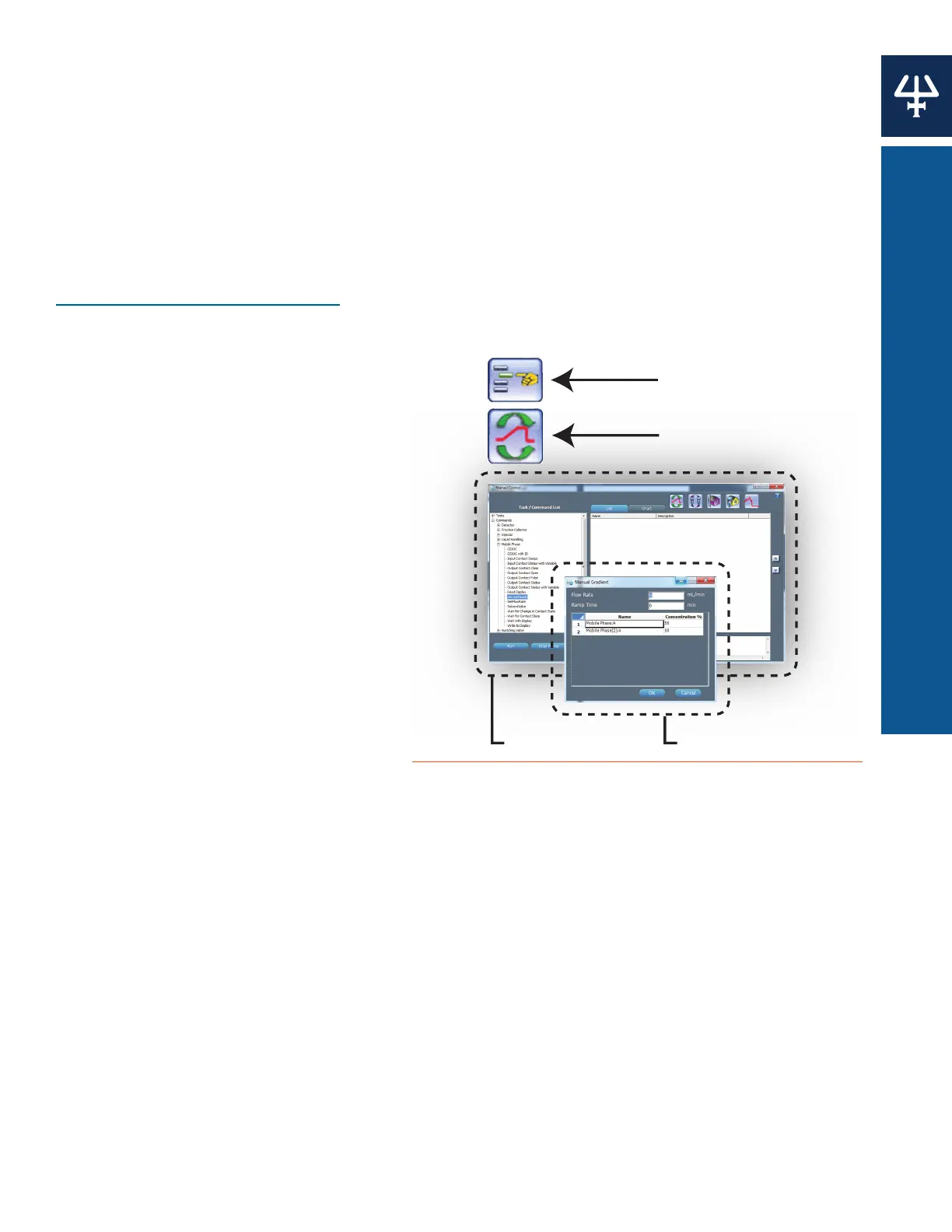
5. Select the Manual Control icon. The
Manual Control window appears.
6. Select the Manual Run Gradient icon.
The Manual Run Gradient window appears.
7. Enter a flow rate (maximum flow rate for the pump head, for example) into the Flow Rate
field.
8. Set the Concentration% for the first mobile phase instrument to 100. Values for any additional
mobile phase instruments automatically set to 0.
9. Select OK to confirm. Allow the solvent to flow through the purge line until there are no air
bubbles present.
10. Repeat steps 5–9 for any additional mobile phase instruments. This will ensure that each
pump is primed individually.
11. Stop the pumps by selecting Stop Pump on the Manual Control window.
12. Close the purge valve on the PPMM.
Manual Control Icon
Manual Run Gradient Icon
n
l R
n Gr
i
nt I
Manual Control Window
Manual Run Gradient Windo
Figure 27
Priming with TRILUTION® LC Software















 To Next Page