23
2.4 Manual cooking mode
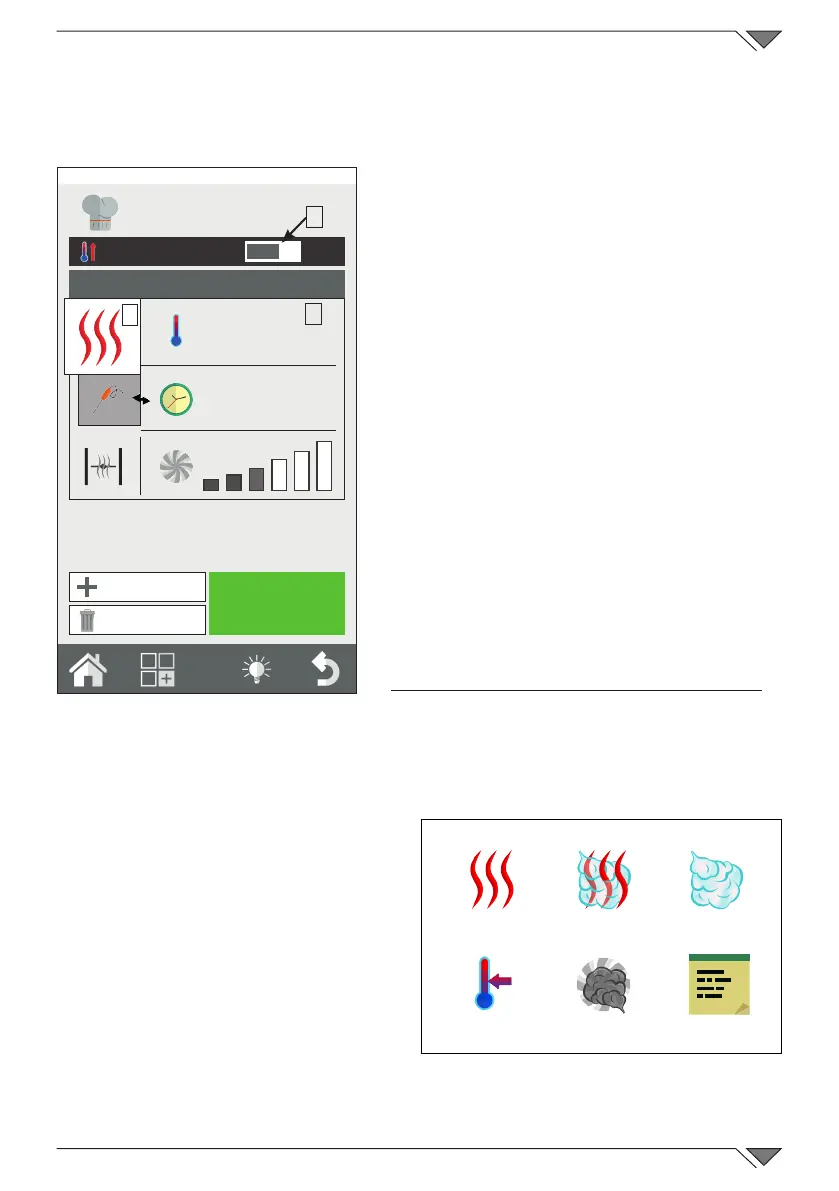
From the “Home” page, by pressing on “Manual” access is given to the
cooking parameters setting screen�
In “Manual” mode, the oven can be set
for individual cooking with one or more
phases and/or a cooking program can
be set and saved in the “Cooking type”
recipe book and/or “Classic recipe book”�
Setting automatic pre-heating
The "preheating" function takes the oven
to the temperature before the dishes to
be cooked are introduced�
“Pre-heating” is set automatically, but
this function can be modied after the
“start” button has been pressed, by
clicking on the temperature displayed�
Furthermore, this function can be
activated or deactivated by operating on
button 1 on the right or left�
Perform preheating with oven empty�
Setting the cooking mode
Button 2 is set as default in the
convection cooking mode (hot
air)� By pressing this button, the
cooking mode can be changed to
mixed or steam� The maintenance
(HOLD) cycle can also be set or
also a messagge cycle�
Furthermore, the oven can be set
in smoke mode�
O
I
START
200°
57'
1
2
3
Friday, 30 October 2015 16:20
New Phase
Delete Phase
convection
mixed
steam
messaGGe
HoLd
smoKinG
Ref� 2



 To Next Page