51
3.3.4 ADVANCED SERVICES
This function is protected by password and allows
access to the conguration, setting and inspection
functionsreservedforthequaliedtechnicalstaff.
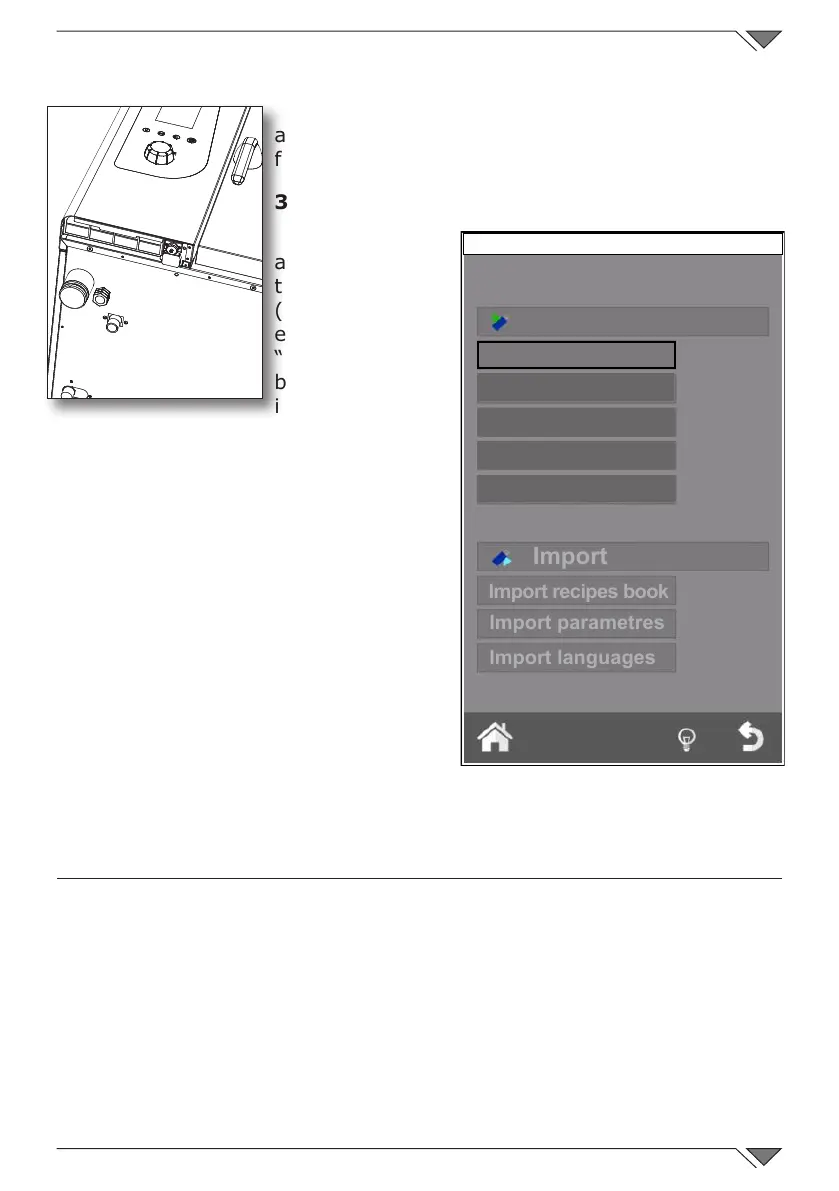
3.3.5 DATE IMPORT / EXPORT
By connecting
a USB, under
the control panel
( fig.19),and
entering the screen
“services” from the
button “home” the
import and export
functions of some of
the functions described above are activated�
By connecting an EMPTY USB, it is
possible to EXPORT:
the RECIPE BOOK; HACCP LOGS (the function
which, when activated, records the cooking
procedure and all its data: time, chamber
temperature, core probe temperature, start-
up and all phase changes, etc�); ALARMS
LOG; WASHING LOG�
On connecting a USB pen drive loaded
with, for example: new recipes, new
parameters r new languages, it is
possible TO IMPORT this data inside
the oven software�
4. MAINTENANCE and CLEANING
Disconnect the appliance from the electric power supply before performing
any cleaning or maintenance intervention�
At the end of the working day, clean the appliance, both for reasons of
hygiene and to prevent operating faults�
The oven should never be cleaned with direct water or high pressure jets�
Moreover, the appliance should not be cleaned with ordinary steel brushes or
scrapers; eventually, you can use stainless steel wool, wiping the appliance in
the direction of sheet metal grain�
Fig. 19
IMPORT/EXPORT
Friday 30 October 2015 16:20
Export recipes book
Export
Export parametres
Export Log HACCP
Export alarm Log
Export wash Log



 To Next Page