36
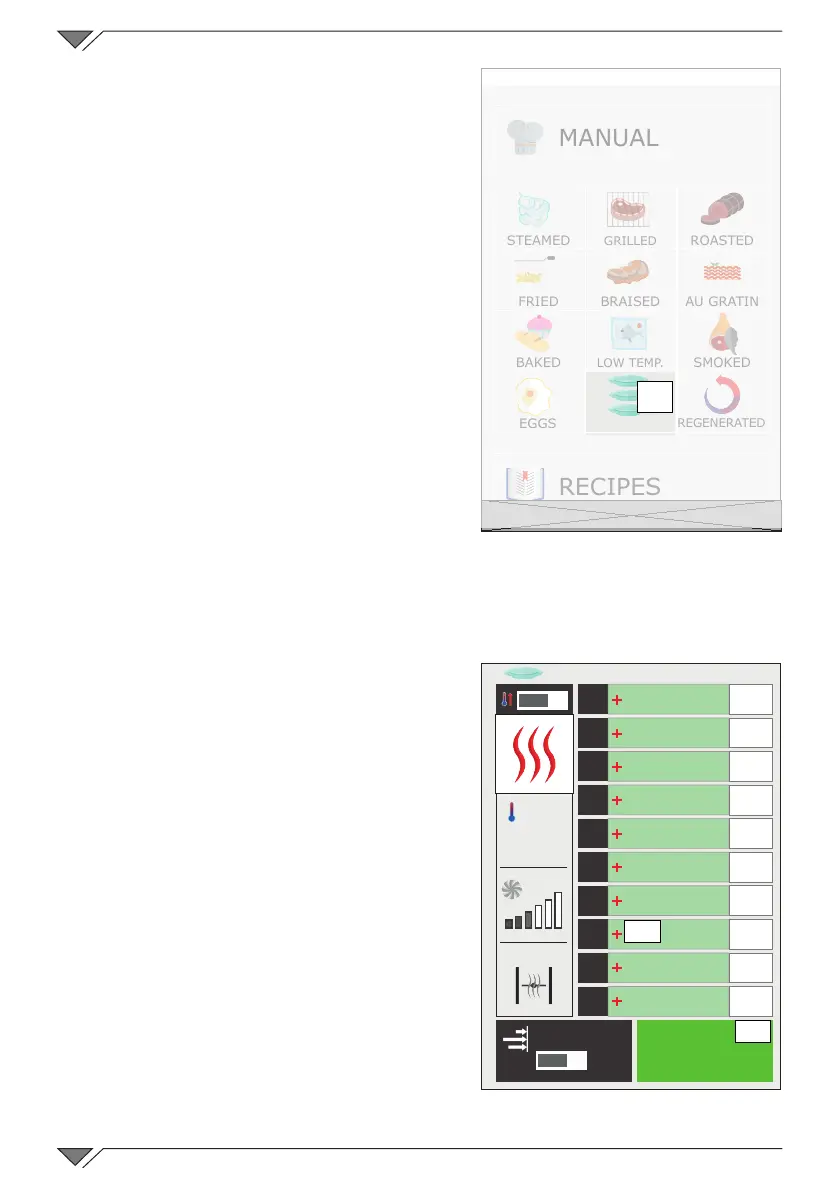
Once the Rack Control icon (ref� 22)
has been clicked, access the list of pre-
set programs, as for example: Breakfast,
Lunch, Multibaker, Mixed steam� Each of
these programs will contain a series of
dishes regarding the program�
Example: the Lunch program will contain
the dishes regarding the lunch service
such as the grilled steak, Milan-style
meat, stir-fried vegetables and lasagne�
It is possible to create and add other
programs and sub-programs (dishes)�
2.12a Using the Rack Control function
Selecting a Rack Control program
By selecting one of the programs from
the list, for example: “Lunch”, will open a
screen with the general program settings
ontheleft:Pre-heat,CookingMode,Temperature,Fan,Butteryvalve(or
humidity or SteamTuner if the Mixed or Steam) cooking mode is set� The 10
empty levels will be seen in the right part�
Starting a Rack Control Program
All Rack Control programs function
basically with innite time. Therefore,
independently from whether the program
envisions pre-heating or not, the rst
thing to do is start the program using the
START button (ref. 23)�
Add the dishes to the program levels
After having started the program and
at the end of pre-heating (if present),
click on + (ref. 24) of any one of the
right hand boxes to add the name of the
dish to insert in the level selected�
The list of sub-programs already set will
therefore open (dishes)� Select one by
clicking in it and this will automatically
22
MANUAL
STEAMED
GRILLED
ROASTED
FRIED BRAISED AU GRATIN
BAKED
LOW TEMP�
SMOKED
EGGS ���
REGENERATED
RECIPES
Friday, 30 October 2015 16:20
O
I
START
1
2
3
4
5
6
7
8
9
10
EasyService
O
I
23
24
A-La-Carte
250°



 To Next Page