30
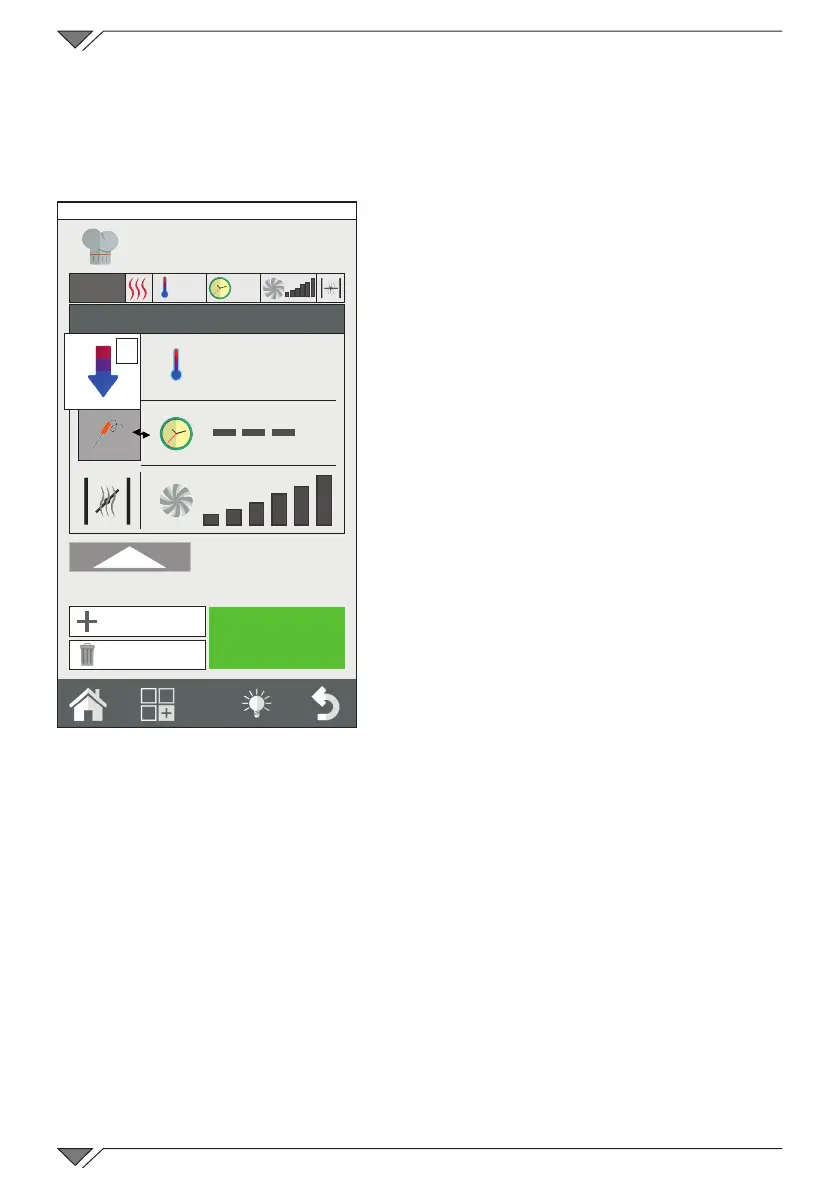
Stetting a cooling phase between two phases
The temperature inside the oven chamber may have to be cooled
between one phase and another� For example, when roasting the chamber
must be cooled between the browning phase (at high temperature) and
the cooking phase (at low temperature)�
This operation can be performed
automatically by the oven by setting an
automatic cooling phase�
The automatic cooling phase can only
be set from phase 2 onwards�
After having set a high temperature
phase, create a new phase and select
automatic cooling from the cooking
modes range (ref. 2)�
One this mode has been selected,
the oven will propose its default
temperature, ventilation and humidity
discharge valve values� Set the desired
cooling temperature (min� 100°C)�
In order to make cooling as fast as
possible, do not modify the ventilation
and humidity discharge valve values
unless indispensable�
2.7 Saving a cooking program
A cooking program created can be saved in order to use it at a later
date, inside a ‘cooking type’ group (grill, braze, steam, etc�), or within
a‘producttype’groupintheclassicrecipebook(meat,sh,chicken,
etc�)� It is also possible to save the program simultaneously in both
recipe books. E.g. grilled llet steak can be saved simultaneously in
‘Grill’ and ‘Meat’�
After having created a cooking program, press the functions key
(ref.14) to access the programs function screen�
Select the “Program Save” function (ref. 15) and press Save (ref. 16)
in the next screen and select in which group to save the program and
press the ‘Next’ key (ref. 17)�
Enter the program name and press send (ref. 18) to save it�
START
1
250°
8’
2
100°
2
New Phase
Delete Phase
Friday, 30 October 2015 16:20



 To Next Page