24
2.4a Cooking modes: convection, mixed and steam
Setting the cooking temperature
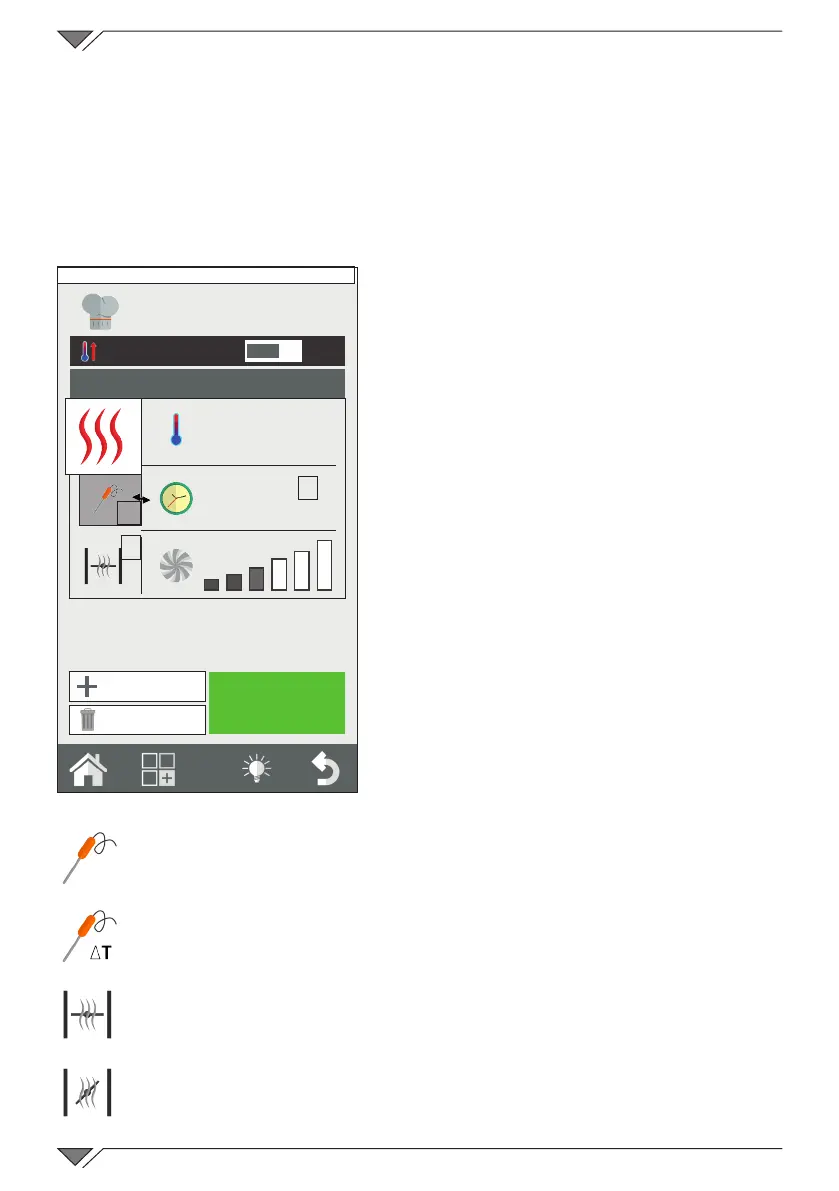
The cooking chamber temperature can be set by pressing button 3� The
temperature that can be set varies depending on the selected cooking
method�
Setting the timer/probe/Delta-T
After having selected the "Cooking
Mode", it is possible to cook in a "timed"
manner or via the "core probe"�
The timer can be set by pressing
button 5 (countdown)�
The time is indicated in the minutes
format (1h30’ = 90 minutes)�
On expiry of the time, the oven emits a
sound and cooking stops�
If the time is not set, cooking will take
placein“innity”mode(INF), the oven
will continue to cook until the operator
intervenes manually to stop cooking�
When cooking with the “core probe” it
is possible to choose between pin (4a)
or ΔT (4 b)�
This mode allows the product to be
cooked more accurately�
Further information regarding ΔT
cooking is described in chapter 2�16�
Setting the humidity vent valve
Only in convection mode is it
possible to manually set the ope-
ning or closing of the humidity
discharge valve� When it is open,
the humidity present in the coo-
king chamber is evacuated, thus
allowing the cooking chamber,
and therefore the product, to dry�
Press button 6 to manoeuvre the
valve�
O
I
START
INF
200°
4
5
6
New Phase
Delete Phase
Friday, 30 October 2015 16:20
4a Cooking mode with
core probe
4b Cooking mode in
ΔT
6a Valve closed
6b Valve opened



 To Next Page