34
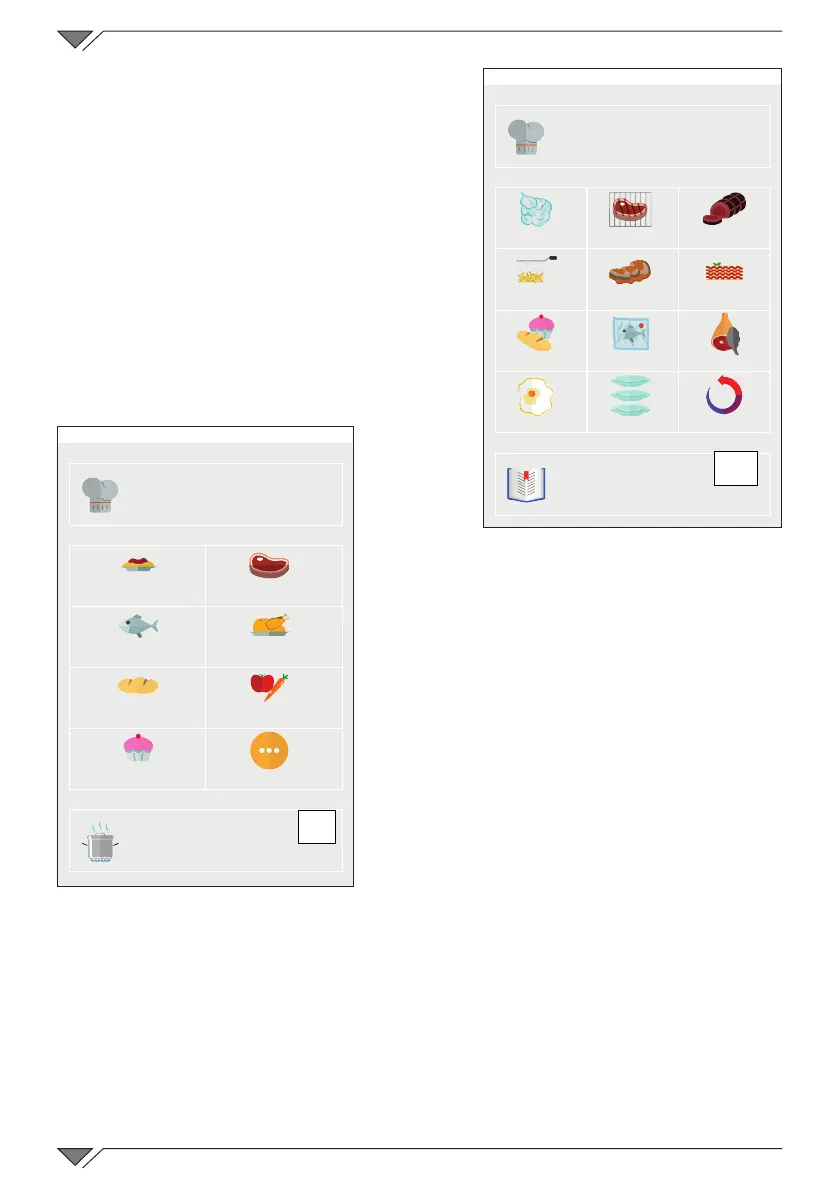
They can be viewed both from the main
menu, which divides them by cooking
type, and from the Recipe menu, which
divides them by product type�
Cooking methods
The cooking modes are displayed on
oven start-up, with which the cooking
programs are collected together�
By selecting the desired cooking mode,
the list of all cooking programs will open
relative to that cooking mode�
Select the desired program from the list�
The product recipe book
By clicking on the recipe button (ref. C1),
the cooking modes will be displayed divided by
productcategory,e.g.meat,sh,vegetables.
By selecting the desired product category,
the list of all cooking programs will open
relative to that category�
Select the desired program from the list�
Press the “Types of cooking” key (ref. C2)
to go back to the display of the types of
cooking�
2.11 The RecipeTuner interfaces
Onceacookingprogramhasbeenopened,itcanbe modied simply
by using the RecipeTuner interfaces� Depending on the type of cooking
selected, the cooking, browning, degree of rising, etc� of a product can
beeasilymodied.
The RecipeTuner function is present for the pre-set programs and the new
onescreated.TheRecipeTunersystemrecognisesthephasetobemodied
in order to meet cooking requirements�
C1
Friday, 30 October 2015 16:20
MANUAL
STEAMED
GRILLED
ROASTED
FRIED BRAISED AU GRATIN
BAKED
LOW TEMP�
SMOKED
EGGS ���
REGENERATED
RECIPES
C2
Friday, 30 October 2015 16:20
MANUAL
PASTA AND RICE
POULTRY
VEGETABLES
EXTRA
MEAT
DESSERTS
BREAD
FISH
COOKING
TYPES



 To Next Page