39
can be introduced into the RackControl
simultaneously�
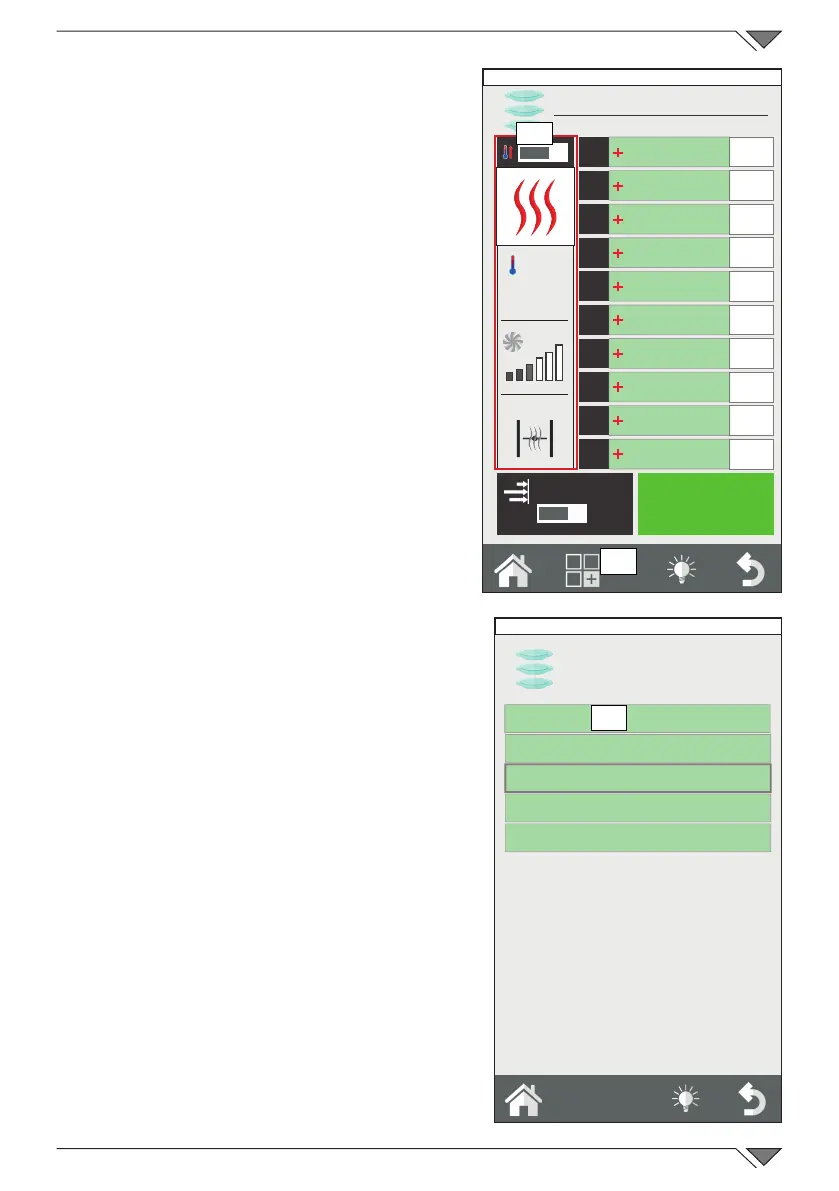
Modifying a RackControl program
If a RackControl program is to be
modied,onceopen,operateonthesets
shown in the left hand column (ref. 29)�
The cooking mode, temperature, fan
(excluding steam mode) and buttery
valve (humidity or SteamTuner) can be
modiedatanytime.
Itisalsopossibletosavethemodication
made or copy, rename and delete the
program� In his case, press the functions
key (ref. 30) and proceed as explained
in chapter 2�9 of this instruction manual�
2.12b Creating a new RackControl
program
In addition to the RackControl programs
already present, customised programs can
be created�
Enter the list of RackControl programs
(from the Home screen, click on the
RackControl icon). The rst program
shown at the top is: “Manual” (ref. 32)�
The “Manual” program allows the creation
of a new program and also to work in
RackControl mode without memorising the
program� In the second case, on exiting the
program, the cooking sets set will be lost�
To create a new program, enter the
“RackControl Manual” section and enter
the desired cooking sets into the left
hand column� Press the functions key and
memorise the program as explained in
chapter 2�7 of this instruction manual�
Only after the program has been memorised
is it possible to enter the list of dishes�
O
I
START
1
2
3
4
5
6
7
8
9
10
EasyService
O
I
250°
29
30
A-La-Carte
Lunch
Friday, 30 October 2015 16:20
A-La-Carte
Manual
Steam Mix
Multibaker
Lunch
Breakfast
31
Friday, 30 October 2015 16:20



 To Next Page