38
is not cooking� In this, the levels selected will not activate� Only after
having pressed START (and having waited until the end of pre-heating if
present), can they be activated one by one, by clicking on the time box
on the right�
Modifying the time or the temperature of the dish probe
Thecookingtimeorthecoreprobesetofadishcanbemodiedbyprolonged
pressing of the same�
To modify denitively, enter the list of
dishes, select the name of the dish to be
modiedbyprolongedpressing.Enterthe
new time (or probe temperature)� The
nameoftheservingcanalsobemodied
in this way�
If, instead, the time of a serving is to
be changed during cooking, click on the
remaining time box and enter the new
time or temperature probe�
The end of cooking a dish
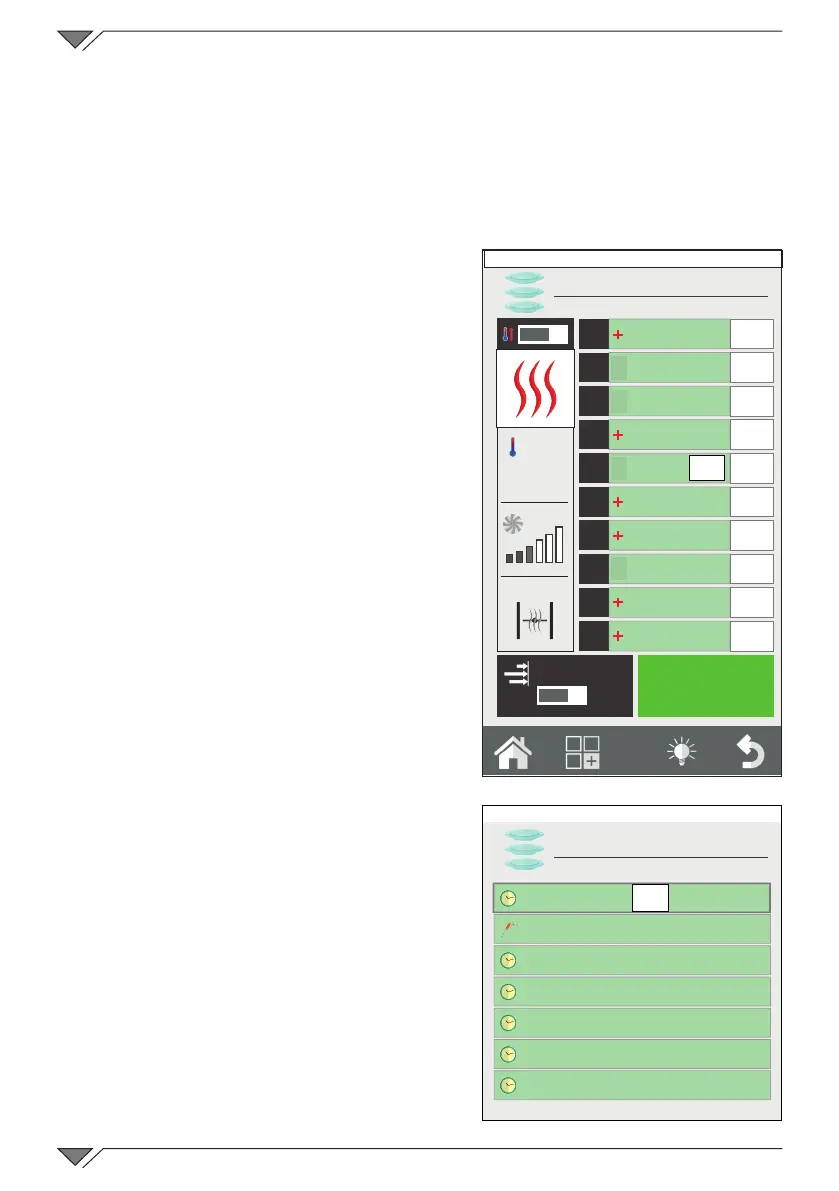
On expiry of the pre-established cooking
time of a dish (or on reaching the core
temperature set), the oven will emit an
acoustic signal and “END” will appear
in the time box (ref. 27)� At this point,
just open the oven door and remove the
product that is ready� Opening and closing
the door will automatically reset the level�
Quick entry of a dish
During the cooking and service phase,
the necessity to cook a product not present
inthelistcanbeveried.Itispossibleto
quickly insert a dish in the RackControl
withouthavingtorecorditwithaspecic
name� The generic name of “Tray” will
appear�
To do this, click on an empty level and
select the sub-program named “Tray”
(ref. 28)� This represents a jolly sub-
program to which a different time can be
set every time� Several “Tray” servings
O
I
START
1
2
3
4
5
6
7
8
9
10
EasyService
O
I
250°
27
A-La-Carte
Lunch
Grilled chicken
breast
Grilledlletsteak
Pizza
Baked salmon
4'
45°C
END
2'
Friday, 30 October 2015 16:20
Lunch
A-La-Carte
Baking pan
Pizza
Milanese
Salmon
Fillet of beef
Sautéed vegetables
Tomato au gratin
28
Friday, 30 October 2015 16:20



 To Next Page