32
2.8 Modifying a cooking program
On delivery, the oven will already contain cooking programs�
Both the pre-loaded cooking programs and the new ones created can
be customised�
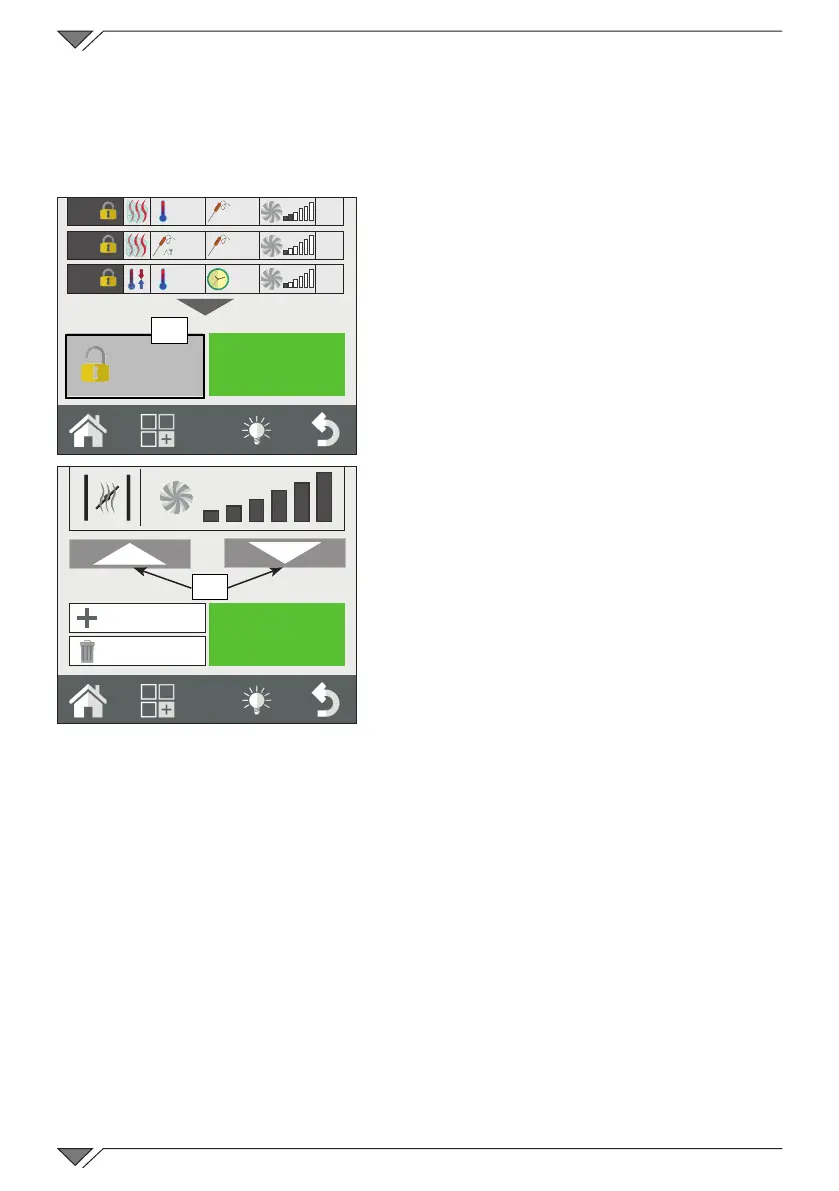
To modify a program, rst select
the desired program from one of the
recipe books� Once open, a summary
of the phases set can be seen� In this
‘reading’ mode it is not possible to
modify the cooking parameters� If one
or more cooking parameters are to be
changed or automatic pre-heating is to
be activated/deactivated, click on the
“Advanced customisation” button (ref.
19) to release the program and make
the desired modications. Use the
arrows (ref. 20) to select the phase to
bemodiedandchangeitatwill.
Once the modication has been
completed, cooking can be started
directly (in this case the changes made
are only valid for this ring cycle)
and/or the program can be saved,
overwriting the previous or creating a
copy with a different name�
You can not save changes to the pre-loaded programs.
2.9 Copy, move, rename and delete
Every program present can be copied, shifted, renamed or deleted
totally or partly�
Copy a program
If a new program is to be created by starting from a program already
present (because the old and new program share some cooking aspects,
it can be copied�
65°
20°
60°
35°
55°
OVEN
35%
25%
35%
19
Advanced
customisation
START
20
New Phase
Delete Phase



 To Next Page