27
during smoking� It is recommended to keep the latter closed so that
smoke does not escape from the chamber�
Smoking can be performed both hot and cold, depending on the type
of product and the desired result�
In the rst case, set a temperature between 10°C and 30°C. The
minimum temperature in the oven chamber will be similar to room
temperature� The chamber can be cooled further by inserting ice�
2.4d Messagge mode
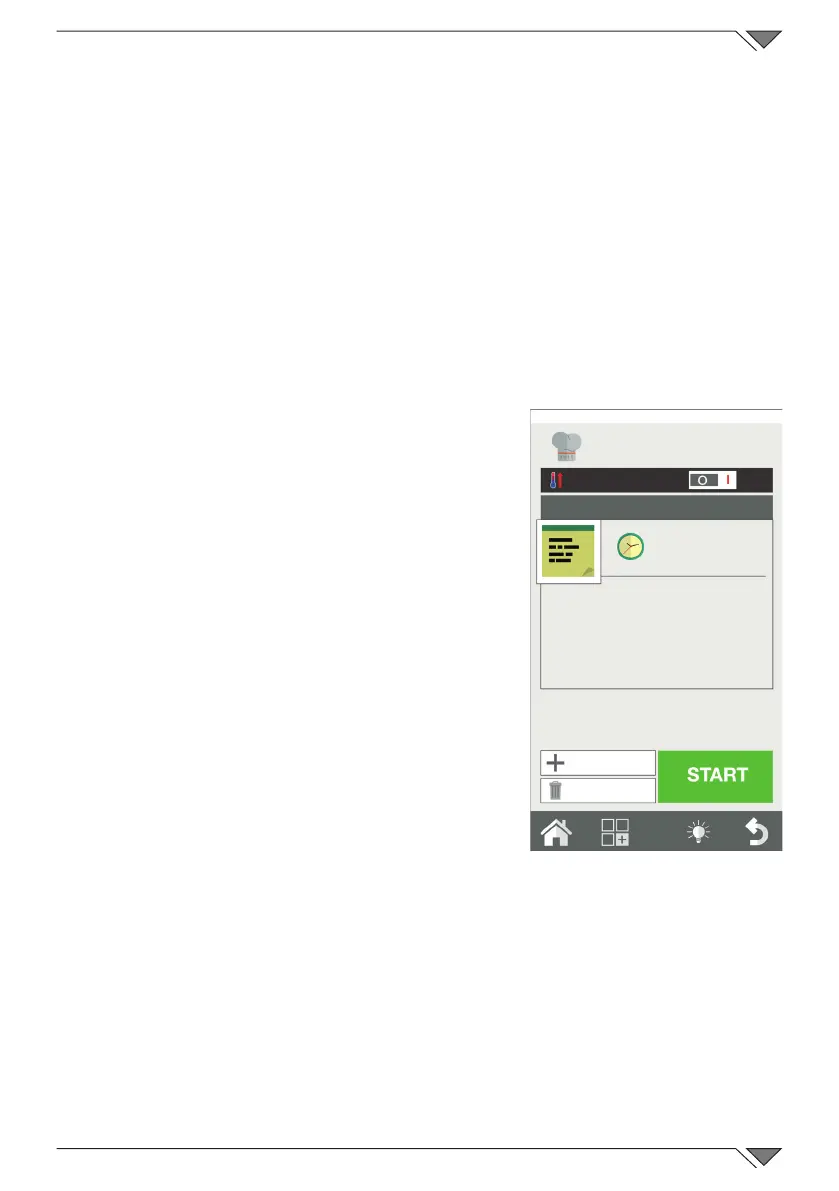
The message mode has the function to allow the management of the
cooking phases through messages that work as annotations for the user�
It’s valid for every cooking program and
it is used to allow the user to have the
entire cooking cycle describedincluding also
the manual steps that require a manual
intervention�
Select the “message” mode from the
cooking methods in a new phase, from the
menu that appears type on the screen the
desired message (Es� Affect the rind��) and
setthedesiredtime.IfyouselectinniteINF
time the cooking cycle stops until the user
performs the desired action�
Instead if you select a different time the
message phase will last for the desired time
and then will go to the next phase without
anyconrmation.
Selecting the message mode, you can enter
a message by selecting it from the list of
existing messages, or you can write a new
one�
The message is handled as a cooking phase�
Friday, 30 Octber 2015 16:20
INF
Insert a message���
New Phase
Delete phase



 To Next Page