43
icon (ref. 40) and save the program in the oven memory as explained in
chapter 2�7 of this instruction manual�
Modifying a program
Ifaprogramthatisalreadysavedistobemodied,selectitfromthe
programs list of the regeneration menu�
Make the modications desired.
At this point, use the START button to start the program or save the
modicationsbyaccessingthefunctionsmenu(ref. 40) and select SAVE�
Rename/Delete a program
Like the cooking programs, the Regeneration programs can also be renamed
and deleted� From the program selected, through the functions menu, access
the SAVE function and rename or delete to perform the desired procedure�
2.16 The core probe and cooking in ΔT
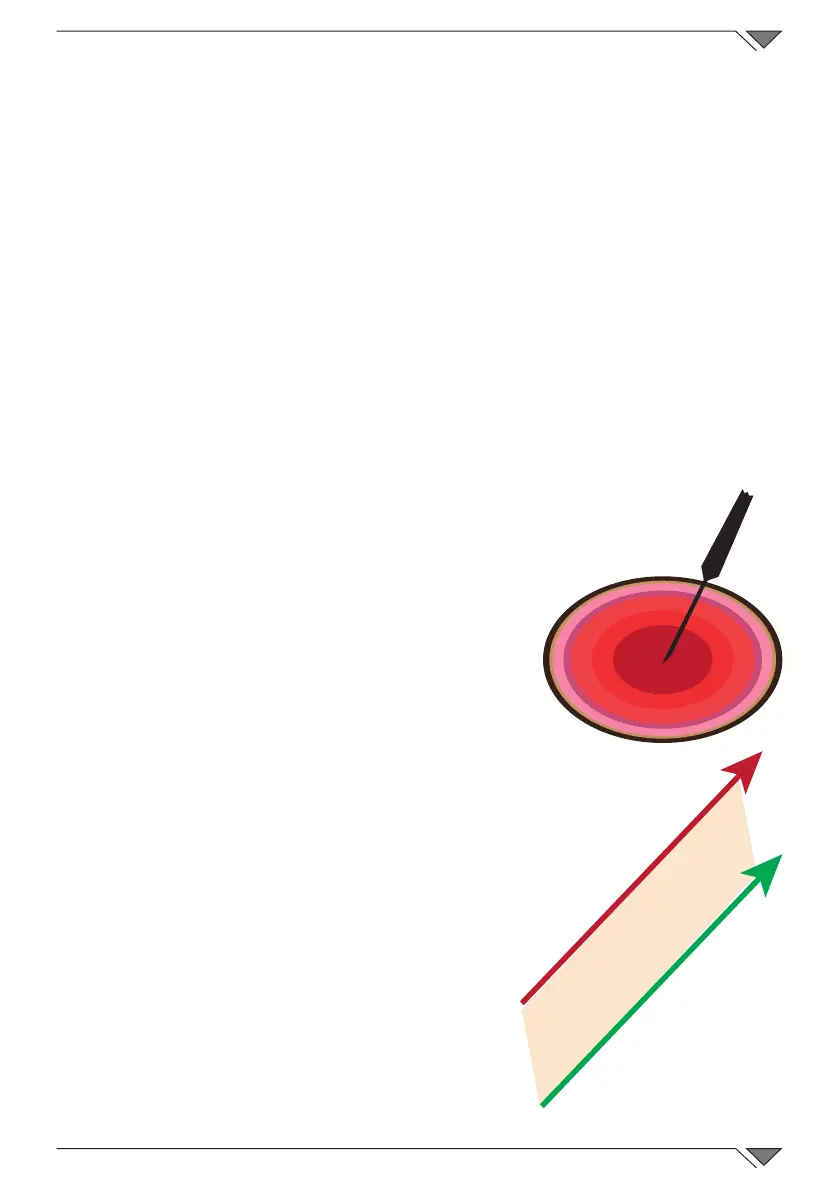
Positioning the probe
The probe detects the temperature via a tip
positioned in proximity of the probe�
This must be inserted in a way that the tip
coincides with the centre of the product in the
largest part�
Cooking in ΔT (Delta-T)
TheΔTfunction is usedmainly forslow,
low temperature cooking�
In ΔT mode, instead of setting the
temperature in the chamber, the
temperature that the oven must maintain
constant between the product core
temperature and the chamber camera
must be set� As the core temperature
rises, the temperature in the chamber will
increase in parallel�
AprobemustbeusedfortheΔTfunction.
ItisadvisedtosetΔTbetween15°Cand
30°C maximum�
ΔT
T° oven
T° core probe



 To Next Page