28
2.4e Starting and stopping cooking
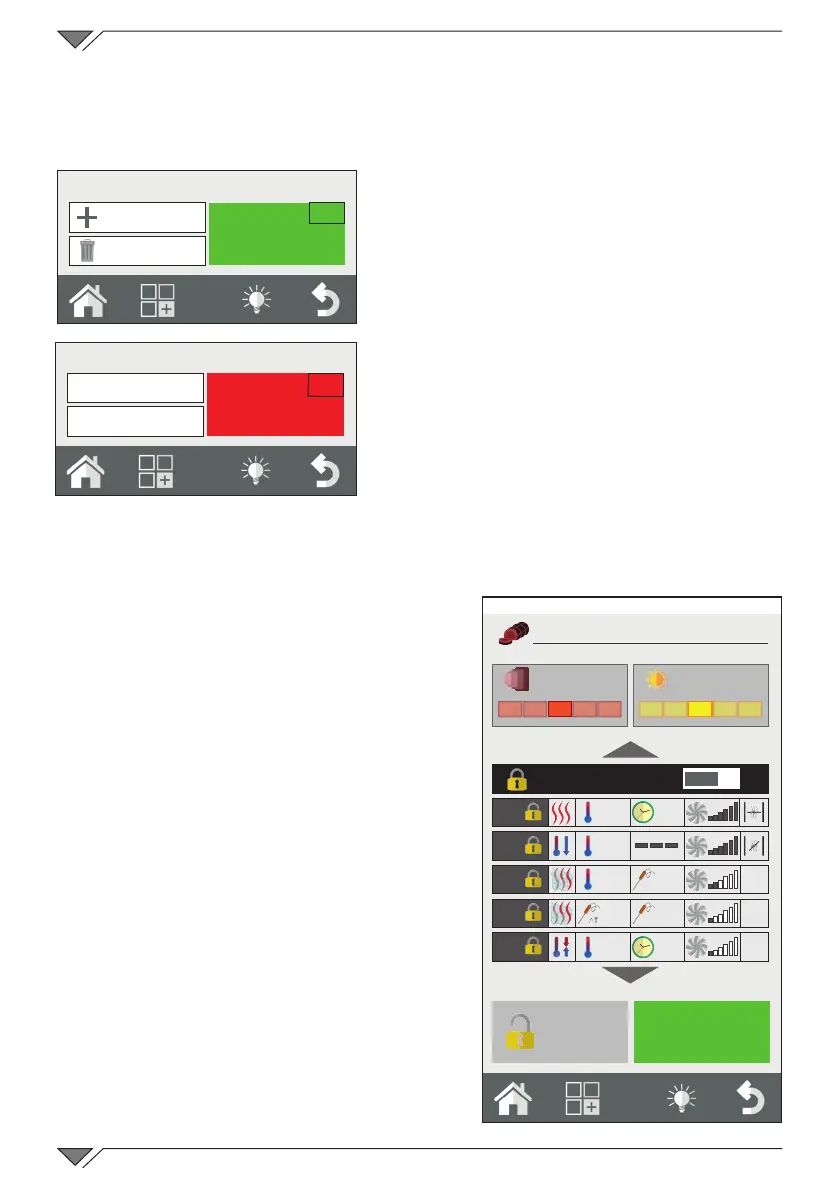
After having set the cooking parameters as desired, press the START
button (ref. 10) to start cooking�
The oven will start in pre-heat mode
if this has been previously selected, or
otherwise directly in cooking mode�
Pressing the button “advanced
customization” it’s possible to select
manually the starting phase of the
cooking cycle, selecting the interested
phase and pressing “GO” button
visualized near the phase number�
Cooking will last until the expiry of
the time set or on reaching the core
temperature in the core probe cooking
mode.Ifthetimeissetoninnity,cooking
must be stopped manually�
Press the STOP key to stop cooking (ref. 11)�
2.5 Customised cooking
programs
It is possible and easy to create
customised cooking programs that can
have up to 9 different phases plus pre-
heating�
Every cooking phase is represented
by a cooking mode (convection, mixed,
steam,etc.)with specic time,humidity,
ventilation parameters, etc�
For example: for a roast dish, a
program can be created that contains a
browning phase, a cooking phase and a
hold phase�
The essential condition for creating a
successive phase is that the previous
phase has a dened time: example, if
phase 1 has the time set on innity, it
will not be possible to create phase 2
START
10
New Phase
Delete Phase
STOP
11
New Phase
Delete Phase
250°
65°
20°
60°
100°
10'
35°
55°
OVEN
35%
25%
35%
Roast beef
COOKING BROWNING
Advanced
customisation
Roasted
Friday, 30 October 2015 16:20



 To Next Page