42
Accessing the Regeneration function
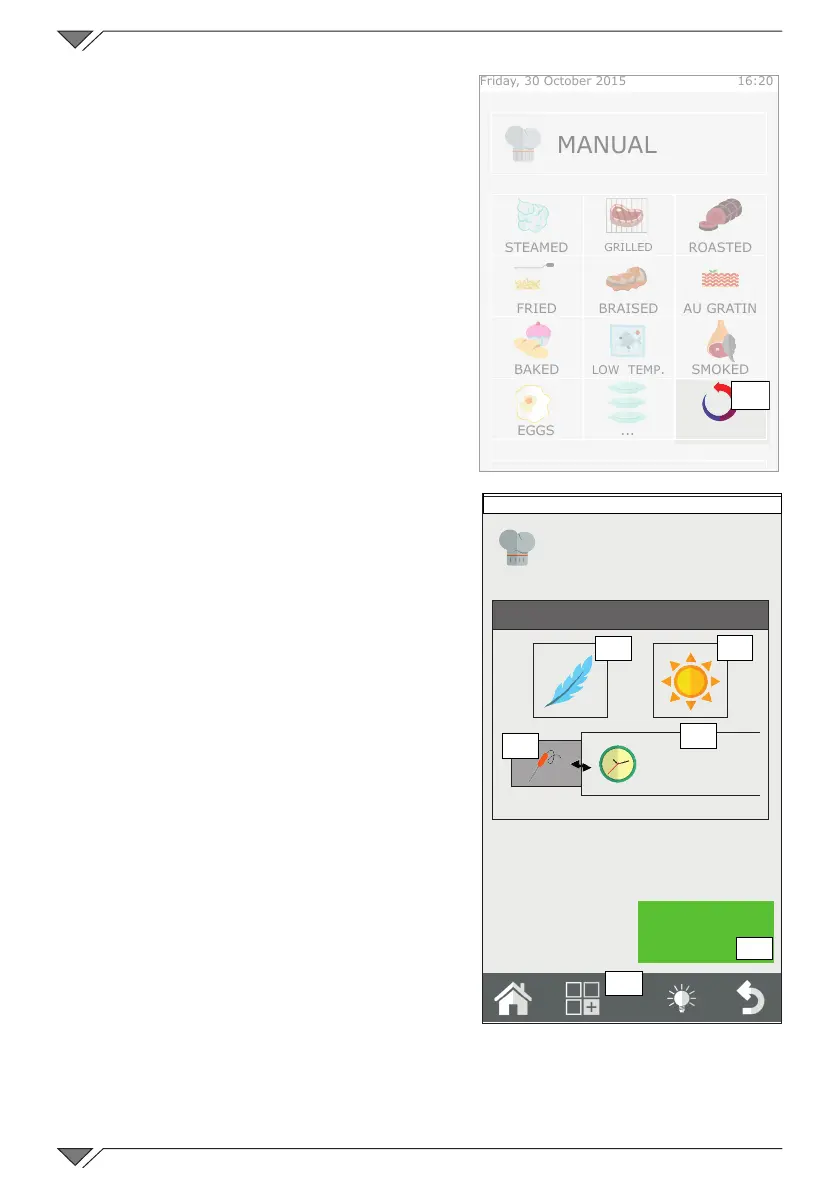
Click on the Regeneration pictogram
(ref. 34) on the HOME page�
The regeneration programs list will be
entered� Select the desired program
from the list or press on manual to
create a customised program�
Using the regeneration function
By selecting a Manual program from
the Regeneration programs list, the oven
can be set manually to regenerate one or
more products�
The screen will show the possibility to
activate the SOFT (ref. 35) or CRISPY (ref.
36)functions.Therstmustbeselected
if a dish cooked at low temperature is
being regenerated� The second must be
selected if, at the end of regeneration,
a high temperature dry phase is to be
performed to regenerate the surface crust
of the product� The functions are optional
and can both be disabled� They cannot be
both selected at the same time: they are
opposite to each other�
Enter the regeneration time (ref. 38) or
the core temperature (ref. 37) and press
START (ref. 39)� The oven will pre-heat
automatically (empty) and then notify when
to place the items in the oven via an acoustic
signal and communication on the display�
2.14a Regeneration Programs
Saving a new program
Personal programs can be added to
the programs already present�
To create a new program, enter the
“Manual” program from the list of
regeneration programs and set the regeneration time (or the temperature of
the core probe) and activate one of the SOFT or CRISPY functions if necessary�
Once the desired parameters have been set, click on the functions menu
START
Manual
Regeneration parameters
8'
35
36
37
38
39
Friday, 30 October 2015 16:20
40
Friday, 30 October 2015 16:20
34
MANUAL
STEAMED
GRILLED
ROASTED
FRIED BRAISED AU GRATIN
BAKED LOW TEMP� SMOKED
EGGS ���
REGENERATED



 To Next Page